 AI
AIPOS system in Saudi Arabia: device, software, cost and e-invoicing
A POS in Saudi Arabia is a device, a software subscription and a card contract. This guide covers ZATCA's Phase 2 rules for the till, Wave 25's 1 February 2027 deadline, SAMA rules on mada, dated prices and a 12-question checklist.


Key takeaways
- Choose the POS software first: it issues, stamps, stores and reports every e-invoice; the device and card contract come after.
- ZATCA's Wave 25 covers taxpayers with VAT-taxable revenue above SAR 187,500 in any year from 2022 to 2025; they must integrate with Fatoora by 1 February 2027.
- In Phase 2, a till stamps each simplified invoice, adds a QR code, hands the customer a copy at once and reports it to Fatoora within 24 hours.
- A compliant POS cannot delete or edit issued invoices, allow anonymous access or let users change the date; returns go through credit notes.
- Card fees can outweigh software: SAMA's 2015 mada rules cap the merchant charge at 0.8%, or SAR 40 on large sales, so get each rate in writing.
On this page
- What a POS system in Saudi Arabia is made of
- POS device: which hardware fits your counter
- POS software: what the system must do
- E-invoicing on the till: what ZATCA requires
- Card payments: mada, SAMA licensing and fees
- What does a POS system cost? (prices checked 14 October 2026)
- How to compare POS providers: a 12-point checklist
- Common mistakes when setting up a POS
- Your next step
A POS system in Saudi Arabia has three parts you pay for separately: the device that takes payment, the software that issues ZATCA-compliant e-invoices and tracks stock, and the card-acceptance contract with a bank or SAMA-licensed provider. Choose the software first, confirm it meets e-invoicing Phase 2, then compare devices and card fees.
This guide is for owners of shops, cafés and service businesses who are buying or replacing a point of sale. It explains what each part does, what ZATCA's e-invoicing rules expect from the till, how card acceptance works under SAMA's rules, and what you will actually pay. Every rule and price below was checked on official pages on 14 October 2026. It is general information; for a specific case, check with ZATCA or a licensed tax advisor.
The timing matters. On 24 July 2026, ZATCA announced that taxpayers whose VAT-taxable revenue exceeded SAR 187,500 in any of 2022, 2023, 2024 or 2025 form Wave 25 of e-invoicing Phase 2, and must integrate their e-invoicing solutions with the Fatoora platform by 1 February 2027 [1]. For many small shops, the coming months are the time to choose the till.
What a POS system in Saudi Arabia is made of
Most buying mistakes come from treating the POS as one product. It has four parts, and the three you pay for separately can come from different suppliers.
| Part | What it does | Who can supply it | What to check |
|---|---|---|---|
| Device (hardware) | Screen, receipt printer, cash drawer, barcode scanner, card reader | The software vendor, your bank or a payment company; sold or rented | Contactless mada support, warranty, spare parts |
| POS software | Sales, invoices, stock, users, shift reports | A software company, normally on a monthly or annual subscription | Phase 2 e-invoicing, Arabic invoices, offline mode, data export |
| Card acceptance | Moves card payments into your bank account | A bank or a payment company licensed by SAMA | Fee per card type, settlement time, terminal rent |
| E-invoicing link | Stamps, reports and stores each invoice with ZATCA's Fatoora platform | Built into the POS software | Onboarding of each till, 24-hour reporting, failure handling |
The software is where your e-invoicing obligations are met or missed: it creates the invoice, stamps it, keeps it and reports it. The device and the card contract decide speed at the counter and a large share of the running cost. That is why this guide follows the order of decisions we suggest: software, then payments, then hardware.
POS device: which hardware fits your counter
mada, the national payment system owned by the Saudi Central Bank (SAMA) and launched in 1990, links point-of-sale devices, ATMs and e-commerce sites to a central system that routes each payment to the card issuer within seconds [2]. SAMA lists the services a merchant can offer through it:
- POS devices: the familiar card terminal, with a direct connection between card issuers and the transaction host [2].
- mada Atheer: contactless payment by card or smart device using near-field communication (NFC) [2].
- POS application service on Android: accepting mada and international network cards directly on a phone or smart device, without a dedicated terminal [2].
- Wallets: mada cards added to mada Pay, Apple Pay, Samsung Pay or Google Pay; mada Pay works at terminals that support mada Atheer [2].
In practice, the hardware choice depends on how your customers pay and where you stand when they do.
| Your business | Setup to consider | Why |
|---|---|---|
| Small shop with one till | An all-in-one cashier device with a receipt printer, plus a contactless card terminal | One screen for sales, one fixed place for payment |
| Café or kiosk with a queue | A handheld POS that takes orders, accepts cards and prints | Staff can take payment in the queue or at the table |
| Market stall, home business or delivery | A phone or Android device using mada's POS application service | No separate terminal to buy or rent [2] |
| Several branches | A cashier device per till, with stock and reports in one cloud back office | Branch stock and sales in one place |
One practical point: if the card terminal and the cashier device are not linked, staff type every amount twice, and mismatches end up in your reconciliation. Ask whether the POS software sends the amount to the terminal automatically and records the payment result on the sale.
POS software: what the system must do
The software is the part you will live with every day, and the part ZATCA's rules apply to. Use this list when you watch a demo.
- Simplified tax invoices in Arabic. ZATCA's guidelines state that the invoice must be in Arabic, with other languages allowed alongside it [3].
- Phase 2 readiness. Each invoicing unit, such as a till, is onboarded through ZATCA's Fatoora portal and receives a cryptographic stamp identifier; the portal lists your onboarded solutions and devices [3].
- Returns by credit note. A sale cannot be deleted or edited once issued; to cancel it, the system issues a credit note and, if needed, a new invoice [3].
- Named users with roles. No anonymous access, no factory passwords, and a log of user actions in the invoicing process [3].
- Stock per branch. Receiving, transfers, counts and low-stock alerts, linked to the same item list the till uses.
- Shift close and cash count. Expected against counted cash, card totals against the terminal's settlement report.
- Data you can take with you. ZATCA requires that the system lets you export your invoices to an external archive [3].
What happens when the internet drops
A compliant solution must be able to save and archive invoices without an internet connection [3]. ZATCA's guidelines then give the seller 24 hours to report a simplified invoice; the device can send it automatically once the connection returns. If the invoice still cannot be reported within 24 hours, the seller notifies ZATCA through a dedicated form on its website, and keeps evidence of the attempts [3]. Ask every vendor to show you this offline flow, not just describe it.
Where the data lives in a cloud POS
ZATCA allows e-invoicing solutions to run in the cloud, provided the data can be reached by the Authority through a direct link; it adds that other rules, such as those of the National Cybersecurity Authority, may also apply [3]. If customer names or phone numbers sit in the POS, read our guide to data residency in Saudi Arabia before you sign.
E-invoicing on the till: what ZATCA requires
Phase 1 has applied to all resident taxpayers since 4 December 2021: invoices must be generated through a compliant electronic solution, and a paper invoice that is scanned or copied does not count [4]. Phase 2 adds integration with ZATCA's systems and a fixed format, and it is rolled out in waves; ZATCA notifies each group at least six months before its integration date [1].
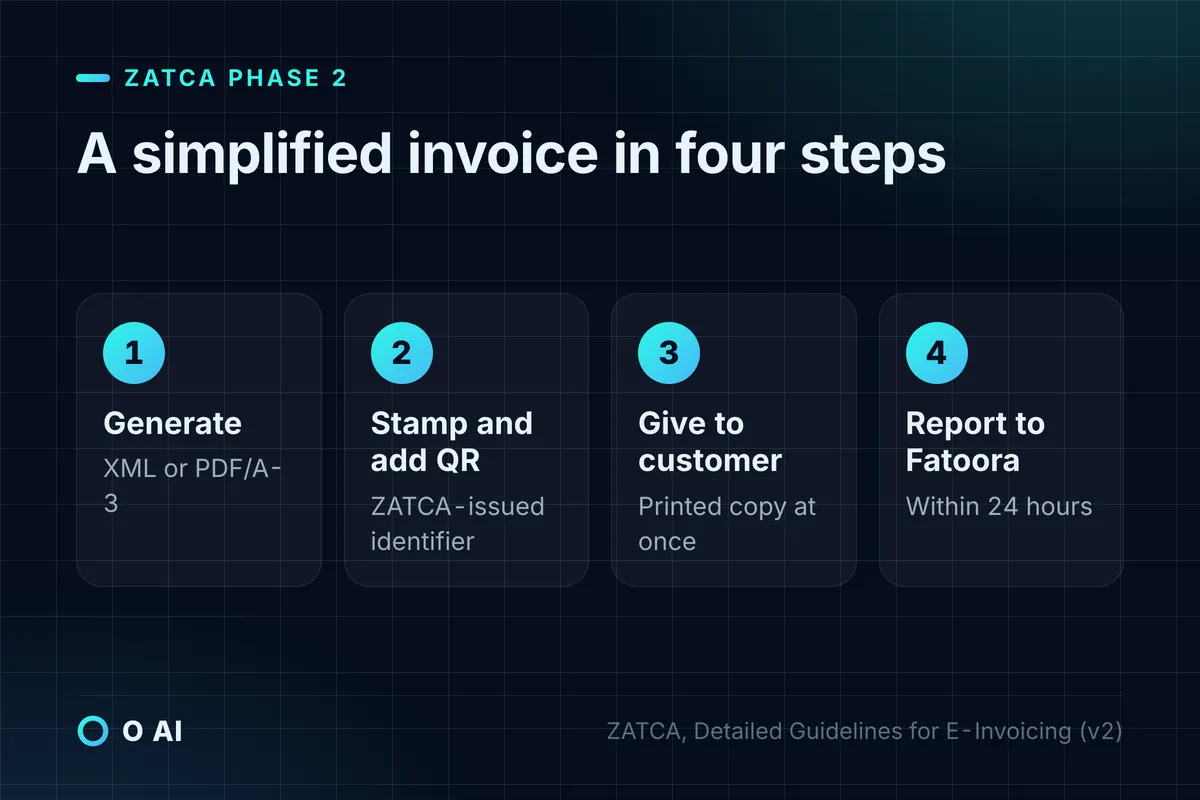
For a retail till, the Phase 2 flow for a simplified tax invoice (the B2C invoice) works like this [3]:
- Generate. The onboarded solution creates the invoice in XML, or PDF/A-3 with embedded XML.
- Stamp and add the QR code. The solution stamps the XML with the identifier ZATCA issued and adds a QR code in the Phase 2 format.
- Hand it over. The customer receives a printed copy immediately, or an electronic copy if both sides agree.
- Report. The XML goes to the Fatoora platform within 24 hours of generation.
Customers can scan the QR code with ZATCA's VAT app to check the invoice [3].
If you also sell to companies from the same till, note the difference. A standard tax invoice to a business must be sent to Fatoora for clearance before it is shared with the buyer. A simplified invoice may be issued to a business buyer only when the taxable supply is under SAR 1,000 [3].
Functions a compliant POS must not have
ZATCA lists functions that an e-invoicing solution must not offer, starting from Phase 1 [3]:
| Prohibited function | What it means at the counter |
|---|---|
| Anonymous access | Every cashier logs in with a unique login, password or biometrics |
| Default or factory password | The system forces a password change on first use |
| No user session log | Every action in the invoicing process is logged, from login onward |
| Changing or deleting issued invoices | A mistake is corrected by a credit note and a new invoice |
| Editing or deleting system logs | Logs are kept unchanged |
| Inaccurate timestamps | Users cannot change the device's date or time |
The same guidelines add that users must not be able to reset the invoice counter, and that the stamping key must not be exportable [3]. A vendor that offers a "delete sale" button is offering you a compliance problem.
Is there a list of ZATCA-approved POS systems?
No, not in the sense of an approval. ZATCA publishes an indicative list of solution providers that passed its qualification process for Phase 1 or Phase 2, and states that the list is not an approval of their solutions. Taxpayers may use any provider whose solution meets the requirements, listed or not [5].
Card payments: mada, SAMA licensing and fees
You can accept cards through a bank or through a payment company licensed by SAMA. SAMA publishes the licensed payment companies on its website, grouped as payment institutions, electronic money institutions and e-commerce payment services [6]. Check a provider there, or on SAMA's list of banks, before you sign.
Fees are where the running cost hides. A SAMA rulebook document of November 2015 on mada business rules sets the maximum merchant service charge for mada POS purchases at 0.8% for transactions up to roughly SAR 5,000 and SAR 40 above that, negotiable below those caps between the acquirer and the merchant [7]. That document is more than ten years old, so ask each provider for its current rate in writing, for mada and for international cards separately, together with terminal rent and the number of days before money reaches your account.
Two SAMA rules are worth telling your cashiers:
- Failed but charged payments. Since 1 July 2020, banks must refund customers for incorrect or incomplete ATM, POS and e-commerce transactions within two working days [8]. A customer charged on a failed sale should get the money back from their bank; check the terminal's record before taking a second payment.
- Card data. SAMA requires banks to make sure their contracted merchants do not photograph cards, copy them or record confidential card information [9].

What does a POS system cost? (prices checked 14 October 2026)
Expect four cost lines, two of them recurring.
| Cost | Paid | What drives it |
|---|---|---|
| Device, printer, cash drawer, scanner | Once, or monthly if rented | Number of tills; all-in-one or separate parts |
| Software subscription | Monthly or annually | Plan tier, branches, users, add-ons |
| Card fees | Every card sale | Your rate per card type and your card sales volume |
| Setup and extras | Once or as needed | Data migration, training, integrations, receipt paper |
As a dated example, not a recommendation: on 14 October 2026, the Arabic pricing page of Rewaa, a POS and accounting system for retail shops, listed three plans, which we translate as Launch, Growth and Excellence, billed annually at SAR 275, SAR 367 and SAR 708 a month, all excluding VAT, with two-year terms for the first two at SAR 247 and SAR 330 a month [10]. The entry plan listed sales, products and inventory, purchases, reports and integration with ZATCA for Phase 2. The page mentioned lower prices for additional branches and discounts on hardware, but published no device prices; its hardware page says devices are arranged through an account manager [11]. Other providers price per device, per branch or per user, so compare a full year, not the headline figure.
Illustrative example: first-year cost for a shop in Al Khobar
Illustrative example. A perfume shop has one branch and one till. Card sales are SAR 120,000 a month, all on mada, and no single sale exceeds SAR 5,000. The owner compares the Rewaa Growth plan price shown above with the maximum mada fee from SAMA's 2015 rules.
| Item | Calculation | First year |
|---|---|---|
| Software, billed annually | SAR 367 × 12 | SAR 4,404 |
| VAT on the software at 15% | SAR 4,404 × 15% | SAR 660.60 |
| mada fees at the 0.8% maximum | SAR 120,000 × 0.8% × 12 | Up to SAR 11,520 |
| Device, printer and cash drawer | Written quote | To be added |
| Known costs before hardware | SAR 16,584.60 |
Two lessons follow. First, card fees can cost more than the software, so a lower negotiated rate is worth more than a cheaper plan. Second, the cap matters for large tickets: on a SAR 8,000 sale, 0.8% would be SAR 64, but the cap in those rules limits the fee to SAR 40 [7].

How to compare POS providers: a 12-point checklist
Send the same questions to every provider in writing, and score the answers before you compare prices.
- Is the solution ready for Phase 2, and how is each till onboarded on Fatoora [3]?
- Is your company on ZATCA's indicative list of solution providers, and for which phase [5]?
- Show the offline flow: a sale with no internet, then automatic reporting within 24 hours [3].
- How is a return or a cancelled sale handled? (The answer must be a credit note [3].)
- Can each cashier have a separate login and limited permissions [3]?
- Which card terminals and payment companies does the software connect to, and does it send the amount automatically?
- What is the card fee for mada, for international cards and for wallets, in writing [7]?
- Is the payment company a bank or on SAMA's list of licensed payment companies [6]?
- What exactly does one subscription cover: one branch, one device, how many users?
- Can you export all invoices and data, including the XML files, if you leave [3]?
- Where is the data hosted, and can ZATCA access it through a direct link if required [3]?
- What is the support response time during your busiest hours, such as a weekend evening?
Common mistakes when setting up a POS
- Shelf prices without VAT. In retail, displayed prices must include VAT [12]. Set item prices in the POS as VAT-inclusive and let the system work out the 15% inside them.
- No VAT certificate on display. A resident taxable person must display the VAT registration certificate at the main place of business, at every branch and on its electronic channels [12].
- One login for the whole shift. It defeats the unique-login rule and leaves you unable to trace a void [3].
- Fixing errors by deleting sales. Issued invoices cannot be changed or deleted; use credit notes [3].
- No daily settlement check. Compare card sales in the POS with the provider's settlement report every day, while the cashier still remembers the shift.
- Forgetting the records. VAT records, including issued and received tax invoices, must be kept for at least six years [12].
Your next step
This week, write one page listing your tills, branches, monthly card sales and the features you cannot work without, and check whether ZATCA has notified you for Wave 25. Send that page and the checklist above to three POS providers and one card acquirer, and compare their written answers over a full first year. If your business needs something no ready-made POS offers, our guide to custom software development in Saudi Arabia explains when to buy, connect or build. You can also read more about O AI, a software and AI company in Al Khobar, on our home page.
Frequently asked questions
What is the difference between a POS device and a POS system?
The device is the hardware at the counter: screen, receipt printer, cash drawer, scanner and card reader. The system is the software that records the sale, issues the e-invoice, updates stock and produces reports. In Saudi Arabia the software also stamps each invoice, adds the QR code and reports it to ZATCA's Fatoora platform once your business is in Phase 2. You can change devices without changing the system, but changing the system means moving your items, customers and invoice history.
Do I need a POS approved by ZATCA?
ZATCA does not approve individual POS products. It publishes an indicative list of solution providers that passed its qualification for Phase 1 or Phase 2, and says clearly that the list is not an approval. You may use any provider whose solution meets the e-invoicing requirements. In practice, ask the vendor to show a stamped invoice with a Phase 2 QR code, the onboarding of a till on Fatoora, and the offline reporting flow.
Can I use my phone as a POS in Saudi Arabia?
Yes. SAMA lists a mada service that lets merchants accept mada and international network cards directly on Android phones or smart devices, without a separate terminal. You still need a contract with a bank or a SAMA-licensed payment company, and you still need software that issues compliant e-invoices for each sale. This setup suits market stalls, home businesses and delivery staff more than a busy fixed counter.
How much does a POS system cost in Saudi Arabia?
It depends on four lines: the device, the software subscription, card fees and setup. As a dated example, one Saudi retail POS listed plans from SAR 275 to SAR 708 a month billed annually, excluding VAT, on 14 October 2026. Card fees can matter more: SAMA's 2015 mada rules cap the merchant charge at 0.8%, or SAR 40 on large sales. Compare a full first year, including hardware quotes and VAT on the subscription.
What happens to e-invoices if the internet goes down?
Keep selling. A compliant POS must save invoices without a connection, and ZATCA's guidelines give you 24 hours to report a simplified invoice, so the till can send it once the connection returns. If you cannot report within 24 hours, notify ZATCA through the dedicated form on its website and keep evidence of your attempts. Ask your vendor to demonstrate this before you buy.
Which companies provide POS in Saudi Arabia?
Three kinds of company are involved. Software companies sell the POS system, usually as a subscription; banks and SAMA-licensed payment companies provide card acceptance and terminals; some providers bundle all three. Check payment companies on SAMA's published list of licensed entities, and check software vendors against ZATCA's indicative list of e-invoicing solution providers. Then compare written answers to the same questions rather than brochures.
Do prices in my shop have to include VAT?
Yes. ZATCA's retail guideline states that prices displayed in the retail sector must include VAT. The VAT inside a VAT-inclusive price is the price multiplied by 15/115, rounded to the nearest halala on the invoice. Set your POS item prices as VAT-inclusive so the shelf price, the till and the invoice match.
How this article was made: Researched from the sources listed below, opened on 14 October 2026. Drafted with AI assistance, then checked against those sources. General information, not professional advice. Images are AI-generated illustrations.
Sources
- ZATCA determines the criteria for selecting the targeted taxpayers in Wave 25 of the e-invoicing integration phase (24 July 2026) (opens in a new tab)Zakat, Tax and Customs Authority (ZATCA) · zatca.gov.sa
- mada (opens in a new tab)Saudi Central Bank (SAMA) · sama.gov.sa
- Detailed Guidelines for E-Invoicing, Version 2 (May 2023) (opens in a new tab)Zakat, Tax and Customs Authority (ZATCA) · zatca.gov.sa
- What is e-invoicing? (opens in a new tab)Zakat, Tax and Customs Authority (ZATCA) · zatca.gov.sa
- E-invoicing solution providers list (opens in a new tab)Zakat, Tax and Customs Authority (ZATCA) · zatca.gov.sa
- Licensed entities: payments (opens in a new tab)Saudi Central Bank (SAMA) · sama.gov.sa
- Mada "Naqd" service (purchase with cash-back) business rules (21 November 2015) (opens in a new tab)SAMA Rulebook · rulebook.sama.gov.sa
- Charging fees on mada claims (6 June 2020) (opens in a new tab)SAMA Rulebook · rulebook.sama.gov.sa
- Merchants contracting with banks to provide e-payment services must not photocopy credit cards or copy or record confidential information on credit cards (10 July 2019) (opens in a new tab)SAMA Rulebook · rulebook.sama.gov.sa
- Rewaa pricing (in Arabic) (opens in a new tab)Rewaa · rewaa.com
- Cashier hardware (in Arabic) (opens in a new tab)Rewaa · rewaa.com
- Guideline for the Retail Sector under VAT Provisions, Issue 3 (May 2026) (opens in a new tab)Zakat, Tax and Customs Authority (ZATCA) · zatca.gov.sa
About the author