 AI
AIAI tools for work: which app fits each task and budget
No single AI tool fits every job. This guide compares ChatGPT, Claude, Gemini, Microsoft 365 Copilot, HUMAIN Chat and Canva by task, price model, Arabic support and data location, with a worked cost example and a 10-point checklist for Saudi businesses.


Key takeaways
- Choose AI tools by task: suite AI for meetings, spreadsheets and email; a general assistant for writing, summaries and translation; a specialist app only where both fail.
- On 14 October 2026, ChatGPT Business cost SAR 75 per user a month billed annually, Claude Team Standard $20 a seat, and Microsoft's Copilot Business add-on listed at $21.
- Arabic support varies by feature: Gemini's Workspace side panel lists Arabic, while Meet note-taking and 'Help me write' in Gmail and Docs do not.
- None of the international assistants and suites checked offered Saudi Arabia as a data-location option; HUMAIN Chat says its model is hosted in the Kingdom.
- Free tiers suit learning and public content; put company data only in business plans with admin controls and no training on your data by default.
On this page
- Four kinds of AI tools for work
- Which AI tool fits each daily task?
- What AI tools cost in Saudi Arabia (prices checked 14 October 2026)
- Arabic support: what each AI app actually lists
- Where your data goes: data location and the PDPL
- Free AI tools: what you get and what you give up
- A 10-point checklist for choosing AI tools
- Your next step
The right AI tools for work depend on the task, not on a ranking. Start with the AI already inside the email and office suite you pay for, add one general assistant on a business plan for writing and summaries, and test Arabic and data location before any customer data goes in.
This guide compares the main options by task, price model, Arabic support and where each one keeps your data. Every price below was read on the vendor's own pricing page on 14 October 2026, as shown to a visitor in Saudi Arabia. Plans change often, so check again before you buy. O AI is not affiliated with OpenAI or any other company named here.
Four kinds of AI tools for work
Most AI tools for work fall into four groups. A typical office needs one or two of them, not all four.
- General chat assistants: ChatGPT, Claude, Gemini, Microsoft Copilot and HUMAIN Chat. You type, paste or upload, and they draft, summarise, translate and analyse. They handle almost any text task, but they only see what you give them unless you connect your files.
- AI inside your office suite: Microsoft 365 Copilot in Word, Excel, Outlook and Teams, or Gemini in Gmail, Docs, Sheets and Meet. It works where your documents already live, under the admin settings you already control.
- Specialist apps: one job done well, such as design (Canva), transcription or reading scanned documents. Add one when a general assistant keeps failing the same task.
- Custom assistants connected to your systems: an assistant that reads your orders, bookings or case files directly. That is a build, not a subscription; our guide to AI agents, RPA and workflow tools explains when it pays off.
If the company already pays for Microsoft 365 or Google Workspace, the second group is the natural first step. Microsoft includes Copilot Chat at no additional cost with eligible Microsoft 365 subscriptions [1], and Google includes Gemini in Gmail and the Gemini app even in Workspace Business Starter [2].
Which AI tool fits each daily task?
The table maps common office tasks to the kind of tool to try first. "Start with" means the first thing to test, not the only choice.
| Task | Start with | Arabic note | Check before you rely on it |
|---|---|---|---|
| Emails, letters and replies in Arabic and English | A general assistant, or the suite AI in Outlook or Gmail | Gemini's side panel in Gmail lists Arabic; its "Help me write" drafting feature does not [3] | Formal titles and tone; names and dates copied exactly |
| Summarising long PDFs: contracts, tenders, reports | A general assistant on a business plan, or Copilot or Gemini where the file is stored | Ask for the summary in Arabic with key clauses quoted in the original wording | Every figure and date against its page in the source |
| Meeting notes and minutes | Teams with Copilot, or note-taking in Google Meet | Meet's "Take notes for me" does not list Arabic as of October 2026 [3]; Microsoft lists Arabic among Copilot's languages [4] | Test a recorded internal meeting in your own dialect first |
| Spreadsheets and figures | Copilot in Excel or Gemini in Sheets; a general assistant for one-off files | Gemini's Sheets side panel and its AI function list Arabic [3] | Recalculate totals; check formulas before sharing |
| Presentations and social media designs | The suite AI for slides; a design app such as Canva for posts | Check the joining and direction of Arabic letters in every generated image | Brand fonts and colours; rights to every image |
| Research with sources | A general assistant with web search | Ask for Saudi official sources by name | Open every link; prefer .gov.sa pages for rules and fees |
| Translation between Arabic and English | A general assistant | SDAIA's guidelines suggest translating the output back to check it [5] | Legal and technical terms; numbers |
| Scanned Arabic documents | An OCR or document-extraction tool | Numbers, dates and tables need the closest check | Follow an Arabic OCR workflow with a human review step |
Two patterns stand out. Writing, summarising and translation work in any general assistant, so pick the one your team will actually open every day. Meetings and spreadsheets work better inside the suite, because the AI sees the recording or the file without anyone copying it into another tool.

What AI tools cost in Saudi Arabia (prices checked 14 October 2026)
The table shows each vendor's prices as displayed to a visitor in Saudi Arabia on 14 October 2026, in the currency the page showed. Microsoft and Anthropic state that their prices do not include tax [1][6], so check how VAT appears at checkout before you compare.
| Tool | Free tier | Paid plan for one person | Business plan | Price model |
|---|---|---|---|---|
| ChatGPT (OpenAI) [7] | SAR 0 | Go SAR 35, Plus SAR 90, Pro from SAR 430 a month | Business SAR 75 per user a month billed annually (SAR 94 billed monthly), from 2 users; Enterprise on quote | Per user |
| Claude (Anthropic) [6] | $0 | Pro $17 a month billed annually ($200 up front) or $20 monthly; Max from $100 a month | Team Standard $20 per seat a month billed annually ($25 monthly), 2 to 150 seats; Enterprise $20 per seat plus usage at API rates | Per seat; Enterprise adds metered usage |
| Gemini, personal Google account [8] | SAR 0 | Google AI Plus SAR 18.99, Google AI Pro SAR 85.99, Ultra from SAR 349.99 a month | Through Google Workspace (next row) | Per person |
| Google Workspace with Gemini [2] | None (14-day trial) | None | Business Starter €6.80, Standard €13.60, Plus €21.10 per user a month with a one-year commitment (€8.10, €16.20 and €25.30 without) | AI included in the suite |
| Microsoft 365 Copilot [1] | Copilot Chat at no additional cost with an eligible Microsoft 365 subscription | None | Copilot Business $21 per user a month paid yearly (an $18 offer price was also shown), up to 300 users | Add-on to a Microsoft 365 plan |
| HUMAIN Chat [9] | Free app | None listed | None listed | Free |
| Canva [10] | SAR 0 | Pro SAR 450 a year | Business SAR 700 a year per person | Per person; AI tools draw on a shared allowance |
Price models: what you are really paying for
- Per-user subscription (ChatGPT, Claude, Canva): easy to budget, but everyone who needs the tool needs a seat. Paying monthly costs about a quarter more than paying annually on ChatGPT Business (SAR 94 against SAR 75) and Claude Team ($25 against $20).
- AI included in the suite (Google Workspace): Gemini comes with the plan, so the question is which tier. Business Starter covers Gemini in Gmail and the Gemini app; Gemini in Docs, Sheets, Drive and Meet starts at Business Standard [2].
- Add-on to the suite (Microsoft 365 Copilot Business): it needs an eligible Microsoft 365 plan first, and it brings your work content into Copilot inside apps such as Word, PowerPoint and Teams [1]. Buy it for the people who spend their day in those apps.
- Seat plus usage (Claude Enterprise): a seat price plus usage billed at API rates, so the bill follows how much the team actually runs [6].
- Free with limits (free tiers, HUMAIN Chat): right for trying things out; read the free tools section below before company data goes in.
Illustrative example: a six-person office in Dammam
Illustrative example. A trading company with six staff already pays for Microsoft 365, on a plan we assume is eligible for Copilot Chat. Two people prepare tender files and monthly reports, one runs the social media accounts, and three mostly answer email.
| Option | Calculation | Yearly cost before VAT |
|---|---|---|
| ChatGPT Business for all six, billed annually | 6 × SAR 75 × 12 | SAR 5,400 |
| Claude Team Standard for all six, billed annually | 6 × $20 × 12 | $1,440 |
| Copilot Business for all six | 6 × $21 × 12 | $1,512, on top of Microsoft 365 |
| Copilot Chat for everyone, Copilot Business for the two report writers, Canva Pro for social media | 2 × $21 × 12, plus SAR 450 | $504 plus SAR 450 |
The last option pays only for the people whose work justifies a seat. Everyone else starts with what the company already pays for, and moves to a paid seat only if the included tool fails a real task during the trial.
Arabic support: what each AI app actually lists
Vendors' language lists differ by feature, not just by product.
- ChatGPT: Arabic is on OpenAI's list of supported languages [11].
- Claude: Anthropic publishes Arabic scores relative to English on a test set translated by professional translators: 97.2% for Claude Sonnet 4.5 and 92.5% for the smaller Claude Haiku 4.5 [12]. The gap shows that the model you pick inside a tool matters. Figures like these measure formal written Arabic on exam-style questions, not a voice note in Najdi dialect or your scanned contracts.
- Microsoft Copilot: Arabic is on Microsoft's list of supported languages for work and school accounts [4].
- Gemini in Google Workspace: Arabic is listed for the Gemini side panel in Gmail, Docs, Sheets, Slides and Drive, but not for "Help me write" in Gmail or Docs, or for note-taking in Meet [3].
- HUMAIN Chat: HUMAIN's app listing describes an assistant built on its ALLaM 34B model that chats in Arabic or English and recognises speech in Arabic dialects from the Gulf to the Maghreb [9].
A language on a list means the feature accepts it, not that the result reads well. Test each candidate with the same four samples from your own work: a formal letter to a government entity, a customer complaint in Saudi dialect, a mixed Arabic and English email thread, and a page from a scanned document. Keep the tool whose output needs the fewest edits before it could be sent.

Where your data goes: data location and the PDPL
Data location is where the options narrow for Saudi companies. As of 14 October 2026, none of the international assistants and office suites below lists Saudi Arabia as a place where you can keep your data.
| Tool | Data-location options the vendor documents | Saudi Arabia listed? |
|---|---|---|
| ChatGPT | Enterprise only: US, EU, UK, Japan, Canada, South Korea, Singapore, India, Australia and the UAE; not available on Business [7] | No (the UAE is) |
| Microsoft 365, including Copilot | Commitments for listed geographies, including Qatar and the UAE; elsewhere, Microsoft chooses the location and may change it without notice [13] | No |
| Google Workspace | Data regions: United States, Europe or no preference [14]; the pricing page places data regions in the Enterprise plan [2] | No |
| Claude | No data-location option stated for Team plans; a US-only processing option for API use at 1.1 times the standard price [6] | No |
| HUMAIN Chat | The app listing says its model is hosted and operated in Saudi Arabia [9] | Yes, according to the vendor |
This matters because of the Personal Data Protection Law. Article 29, as amended by Royal Decree M/148 dated 5/9/1444H, allows personal data to be transferred outside the Kingdom for listed purposes, provided the transfer does not harm national security or the Kingdom's vital interests, the destination offers an adequate level of protection based on the competent authority's assessment, and only the minimum personal data needed is sent [15]. Pasting a customer list or an employee file into a tool hosted abroad can amount to such a transfer.
Our guide to data residency in Saudi Arabia walks through the conditions and SDAIA's safeguards in detail. This section is general information; for a specific case, check SDAIA's guidance or ask a licensed advisor.
SDAIA's generative AI guidelines for government entities draw a stricter line: staff must not enter data classified as restricted or higher, should limit these tools to data classified as public, and should check each tool's privacy, disclosure and sharing terms [5]. They were written for public bodies, but a similar split works in a private office:
- Public and marketing text: any tool, including free tiers.
- Internal, non-personal material (draft proposals, price analysis without names): a business plan whose terms exclude training on your data by default.
- Personal data and confidential files (IDs, salaries, customer lists, contracts): only in a tool whose data location and terms you have checked against the PDPL, or not at all.
Free AI tools: what you get and what you give up
Free tiers are enough to learn and to test a task. On 14 October 2026, ChatGPT, Claude and the Gemini app all had free tiers [7][6][8], HUMAIN Chat was free [9], Canva had a free plan [10], and Copilot Chat came with eligible Microsoft 365 subscriptions [1].
What you give up:
- Limits: ChatGPT's free plan lists uploads, image creation and deep research as limited [7], and Claude's free plan allows up to 5 projects [6].
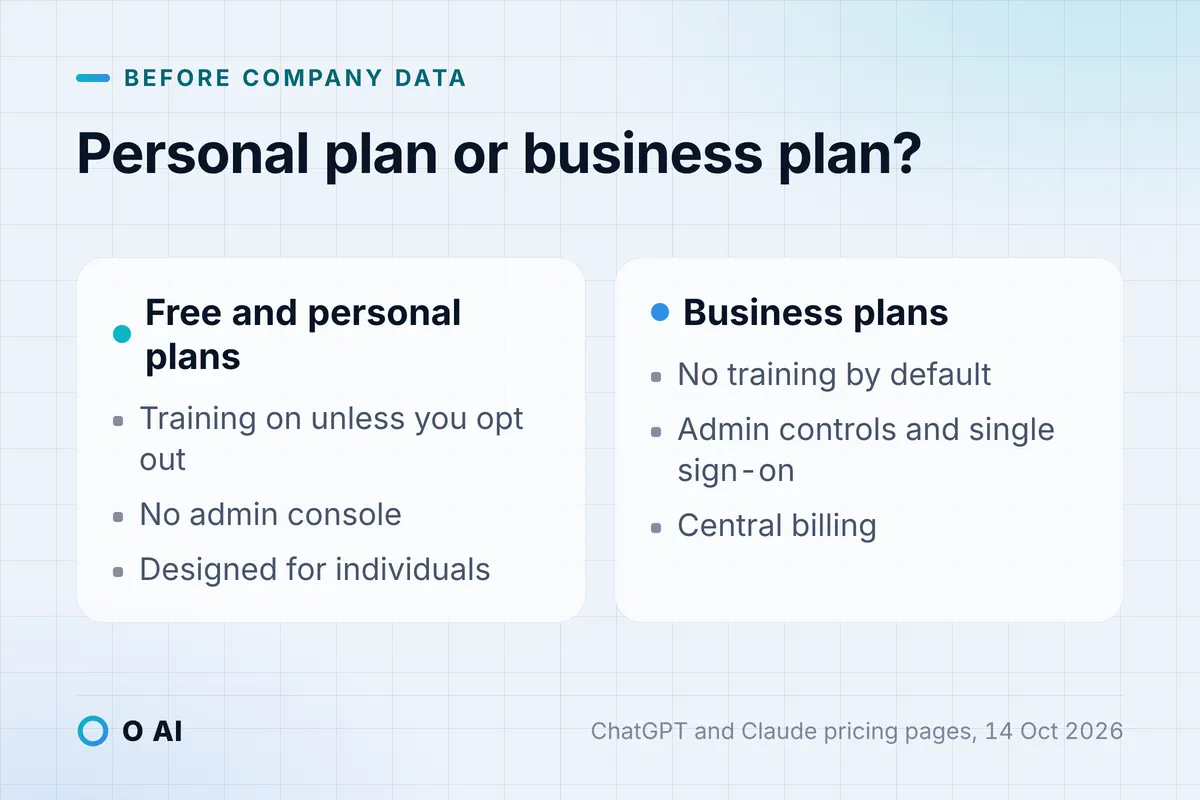
- Training by default: on ChatGPT's personal plans, content can be used to train models unless the user opts out, and Claude's Free, Pro and Max plans show the same opt-out [7][6]. On ChatGPT Business and Claude Team, business content is not used for training by default [7][6].
- Control: OpenAI describes its Free, Go and Plus plans as designed for individuals [7]. A personal account has no admin console, so the company cannot see who uses what or close a leaver's access. Business plans add central billing, admin controls and single sign-on [7][6].
- Ads: OpenAI notes that its low-cost Go plan may include ads [7].
The working rule: free tiers for learning and public content, and a business plan in the company's name before company data goes in.
A 10-point checklist for choosing AI tools
Use it as-is whenever a vendor or an employee proposes a new tool.
- Name the tasks. List the three tasks that take the most staff hours each week, and test tools on those first.
- Start with what you already pay for. On Microsoft 365, try Copilot Chat; on Google Workspace, check which Gemini features your tier includes.
- Test Arabic with your own samples. Run the same four samples in each tool and count the edits.
- Check the feature, not just the product. The same suite can support Arabic in its chat panel and not in its meeting notes.
- Read the price on the vendor's page from Saudi Arabia. Note the currency, whether tax is included, annual against monthly billing, and the minimum number of users.
- Keep company data in business plans. Look for no training on your data by default, an admin console and single sign-on.
- Check data location. If personal data will go in, compare the regions the vendor documents with the PDPL conditions.
- Keep accounts in the company's name. Use company email addresses, so access ends when someone leaves.
- Write a one-page usage rule. State what never goes in (IDs, salaries, client files), and that a person checks every figure, name and legal reference before anything is sent.
- Run a two-week trial with a measure. Record the time a task takes before and after, and the errors caught in review; then keep the tool, switch or drop it.
For the trial itself, our guide on how AI can help your business shows how to pick one task and measure it before you spend.
Your next step
This week, pick the task from the table above that costs your team the most hours. Run the same real Arabic sample through the AI tools for work you already have access to, on a business account where possible, and note the edits each result needs. Then pay for seats only for the people whose work clearly improved. If you later need an assistant connected to your own systems, that is a software project rather than a subscription; you can read about O AI, a software and AI company in Al Khobar, on our home page.
Frequently asked questions
Is there one best AI tool for work?
No single tool leads every task. General assistants such as ChatGPT, Claude and Gemini handle writing, summaries and translation; the AI built into Microsoft 365 or Google Workspace suits meetings, spreadsheets and email because it works where the files already are; specialist apps fit narrow jobs such as design. Choose per task: test two candidates on the same real sample, compare the edits each output needs, and check the price model and data terms before you pay.
Are there free AI tools good enough for a small business?
Yes, for learning and for public content. ChatGPT, Claude and Gemini have free tiers, HUMAIN Chat is a free app, Canva has a free plan, and Copilot Chat comes at no additional cost with eligible Microsoft 365 business subscriptions. Free tiers have usage limits, are designed for individuals, and on some services your chats can be used for model training unless you opt out. Move to a business plan in the company's name before customer, employee or financial data goes in.
Which AI apps work in Arabic?
OpenAI, Microsoft and Google list Arabic among the supported languages for ChatGPT, Copilot and Gemini, Anthropic publishes Arabic test scores for Claude, and HUMAIN Chat was built for Arabic and its dialects. Support differs by feature: in Google Workspace, for example, the Gemini side panel accepts Arabic but Meet note-taking does not list it. Test each app with your own formal letters, dialect messages and mixed Arabic and English emails before you decide.
Can we put customer data into ChatGPT or other AI tools hosted abroad?
Saudi Arabia's Personal Data Protection Law allows personal data to leave the Kingdom only for listed purposes and under conditions, including an adequate level of protection at the destination and sending only the minimum data needed. Most international AI tools do not offer storage in Saudi Arabia. Keep personal data out of free and personal plans, check the vendor's terms and data location, and for your specific case check SDAIA's guidance or ask a licensed advisor.
Do I need Microsoft 365 Copilot if my team already uses ChatGPT?
Not necessarily. ChatGPT works on what you paste or connect, while Microsoft 365 Copilot works with your work content inside Word, Excel, PowerPoint, Outlook and Teams. If your staff spend the day in those apps, test Copilot Chat first, since eligible Microsoft 365 subscriptions include it, and buy Copilot Business seats only for the people who need it in documents and meetings. Few small offices need both tools for every employee.
Should employees use personal AI accounts for work?
It is safer not to. Personal plans are designed for individuals, have no admin console and, on several services, can use chats for training unless the user opts out. A business plan gives central billing, admin controls and single sign-on, and keeps the accounts in the company's name, so access ends when someone leaves. If the budget is tight, pay for the heavy users and keep everyone else on the AI already included in your suite.
Is any AI assistant hosted in Saudi Arabia?
HUMAIN says the model behind its HUMAIN Chat app is hosted and operated in Saudi Arabia. Among the international assistants and office suites in this guide, none listed Saudi Arabia as a data-location option on 14 October 2026: OpenAI's enterprise list includes the UAE, and Microsoft's includes Qatar and the UAE. These offers change, so check the vendor's current documentation before you sign.
How this article was made: Researched from the sources listed below, opened on 14 October 2026. Drafted with AI assistance, then checked against those sources. General information, not professional advice. Images are AI-generated illustrations.
Sources
- Microsoft 365 for business: additional services and pricing (Saudi Arabia billing market) (opens in a new tab)Microsoft · microsoft.com
- Google Workspace pricing: compare plans (opens in a new tab)Google · workspace.google.com
- Supported languages for Google Workspace with Gemini (opens in a new tab)Google Docs Editors Help · support.google.com
- Supported languages for Microsoft Copilot (opens in a new tab)Microsoft Support · support.microsoft.com
- Generative Artificial Intelligence Guidelines for Government (2025) (opens in a new tab)Saudi Data and AI Authority (SDAIA) · sdaia.gov.sa
- Claude plans and pricing (opens in a new tab)Anthropic · claude.com
- ChatGPT plans and pricing (opens in a new tab)OpenAI · chatgpt.com
- Google AI plans: Gemini subscriptions (Saudi Arabia) (opens in a new tab)Google · gemini.google
- HUMAIN Chat (opens in a new tab)HUMAIN, App Store listing · apps.apple.com
- Canva pricing: Free, Pro, Business and Enterprise plans (opens in a new tab)Canva · canva.com
- How to change your language setting in ChatGPT (opens in a new tab)OpenAI Help Center · help.openai.com
- Multilingual support (opens in a new tab)Anthropic, Claude documentation · platform.claude.com
- Compare Microsoft 365 Data Residency offerings (opens in a new tab)Microsoft Learn · learn.microsoft.com
- Choose a geographic location for your data (opens in a new tab)Google Workspace Admin Help · knowledge.workspace.google.com
- Personal Data Protection Law, with amendments (in Arabic) (opens in a new tab)Bureau of Experts at the Council of Ministers · laws.boe.gov.sa
About the author