 AI
AIHow to choose ZATCA-compliant accounting software in Saudi Arabia: a checklist
What ZATCA-compliant accounting software must do in 2026: Phase 1 and Phase 2 rules, how to tell your wave, what ZATCA's solution provider list does and does not mean, a decision table by type of business, a 13-point checklist and a 30-minute demo test.


Key takeaways
- ZATCA does not approve software: its solution provider list is indicative and non-binding, and any provider whose solution meets the requirements may be used.
- Wave 25 covers taxpayers whose revenue subject to VAT exceeded SAR 187,500 in 2022, 2023, 2024 or 2025, with integration due no later than 1 February 2027.
- In Phase 2, standard tax invoices are cleared by ZATCA before reaching the buyer, and simplified invoices are reported within 24 hours.
- Check that Phase 2 is in the plan you pay for: on 14 October 2026 some providers listed it only from their second tier up.
- A 30-minute test in ZATCA's simulation portal, with your own customers and items, exposes weak compliance claims before you sign.
On this page
- What ZATCA-compliant accounting software means in 2026
- Which wave are you in?
- Is there ZATCA-approved accounting software?
- Decision table: what your accounting software must handle
- The checklist: 13 points to verify before you subscribe
- A 30-minute test that exposes weak claims
- Common mistakes when choosing accounting software
- Your next step
ZATCA-compliant accounting software issues invoices that meet ZATCA's e-invoicing rules for your phase: compliant electronic generation since December 2021 and, once your wave applies, integration with the Fatoora platform. Choose by testing that, not by a logo: Phase 2 in the plan you pay for, a test invoice in ZATCA's simulation portal, Arabic invoices and an archive you can export.
This guide sets out what the rules require, how to tell which wave you are in, a decision table by type of business, a checklist you can use in any demo, and a short test that exposes weak claims. Every rule below was read on zatca.gov.sa on 14 October 2026. It is general information, not tax advice; for your own case, check with ZATCA or a licensed tax advisor.
What ZATCA-compliant accounting software means in 2026
ZATCA rolled out e-invoicing (Fatoora) in two phases: Phase 1, generation, from 4 December 2021, and Phase 2, integration, from 1 January 2023 [1]. Phase 1 applies to all taxpayers except non-residents, and Phase 2 is rolled out in waves by taxpayer group, with ZATCA notifying each group at least six months in advance [2].
In Phase 1, invoices must come from a compliant electronic solution. Handwritten invoices and invoices made with text-editing tools are not e-invoices. A tax invoice shows the buyer's VAT number if the buyer is registered, and a simplified tax invoice must carry a QR code generated by the solution. The solution must not allow uncontrolled access, tampering with invoices or logs, or more than one invoice sequence [6].
Phase 2 adds integration with ZATCA's systems [7]:
| Requirement | Phase 1 (generation) | Phase 2 (integration) |
|---|---|---|
| Format | Any electronic format | XML, or PDF/A-3 with the XML embedded |
| Sharing with ZATCA | None | Standard tax invoices cleared before they reach the buyer; simplified invoices reported within 24 hours |
| Cryptographic stamp | Not required | Required; ZATCA stamps cleared invoices, your solution stamps simplified ones |
| QR code | Required on simplified invoices, optional on tax invoices | Generated to the Phase 2 specification |
| Invoice hash and UUID | Not required | Included in every e-invoice |
| Applies to | All resident taxpayers since 4 December 2021 | Taxpayers in each wave from its integration date |
Which wave are you in?
ZATCA selects each wave by revenue subject to VAT and notifies the taxpayers it targets. The two most recent waves, as published on zatca.gov.sa:
| Wave | Who is targeted | Integration deadline |
|---|---|---|
| Wave 24 (announced 26 September 2025) | Revenue subject to VAT above SAR 375,000 in 2022, 2023 or 2024 | 30 June 2026 [4] |
| Wave 25 (announced 24 July 2026) | Revenue subject to VAT above SAR 187,500 in 2022, 2023, 2024 or 2025 | No later than 1 February 2027 [3] |
The test looks back: a single year above the threshold is enough, even if revenue has fallen since. If you received a notification, your accounting software must be integrated by the date in it. If you did not, ZATCA's rule of at least six months' notice means you will have time, but choosing software with Phase 2 now avoids a second migration later.

Is there ZATCA-approved accounting software?
Not in the sense most advertisements suggest. ZATCA publishes a list of solution providers that passed its qualification process, for Phase 1 and for Phase 2. ZATCA calls it an indicative list that is not legally binding on taxpayers and is not an approval of any provider's solution, and says it bears no liability for publishing it [5]. Taxpayers may use any provider whose solution meets the requirements, even if it is not on the list [1].
So the search for the "best accounting software" has no single answer. The right one is the program whose plan includes what your wave requires, handles the invoice types you issue, and passes the checks below with your own data. A provider on ZATCA's list is a reasonable place to start; a test invoice is the evidence.
Decision table: what your accounting software must handle
What the software must do depends on whom you sell to. Find your row before you compare products.
| Your sales | Invoice type | The software must | Check in particular |
|---|---|---|---|
| Business to business only: trading, contracting, services | Standard tax invoices | Send each invoice for clearance and share the cleared XML or PDF/A-3 with the buyer | That the buyer's VAT number is captured, and what happens when clearance is rejected |
| Shop, café, salon or clinic | Simplified tax invoices | Stamp the invoice and print a QR code at the till, then report it within 24 hours | Whether each till is a separate unit, and what happens when the connection drops |
| Both | Both | Choose the right invoice type for each sale and run both flows | That a business customer is never given a simplified invoice by mistake |
| Several branches | Both | Run one invoice sequence per unit; ZATCA allows a separate sequential reference number per branch [7] | How many units must be onboarded, and who does it |
| Online store | Mostly simplified | Receive each order from the store and issue the invoice in one place | Which system issues the invoice, so it is never issued twice |
If your business fits two rows, the software must handle both, and the demo should show both.
The checklist: 13 points to verify before you subscribe
Use it as-is in every demo. Ask for each answer in writing.
Compliance in the plan you pay for
- Phase 2 is in your plan. Some providers include Phase 2 only from their second tier up. On 14 October 2026, for example, Daftra's pricing page listed Phase 1 only on its Basic plan and Phase 1 and 2 on Advanced and Premium [11].
- Both flows work: clearance for standard tax invoices and reporting within 24 hours for simplified ones, including credit and debit notes [7].
- The right formats: invoices generated and stored in XML or PDF/A-3 with embedded XML, and shared with business buyers in those formats [7][8].
- None of the prohibited functions. ZATCA's list includes anonymous access, default passwords, no session logging, editing or deleting issued invoices, editing logs, inaccurate timestamps, resetting the invoice counter, more than one invoice sequence per unit, changing the system time, and exporting the private stamping key [7].
Onboarding and testing
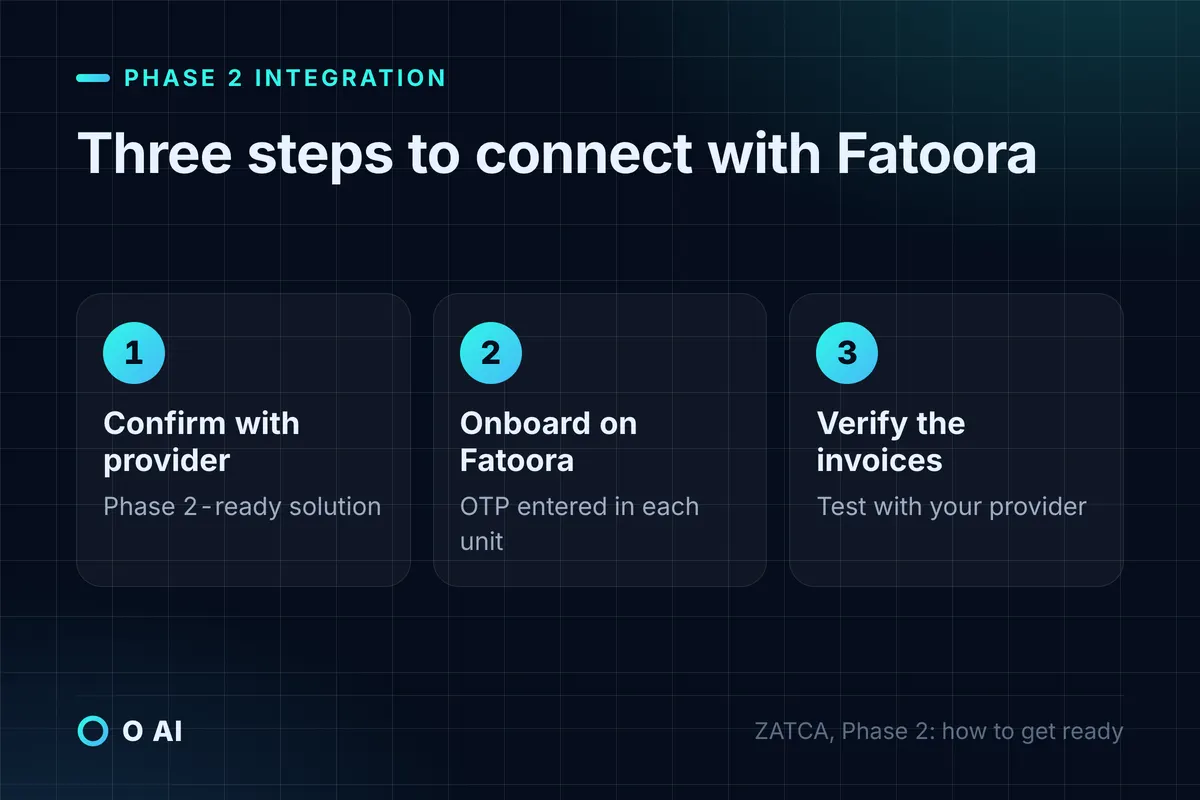
- Who onboards each unit on the Fatoora portal. The taxpayer logs in with ERAD credentials, chooses "onboard new solution unit/device", generates a one-time password valid for one hour and enters it in the unit; cryptographic stamp identifiers are renewed and units revoked from the same portal [9].
- A test in the simulation portal, ZATCA's separate environment for end-to-end testing, before any live invoice [9].
- The three readiness steps in ZATCA's Phase 2 guide are covered: confirm the solution is integration-compliant with your provider, onboard it on Fatoora, then verify with your provider that it generates compliant invoices [8].
Arabic and records
- Arabic on every invoice field, with any other language as a translation; Arabic or Hindi numerals are both accepted [10][7].
- An archive you control: export of invoices to an external archive, with files named by VAT number, timestamp and invoice reference [7], kept for at least six years from the end of the tax period [10].
- Where the servers are. ZATCA's VAT guideline (May 2026) says a resident taxpayer's records server must be in the Kingdom [10], and its e-invoicing guideline requires cloud-hosted data to be reachable through a direct link that can be given to ZATCA [7]. Ask the provider for both in writing.
Day-to-day operation
- Internet and incidents: the solution needs an internet connection to share invoices, and taxpayers must notify ZATCA of incidents that stop invoice generation and resume clearance or reporting once it works again [7]. Ask what the software does while offline and how it catches up.
- Corrections by credit note only: an issued invoice is cancelled through a credit note and a new invoice [7]. The software should make that the only path.
- Updates and exit: a written commitment to apply ZATCA specification changes, and a way to export all data and invoices in XML if you leave.
Our guide to choosing a software company in Saudi Arabia suggests how to score written answers from several providers.
A 30-minute test that exposes weak claims
Ask the provider to share a screen with a test company connected to ZATCA's simulation portal, and run these six steps with your own customer and item names.
- Issue a standard tax invoice to a VAT-registered customer. Ask to see the cleared XML returned with ZATCA's stamp and QR code.
- Issue a simplified invoice as at a till, and print it. Check the Arabic fields and the QR code.
- Scan the QR code with ZATCA's app, which ZATCA's guideline describes as a way for buyers to check invoices [7].
- Try to delete or edit the invoice you just issued. The software should refuse and offer a credit note.
- Issue a credit note for part of the standard invoice and check that it references the original.
- Export the archive for the test period and open one XML file.
If any step fails, or the provider cannot run it in a simulation environment, you have your answer before you sign.
Common mistakes when choosing accounting software
These come straight from the official rules, and each one is expensive to fix later.
- Buying the entry plan without Phase 2 because the wave notification has not arrived. Wave 25's revenue test looks back to 2022, so one strong year is enough to bring a business into scope [3].
- Treating a logo as proof. ZATCA's list is indicative and is not an approval [5].
- Keeping a side invoice book in Word or Excel for some customers. ZATCA's VAT guideline tells taxpayers to stop issuing handwritten invoices or invoices made with word-processing software [10].
- Deleting a wrong invoice instead of issuing a credit note [7].
- Cancelling a subscription before exporting the archive, which must be kept for at least six years [10].
- Hosting records abroad without checking how ZATCA's in-Kingdom rule applies to you [10]. Our guide to data residency in Saudi Arabia covers the separate rules for personal data.
Your next step
This week, check whether ZATCA has notified you of a wave, and list the invoice types you issue and the tills and branches that issue them. Then send the 13-point checklist to three providers, and book the 30-minute test with the two that answer best. The ZATCA-compliant accounting software that passes every step with your own data is the one to choose, whatever its rank in an advertisement. You can read about O AI, a software and AI company in Al Khobar, on our home page.
Frequently asked questions
What makes accounting software ZATCA-compliant?
Its invoicing meets ZATCA's e-invoicing requirements for your phase. In Phase 1 it generates and stores invoices electronically with the required fields, a QR code on simplified invoices, and none of the prohibited functions such as deleting issued invoices or running several sequences. In Phase 2 it also integrates with the Fatoora platform, produces XML or PDF/A-3 invoices, sends tax invoices for clearance and reports simplified invoices within 24 hours.
Is there a list of ZATCA-approved accounting software?
ZATCA publishes an indicative list of solution providers that passed its qualification process for Phase 1 and Phase 2. ZATCA says the list is not legally binding, is not an approval of any solution, and that taxpayers may use any provider whose solution meets the requirements even if it is not listed. Use the list as a starting point, then ask for a live test invoice in ZATCA's simulation portal.
Which is the best accounting software in Saudi Arabia?
There is no single best program for every business. A trading company that only invoices other businesses needs fast clearance and credit notes; a café needs tills that stamp, print and report simplified invoices. The best choice for you is the program whose plan includes Phase 2, handles your invoice types, works in Arabic with your data and lets you export your archive. Compare candidates on those points, then on price.
Do I need Phase 2 e-invoicing now?
You must integrate by the date in ZATCA's notification for your wave. Wave 25 covers taxpayers whose revenue subject to VAT exceeded SAR 187,500 in 2022, 2023, 2024 or 2025, with integration due no later than 1 February 2027. ZATCA notifies each wave at least six months ahead. Even if you have not been notified, choosing software whose plan already includes Phase 2 avoids a second change later.
Can I issue tax invoices from Excel or Word?
No. Since Phase 1 started on 4 December 2021, invoices must be generated by a compliant electronic solution. ZATCA states that handwritten invoices and invoices made with text-editing or word-processing tools are not e-invoices, and a scanned paper invoice does not count either. A spreadsheet can still help with internal bookkeeping, but the invoice you give a customer must come from compliant software.
What happens if the internet goes down?
A Phase 2 solution needs an internet connection to share invoices with ZATCA. ZATCA's guideline asks taxpayers to notify it of incidents or technical errors that stop invoice generation, and to resume generation and clearance or reporting as soon as the solution works again. Simplified invoices are reported within 24 hours of issue. Ask your provider how the software stores invoices while offline and sends them once the connection returns.
How long must I keep e-invoices?
ZATCA's VAT guideline sets a basic retention period of at least six years from the end of the related tax period, and 15 years for records about real estate. Records are kept in Arabic, and the guideline expects a resident taxpayer's records server to be in the Kingdom. Choose software that lets you export invoices to an external archive, and export everything before you change provider.
How this article was made: Researched from the sources listed below, opened on 14 October 2026. Drafted with AI assistance, then checked against those sources. General information, not professional advice. Images are AI-generated illustrations.
Sources
- E-Invoicing (opens in a new tab)Zakat, Tax and Customs Authority (ZATCA) · zatca.gov.sa
- Roll-out phases (opens in a new tab)ZATCA · zatca.gov.sa
- ZATCA determines the criteria for selecting the targeted taxpayers in Wave 25 for the integration phase of e-invoicing (24 July 2026) (opens in a new tab)ZATCA · zatca.gov.sa
- Criteria for Wave 24 of the e-invoicing integration phase (26 September 2025) (opens in a new tab)ZATCA · zatca.gov.sa
- Solution Providers List (opens in a new tab)ZATCA · zatca.gov.sa
- Phase 1: how to prepare (opens in a new tab)ZATCA · zatca.gov.sa
- Detailed Guidelines for E-Invoicing, version 2 (May 2023) (opens in a new tab)ZATCA · zatca.gov.sa
- Phase 2: how to get ready (opens in a new tab)ZATCA · zatca.gov.sa
- FATOORA Portal User Manual, version 3 (May 2023) (opens in a new tab)ZATCA · zatca.gov.sa
- Guideline for Tax Invoicing and Records under VAT Provisions, version 3 (May 2026) (opens in a new tab)ZATCA · zatca.gov.sa
- Plans and pricing (opens in a new tab)Daftra · daftra.com
About the author