 AI
AIVerify a VAT number in Saudi Arabia: what it is and how to check a supplier
What a Saudi VAT number is, where it must appear, why checking a supplier's number protects your input VAT, the ZATCA lookup step by step with bulk and QR options, how to read the result, and a simple supplier-check routine for finance teams.

Key takeaways
- ZATCA's VAT registration lookup is free and open to the public; search by VAT number, VAT certificate number or CR national number.
- A Saudi VAT registration number has 15 digits and starts and ends with 3, according to ZATCA's e-invoicing technical guideline.
- Input VAT needs a valid tax invoice (Article 49(7)), and an unregistered business issuing one faces a fine of up to SAR 100,000.
- The lookup page also accepts a bulk .xlsx upload, and ZATCA's VAT app can check the QR code on e-invoices.
- ZATCA's terms forbid using lookup data for marketing or data analysis.
On this page
- What a Saudi VAT number is, and where you will see it
- Why check a supplier's VAT number before you pay
- How to verify a VAT number in Saudi Arabia, step by step
- Reading the result: what to do next
- Quick checks on the invoice itself
- A supplier VAT check routine for your finance team
- Five common mistakes
- Your next step
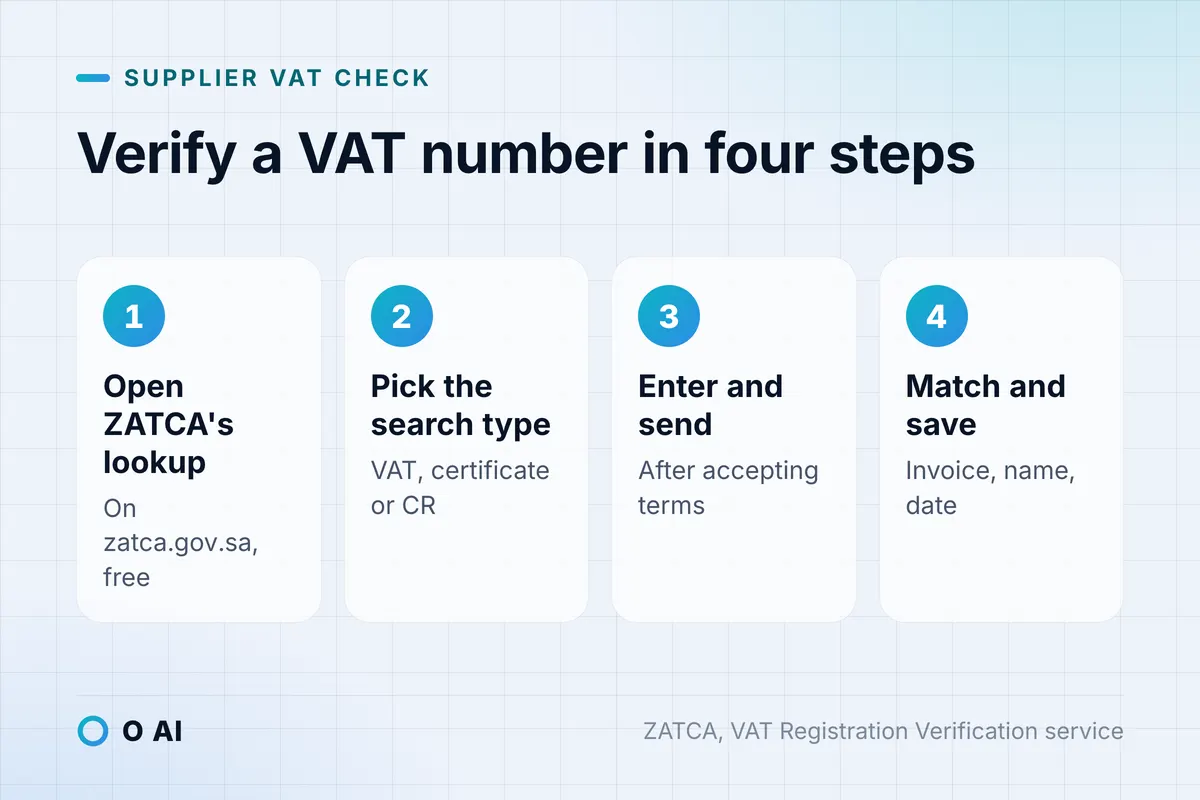
To verify a VAT number in Saudi Arabia, open ZATCA's free VAT registration lookup, choose the search type (VAT account number, VAT certificate number or CR national number), enter the number, accept the terms and send [1]. A Saudi VAT registration number has 15 digits and starts and ends with 3 [2]; then match the result to the invoice.
This guide explains what the number is, why it matters before you pay, the lookup step by step, how to read the result, and a routine for your finance team. It is general information, not tax advice: confirm a specific case with ZATCA or a licensed tax adviser.
What a Saudi VAT number is, and where you will see it
When ZATCA accepts a VAT registration, it issues a certificate that shows the business's tax identification number and the date its registration took effect (Article 8(5) of the Implementing Regulations) [4]. On invoices and in everyday use, this is the VAT number; ZATCA's lookup calls it the VAT account number, and Arabic speakers call it «الرقم الضريبي» [1].
- Format: ZATCA's e-invoicing technical guideline describes the VAT registration number as 15 digits, starting and ending with 3. A VAT group has its own group number, and the same guideline treats an 11th digit of 1 as the mark of a group number [2].
- On a tax invoice: the supplier's VAT number is a required detail, together with the invoice date, a serial number, both parties' names and addresses, the goods or services, the rate and the VAT in riyals (Article 53(5)) [4].
- On a simplified invoice: the supplier's name, address and VAT number are required too (Article 53(8)) [4].
- On the wall and the website: a resident registered business must display its registration certificate at its head office, branches and online stores (Article 8(8)) [4].
A number that is not 15 digits long is not a VAT registration number. It may be a commercial registration number or another identifier, so ask for the right one before you book the invoice.
The same terms in Arabic and English
Suppliers, ZATCA's pages and the invoices themselves switch between the two languages, so it helps to know which term means what [1][4].
| On the lookup or invoice (English) | In Arabic | What it is |
|---|---|---|
| VAT account number | الرقم الضريبي | The supplier's VAT registration number, printed on its invoices |
| Tax identification number | رقم التعريف الضريبي | The term the regulations use for the same number on the certificate and invoices |
| VAT certificate number | رقم شهادة ضريبة القيمة المضافة | The number of the registration certificate, a separate search option |
| CR national number | الرقم الموحد للسجل التجاري | The commercial registration identifier, also accepted by the lookup |
| Tax invoice / simplified tax invoice | فاتورة ضريبية / فاتورة ضريبية مبسطة | The two invoice types in Article 53 |
Why check a supplier's VAT number before you pay
Input VAT, the VAT you pay to suppliers, can be deducted only when you hold the evidence the rules require, which is normally a valid tax invoice (Article 49(7)) [4]. Only a registered business can issue one: the VAT Law fines an unregistered person who issues a tax invoice up to SAR 100,000 (Article 44) [5]. If you claim VAT from such an invoice, the deduction is at risk, and an understated return can carry a fine of 50% of the difference (Article 42(1)) [5].
ZATCA also states on the lookup page that it is not responsible for the accuracy of data obtained through the service, and that the user is responsible for verifying it [1]. The lookup is a strong check, but it works best alongside the invoice itself and the supplier's certificate.
Illustrative example: one building-materials invoice
Illustrative example. A Riyadh contractor receives an invoice for building materials: SAR 80,000 plus SAR 12,000 VAT, a total of SAR 92,000.
| Scenario | What the contractor pays | VAT deducted | Possible extra exposure | Net cost of the materials |
|---|---|---|---|---|
| Supplier is registered and the number checks out | SAR 92,000 | SAR 12,000 | None | SAR 80,000 |
| Supplier is not registered, and the contractor claimed the VAT | SAR 92,000 | Deduction can be disallowed | A fine of up to 50% of the SAR 12,000, so SAR 6,000, unless ZATCA waives or reduces it | Up to SAR 98,000 |
A two-minute check before payment protects SAR 12,000 of input VAT on this one invoice, and avoids the fine.

How to verify a VAT number in Saudi Arabia, step by step
ZATCA's VAT Registration Verification service is free and open to taxpayers and the public [3]. The steps:
- Open the official VAT registration lookup on zatca.gov.sa. Its heading reads "Verify the Current VAT Registration Status of Any Business" [1].
- Under Type, choose VAT Account Number, VAT Certificate Number or CR National Number [1].
- Type the number exactly as it appears on the invoice or certificate.
- Tick I confirm reading terms and conditions [1].
- Select Send. The business's VAT registration status appears on the screen [3].
- Save the result, for example as a screenshot or a PDF printout with the date, in the supplier's file.
Checking many suppliers at once
The same page offers a bulk check for multiple businesses: download the template, fill it in, and upload it. The page accepts .xlsx files only [1]. This suits onboarding a batch of new suppliers, or a quarterly re-check of your whole supplier list.
Checking an e-invoice's QR code with ZATCA's VAT app
E-invoices carry a QR code that customers can use for a basic validation. ZATCA's e-invoicing guideline describes the process: you scan the QR code with the VAT App, the app checks that the QR content is compliant, and it shows you the content together with the verification result [6]. Simplified invoices carry the QR code, and for tax invoices cleared in the integration phase, ZATCA generates the QR code itself at clearance [6].
What you may and may not do with the results
ZATCA's terms on the lookup page say the data must not be used for marketing, promotion, data analysis or sale, and that ZATCA may take legal action over unauthorised use [1]. Use the lookup to check the businesses you deal with, not to build lists.
Reading the result: what to do next
The lookup tells you the registration status. Your next step depends on what you see and on how it compares with the invoice [1][3].
| What you see | What it may mean | What to do |
|---|---|---|
| Registered, and the details match the invoice and certificate | The supplier is registered for VAT | Pay and claim the input VAT as usual; keep the dated check |
| Registered, but the name differs from the invoice | A trading name, a branch, a typing error, or a number belonging to another business | Ask for the VAT certificate and commercial registration, compare them, and hold the VAT portion until it is resolved |
| No match, or not registered | A wrong number, a business not yet registered, or one that has deregistered | Ask the supplier to explain; do not treat the VAT as deductible; ask for a corrected invoice |
| The number is not 15 digits, or does not start and end with 3 | It is not a VAT registration number | Ask for the correct number before you book the invoice |
Registration can change. A business must deregister when it stops its activity, and ZATCA can cancel a registration that should not exist (Article 13) [4]. A supplier that checked out last year is worth checking again.

Quick checks on the invoice itself
Before you even open the lookup, an invoice that fails these checks needs a question to the supplier. Each point comes from Article 53 of the regulations [4]:
- The invoice is in Arabic, alongside any other language.
- It shows the issue date and a serial number.
- It shows the supplier's VAT number, in the 15-digit format.
- It names both the supplier and your business, with addresses.
- It describes the goods or services and their quantity.
- It shows the VAT rate and the VAT amount in riyals.
- For a simplified invoice, the supplier's name, address and VAT number are still there.
If the invoice carries a QR code, scanning it with ZATCA's VAT app adds a further check [6].
A supplier VAT check routine for your finance team
Most problems come from checking once at onboarding and never again. A routine that fits a small finance team:
- At onboarding: look up the VAT number, ask for a copy of the VAT certificate, and save both in the supplier file. The certificate is available to the supplier on ZATCA's portal, and it can reprint a copy for free at any time [7].
- Before the first payment and any unusually large one: run the lookup again and compare it with the invoice.
- Every quarter: run a bulk check of active suppliers with ZATCA's .xlsx template [1].
- When anything changes: a new legal name, new bank details or a new address is a reason to check again before paying.
- Keep the evidence: the dated result belongs with the invoice in your records, which the regulations require you to keep for at least six years (Article 66) [4].
If your team keys supplier invoices from scanned PDFs, our guide to Arabic OCR for scanned PDFs shows how to pull out the VAT number and other fields with a human check. For the repeat checks themselves, our comparison of AI agents, RPA and workflow tools helps you decide what to automate.
Five common mistakes
- Using lookup copies on other websites. Use the service on zatca.gov.sa; third-party copies may be out of date.
- Confusing the commercial registration number with the VAT number. The lookup accepts the CR national number as a search type, but the VAT number on the invoice is a separate 15-digit number [1][2].
- Checking once and never again. Registrations can be cancelled (Article 13) [4].
- Trusting the invoice alone. A number in the right format can still belong to someone else; only the lookup shows the registration status.
- Treating the lookup as a mailing list. ZATCA's terms forbid using the data for marketing or analysis [1].
Your next step
This week, take your ten largest suppliers by spend, verify each VAT number on ZATCA's lookup, or in one bulk upload, and save the dated results in their files. Then make the check part of supplier onboarding, so that every new supplier's VAT number is verified in Saudi Arabia's official service before its first invoice is paid. O AI is a software and AI company in Al Khobar; more about us on our home page.
Frequently asked questions
How many digits does a Saudi VAT number have?
Fifteen. ZATCA's e-invoicing technical guideline describes the VAT registration number as 15 digits that start and end with 3. A VAT group has its own group number, which ZATCA's e-invoicing rules identify by an 11th digit of 1. A number of a different length is not a VAT registration number, so ask the supplier for the correct one before you book or pay the invoice.
Is the ZATCA VAT number check free?
Yes. ZATCA's VAT Registration Verification service is free and available to taxpayers and the public, and the lookup page itself is open to anyone. You choose the search type, enter the number, accept the terms and send, and the registration status appears on screen. The same page lets you check many businesses at once by uploading ZATCA's .xlsx template.
Can I check a supplier using its commercial registration number?
Yes. The lookup accepts three search types: the VAT account number, the VAT certificate number and the commercial registration national number. Searching by CR helps when a supplier has not given you its VAT number. You still need the VAT number itself on the invoice, because a tax invoice must show the supplier's VAT number to support your input VAT deduction.
What should I do if a supplier's VAT number is not registered?
Do not treat the VAT on that invoice as deductible until it is resolved. Ask the supplier to explain: the number may be mistyped, the registration may be new, or the business may have deregistered. Ask for its VAT certificate and a corrected invoice. If the supplier is not registered, it should not be charging VAT at all, and you should not pay the VAT portion.
Can I verify many VAT numbers at once?
Yes. ZATCA's lookup page includes a bulk option for multiple businesses. You download the template, fill in the numbers, and upload the file, which must be in .xlsx format. A quarterly bulk check of all active suppliers is a practical way to catch registrations that have been cancelled since you last checked.
How do I check the QR code on an e-invoice?
Scan it with ZATCA's VAT app. According to ZATCA's e-invoicing guideline, the app checks that the QR code content is compliant and then shows you the content and the verification result. Simplified invoices carry a QR code, and for tax invoices cleared in the integration phase, ZATCA generates the code at clearance. A QR check complements the lookup; it does not replace it.
Is the VAT number the same as the VAT certificate number?
No. ZATCA's lookup lists them as separate search types, the VAT account number and the VAT certificate number, and either can be used to search. The number that must appear on tax invoices is the supplier's VAT number. The certificate itself shows the tax identification number and the date registration took effect, so a copy of it helps you match the two.
How this article was made: Researched from the sources listed below, opened on 14 October 2026. Drafted with AI assistance, then checked against those sources. General information, not professional advice. Images are AI-generated illustrations.
Sources
- Verify the Current VAT Registration Status of Any Business (VAT registration lookup) (opens in a new tab)Zakat, Tax and Customs Authority (ZATCA) · zatca.gov.sa
- E-invoicing Detailed Technical Guidelines, version 2, November 2022 (opens in a new tab)Zakat, Tax and Customs Authority (ZATCA) · zatca.gov.sa
- VAT Registration Verification (e-service) (opens in a new tab)Zakat, Tax and Customs Authority (ZATCA) · zatca.gov.sa
- Implementing Regulations of the VAT Law, official Arabic text, tenth edition, April 2025 (opens in a new tab)Zakat, Tax and Customs Authority (ZATCA) · zatca.gov.sa
- Value Added Tax Law, with amendments (in Arabic) (opens in a new tab)Bureau of Experts at the Council of Ministers · laws.boe.gov.sa
- Detailed Guidelines for E-Invoicing, version 2, May 2023 (opens in a new tab)Zakat, Tax and Customs Authority (ZATCA) · zatca.gov.sa
- Print VAT Certificate (e-service) (opens in a new tab)Zakat, Tax and Customs Authority (ZATCA) · zatca.gov.sa
About the author