 AI
AI

How to verify a commercial registration before you sign a contract
A step-by-step guide to checking a Saudi counterparty's commercial registration before you sign: the free Ministry of Commerce inquiry, QR codes, detailed extracts, Wathq and ZATCA checks, what each field means, and the red flags under the 2025 Commercial Register Law.


Key takeaways
- Search by the unified national number, which begins with 7, rather than by name; MC's commercial registration data inquiry is free and instant.
- A registration is suspended if its annual confirmation is not filed within 90 days of the due date, and every licence issued to it is suspended too.
- Anyone may request a detailed extract showing partners and managers; it costs SAR 100 on the Business platform and is issued within 72 hours.
- Registered data has legal weight under Article 17, but the registrar does not vouch for its accuracy: a CR check confirms identity, not reliability.
- Pause before signing if the trade name, signatory, activity or VAT number in your contract does not match the register.
On this page
- Why verify a commercial registration before you sign?
- Where to check a CR: the official routes
- CR number or unified national number: which one to ask for?
- Step by step: checking a counterparty before you sign
- Commercial registration data: what each field means
- Active, suspended or struck off: reading the CR status
- Red flags that should pause a signature
- Illustrative example: a supply contract in Al Khobar
- Your next step
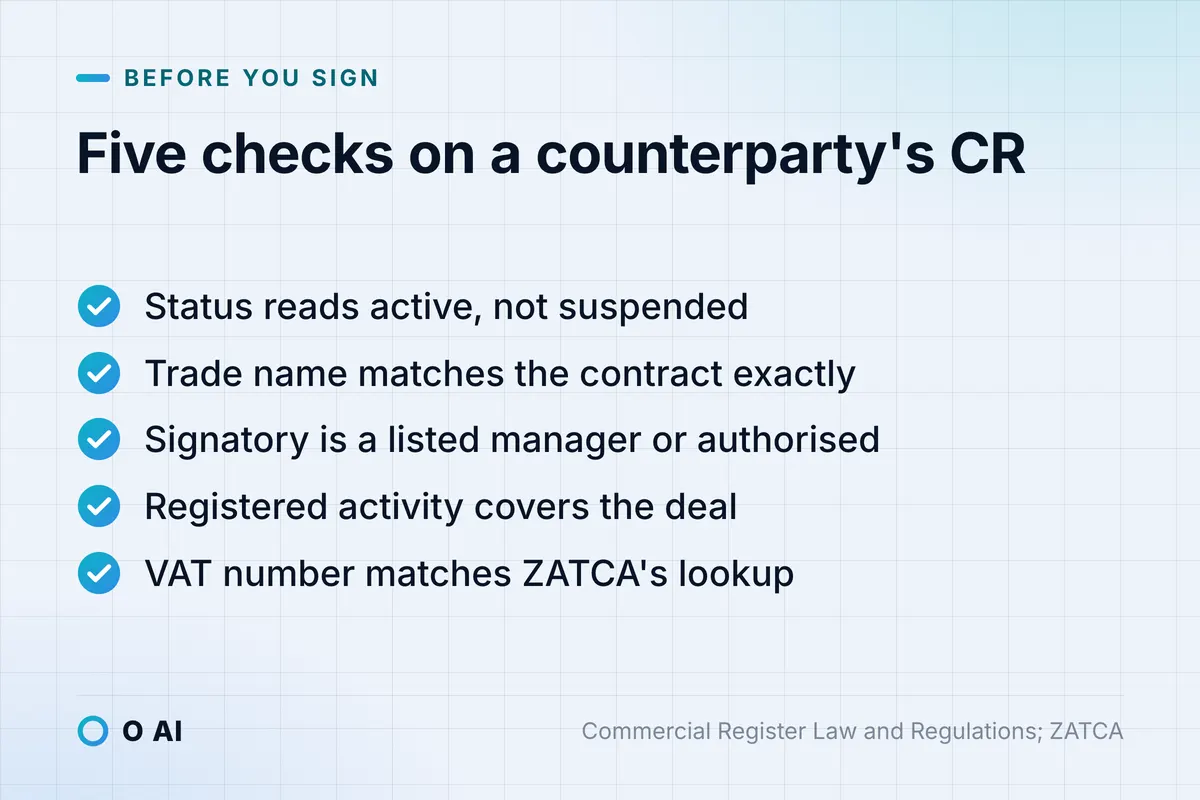
To verify a commercial registration in Saudi Arabia, look up the counterparty's unified national number on the Ministry of Commerce's free inquiry service, then check five things against your draft contract: an active status, the exact trade name, a signatory who is a listed manager or properly authorised, an activity that covers the deal, and a matching VAT number.
The rules behind these checks changed in 2025. The Commercial Register Law, approved by Royal Decree M/83 dated 19/3/1446H, replaced the 1416H law and took effect 180 days after its publication in the Official Gazette on 4 October 2024 [1]. Its Implementing Regulations, published by the Ministry of Commerce (MC) in 2025, replaced the old expiry date with an annual confirmation and list the data anyone may see [2]. This guide covers the official lookup routes, what each field means and the findings that should pause a signature. It is general information, not legal advice; for a high-value or disputed deal, ask a licensed lawyer.
Why verify a commercial registration before you sign?
A commercial registration (CR) is the public record of who a merchant is, what it is registered to do and who manages it. The law states two aims: transparency, so that registered data is available and easy to search, and reliability, so that it is accurate and updated periodically (Article 2) [1].
Two other articles explain why the check matters for your contract:
- Registered data carries legal weight. Under Article 17, the data in the register counts as evidence for or against the merchant from the date it is entered, and a fact that should have been registered or updated cannot be relied on against third parties until it is [1]. If the register lists someone as manager, you are entitled to rely on that entry.
- The registrar does not vouch for the content. Article 12 says the registrar is not responsible for the accuracy of the data a merchant supplies [1]. The register shows what the merchant declared, not whether it can deliver, pay or perform.
A CR check therefore confirms identity, legal form, status and who may act for the business. It does not replace references, a look at financial standing, or careful reading of the contract itself.
Where to check a CR: the official routes
Most CR services now run on the Business platform of the Saudi Center for Competitiveness and Business, created by Cabinet Decision 662 dated 7/9/1447H (24 February 2026), which merged the Saudi Business Center and the National Competitiveness Center into one body [3]. MC still lists the same services on its own website. The routes worth knowing:
| Route | Who can use it | Cost on 14 October 2026 | Best for |
|---|---|---|---|
| MC's commercial registration data inquiry | Anyone; search by establishment name or unified national number, plus a verification code | Free, instant [4] | A first check of status and basic data |
| The unified electronic code (QR code) | Anyone who scans it at the shop or on the website | Free to issue [5] | Confirming a shop's or online store's current certificates and licences |
| Detailed CR extract on the Business platform | Anyone with a national single sign-on (Nafath) login; no role in the CR is needed | SAR 100, within 72 hours [6] | Partners, managers and board members before a large deal |
| MC document verification | Consumers and merchants | Free [7] | Checking a CR certificate the counterparty sent you |
| Wathq data services | Businesses that open an account and choose a package | By subscription package [8] | Procurement teams, platforms and lenders that check many counterparties |
| ZATCA VAT registration verification | Taxpayers and the public | Free [9] | Confirming the VAT number on a quotation or invoice |
The Saudi Central Bank's circular of 28 April 2025 on the new laws names three of these channels for banks verifying registration data: the Wathq platform, MC's website and the QR code on the certificate [10]. For routine purchases, the free inquiry plus a scan of the QR code is usually enough. Add the paid extract when the contract is large, long or paid in advance.
CR number or unified national number: which one to ask for?
Under the new rules, MC adopted a unified national number beginning with 7 as the primary and sole identifier of an establishment, and SAMA's circular tells banks that separate commercial registration numbers are no longer issued [10]. When you ask for a "CR number", ask for this unified national number.
Two related changes affect what you may be shown:
- One registration per merchant. A merchant is registered once, even if it has several activities and branches (Article 6 of the Regulations) [2].
- Branch registrations are being phased out. The Royal Decree gives merchants five years from the law's entry into force to regularise their sub-registrations; all of them are struck off when that period ends [1].
If a supplier sends you an old branch CR, ask for the main registration and its unified national number, and name the merchant itself as the contracting party. Write the number and the exact registered trade name into the party clause of the contract.
Step by step: checking a counterparty before you sign
- Ask for the identifiers in writing. Request the unified national number, the exact trade name (in Arabic, and in English if it has one), the legal form, the name and title of the person who will sign, and the VAT number.
- Run the MC inquiry by number. Searching by number avoids confusing similar names; the service is free and shows the result immediately [4].
- Compare each field with your draft contract. The table in the next section shows what to compare with what.
- Scan the QR code. The Regulations require merchants to display their basic registered data through the unified electronic code in a clear place inside and outside the shop, and online sellers on their website (Article 14) [2]. The code gives access to the establishment's updated certificates and licences [5].
- Order a detailed extract for larger deals. Anyone may request a detailed extract of a registration (Article 18 of the law) [1]. It covers the company and its partners, the managers or board members, or the individual merchant (Article 15 of the Regulations) [2], and costs SAR 100 [6].
- Verify the VAT number. ZATCA's free service searches by VAT account number, CR number or VAT certificate number [9].
- Check licences for regulated activities. A merchant must obtain the licence for a licensed activity within 90 days of registering it, or the registrar strikes that activity off the register unless it extends the period (Article 4 of the Regulations) [2].
- Save the evidence. Keep a dated PDF or screenshot of each result in the deal file, and repeat the check before a renewal or a large payment.
Commercial registration data: what each field means
Article 15 of the Regulations lists the basic data that any person may view [2]. Here is what each field tells you and what to compare it with.
| Field | What it tells you | Compare it with |
|---|---|---|
| Trade name | The name the merchant must use on its storefront, documents, correspondence and printed matter (Article 8 of the Trade Names Law) [11] | The party clause, quotation header, invoices and stamp |
| Registration number | The establishment's identifier | The number in the contract and on invoices |
| Manager(s) or board members | Who runs the business; the registration application must state their powers (Article 6 of the law) [1] | The person who will sign |
| Legal form | Sole proprietorship, limited liability company, joint stock company and so on | How the party is described in the contract |
| Registration date | How long the registration has existed | Claims such as "in business for 20 years" |
| Annual confirmation due date | When the next confirmation falls due: one year after registration (Article 10 of the Regulations) [2] | The contract start date |
| Status | Whether the registration is active, suspended or struck off | Must read active |
| Capital | The capital the merchant declared | The size of your exposure |
| Phone, email and website | The registered contact details | The address the quotation came from |
| Head office address and branches | Where the merchant says it operates | The delivery or site address |
| Activities | What the merchant is registered to do | The subject of your contract |
The registered contact details matter beyond the check itself: official notices under the law and Regulations count as delivered when sent by text message to the registered mobile number, to the registered email, through government system accounts, or by licensed post to the national address (Article 20 of the Regulations) [2].
Active, suspended or struck off: reading the CR status
The status line is the single most important field, and under the new law it changes on a clear timeline.
| Status | What happened | Signing? |
|---|---|---|
| Active, confirmation not yet due | Normal | Proceed with the other checks |
| Active, confirmation overdue | The annual confirmation falls due one year after registration and may be filed up to 30 days early (Article 10 of the Regulations) [2]. The registration is suspended if it is not filed within 90 days of the due date, after a 14-day warning (Article 15 of the law) [1] | Ask the counterparty to confirm first |
| Suspended | All licences issued to the suspended registration are suspended too [1]. Linked services stop, except printing the CR, printing the detailed extract, lifting the suspension and striking off; other government bodies are notified (Article 11 of the Regulations) [2] | Do not sign until the suspension is lifted |
| Still suspended after a year | A suspension lasts one year. After that, a sole proprietorship is struck off, while a company or foreign branch loses the right to have it lifted and MC may ask the partners to dissolve it or apply to court (Article 15 of the law) [1] | Do not sign |
| Struck off | Voluntary strike-off, a final judgment, the end of liquidation, or the death of the merchant unless the heirs request an amendment (Articles 13 and 14) [1] | Do not sign |
Courts must also notify the registrar within 30 days of final judgments on bankruptcy procedures, dissolution and liquidation of companies, removal of managers and similar matters, and their effect is entered in the register once notified (Article 20 of the law) [1]. A check shortly before signing can therefore surface more than a missed confirmation.
Red flags that should pause a signature
None of these findings proves bad faith. Each one is a reason to ask a question, in writing, before you sign or pay.
| Finding | Why it matters | What to do |
|---|---|---|
| No result for the number or name | The business may trade under another registered name, or may not be registered at all; trading without registration is a violation unless the merchant falls in an exempt category [12] | Ask for the unified national number and run the search again |
| Status suspended or struck off | Licences tied to the registration are suspended or gone [1] | Stop until the status is active |
| Confirmation due date passed | Suspension may follow once 90 days pass [1] | Ask for proof the confirmation was filed |
| Trade name on the quotation differs from the register | The law requires the registered trade name on documents and correspondence [11] | Contract and invoice in the registered name only |
| Signatory not listed as a manager | The register records managers and their powers [1] | Ask for a written authorisation from a listed manager or the competent body |
| Contract activity missing from the registration | Licensed activities without a licence are struck off after 90 days [2] | Ask for the licence, or a registration that covers the activity |
| An old branch CR number | Merchants are registered once, and sub-registrations are being phased out [2] [1] | Ask for the main registration |
| VAT number not found or in another name | The VAT registration may belong to a different entity [9] | Do not pay VAT until it matches |
| No QR code at the shop or on the website | Displaying it is a legal duty [2] | Ask for it; scan it yourself |
Illustrative example: a supply contract in Al Khobar
Illustrative example. On 14 October 2026, a contracting firm in Al Khobar is about to sign a SAR 230,000 supply contract with a building-materials supplier, or SAR 264,500 including 15% VAT. Its procurement officer runs the checks above in one morning.
| Check | Finding | Decision |
|---|---|---|
| Status | Active | Continue |
| Trade name | The quotation shows a short brand name; the register shows the full trade name | Use the registered name in the contract and on invoices |
| Annual confirmation | Due on 1 August 2026 and not yet filed: 74 days overdue | Day 90 falls on 30 October 2026; ask the supplier to confirm before signing |
| Signatory | The sales manager who will sign is not a listed manager | Request a written authorisation from a listed manager |
| Activity | Wholesale of building materials is registered | Matches the contract |
| VAT number | ZATCA's lookup by CR number shows a VAT registration in the same name | Matches the quotation |
The firm signs a week later, after the supplier files its confirmation and sends the authorisation. Copies of every result go into the contract file, and the check is repeated before the advance payment.

Your next step
Before your next contract or purchase order, ask the counterparty for its unified national number and exact trade name, run MC's free inquiry, scan its QR code and save a dated copy in the deal file. Add a clause requiring the other party to keep its registration active and to tell you of any change to its registered data. The same discipline applies when you hire a technology vendor; our guide to choosing a software, AI or app development company lists the questions to send before you sign. If you are a consumer and the shop turns out to be unregistered, Dalni, the consumer-rights guide built by O AI, explains how to file a commercial complaint. Teams that check dozens of suppliers a month can connect to Wathq's data services instead of searching by hand; you can read about O AI, a software and AI company in Al Khobar, on our home page.
Frequently asked questions
Is the Ministry of Commerce commercial registration inquiry free?
Yes. As of October 2026, MC's commercial registration data inquiry is free and instant. You search by the establishment's name or its unified national number and enter a verification code. A detailed extract showing partners and managers is a separate service on the Business platform, costs SAR 100 and is issued within 72 hours. You do not need any role in the registration to request either one, but the extract requires a Nafath login.
Can I verify a commercial registration with only the company name?
You can search by name, but similar names can return several results, and the brand on a quotation is often shorter than the registered trade name. Ask the counterparty for its unified national number, which begins with 7 under the new rules, and search by that. Then confirm that the trade name, legal form and managers in the result match the party you are about to sign with.
What does a suspended commercial registration mean for my contract?
A registration is suspended when the merchant fails to file its annual confirmation within 90 days of the due date. Suspension also suspends the licences issued to that registration, and other government services linked to it stop. Signing with a suspended merchant exposes you to delays and disputes over its capacity to perform. Ask the merchant to lift the suspension first, then check the status again before you sign.
How do I check who can sign on behalf of a company?
The register records the company's managers or board members, and the registration application must state their powers. The basic inquiry shows their names; a detailed extract adds data on the partners and managers. If the person signing is not listed, ask for a written authorisation from a listed manager or the competent body, and keep a copy with the contract.
Is a commercial registration check enough before a large contract?
No. It confirms identity, status, activities and who manages the business, and the law gives registered data legal weight. But the registrar does not vouch for the accuracy of what the merchant declared, and the register says nothing about solvency or quality. For large deals, add references, recent financial information, VAT verification and a review of the contract by a licensed lawyer.
How can a company outside Saudi Arabia verify a Saudi supplier?
The free MC inquiry is a public web service, and the supplier's QR code can be scanned from anywhere to view its current certificates and licences. The detailed extract needs a Nafath login, so a foreign buyer usually asks the supplier to provide one and checks it against the free inquiry. Businesses that verify many Saudi counterparties can subscribe to Wathq's commercial registration data services.
How this article was made: Researched from the sources listed below, opened on 14 October 2026. Drafted with AI assistance, then checked against those sources. General information, not professional advice. Images are AI-generated illustrations.
Sources
- Commercial Register Law, Royal Decree M/83 dated 19/3/1446H (in Arabic) (opens in a new tab)Bureau of Experts at the Council of Ministers · laws.boe.gov.sa
- Commercial Register Law and its Implementing Regulations (in Arabic) (opens in a new tab)Ministry of Commerce · mc.gov.sa
- Organisation of the Saudi Center for Competitiveness and Business, Cabinet Decision 662 dated 7/9/1447H (in Arabic) (opens in a new tab)Bureau of Experts at the Council of Ministers · laws.boe.gov.sa
- E-service: commercial registration data inquiry (in Arabic) (opens in a new tab)Ministry of Commerce · mc.gov.sa
- Issuing the unified electronic code (QR code) (in Arabic) (opens in a new tab)Saudi Center for Competitiveness and Business · scbc.gov.sa
- E-service: commercial registration extract and commercial certificate (in Arabic) (opens in a new tab)Ministry of Commerce · mc.gov.sa
- E-service: document verification (in Arabic) (opens in a new tab)Ministry of Commerce · mc.gov.sa
- Wathq developer portal: data services and packages (in Arabic) (opens in a new tab)Wathq · developer.wathq.sa
- VAT registration verification (opens in a new tab)Zakat, Tax and Customs Authority (ZATCA) · zatca.gov.sa
- Emphasizing on the implementation of the provisions of the Commercial Register Law and the Law of Tradenames, circular 106900951 (opens in a new tab)Saudi Central Bank (SAMA) · rulebook.sama.gov.sa
- Trade Names Law, Royal Decree M/83 dated 19/3/1446H (in Arabic) (opens in a new tab)Bureau of Experts at the Council of Ministers · laws.boe.gov.sa
- FAQ on violations and penalties under the Commercial Register and Trade Names Laws and their Implementing Regulations (in Arabic) (opens in a new tab)Ministry of Commerce · mc.gov.sa
About the author
Newsletter
New guides and news by email
New guides and news about O AI, Rushd and Dalni, at most twice a month. No spam.