 AI
AI

AI photo editing: background removal, upscaling and merging
Remove backgrounds, erase objects, upscale and merge photos with AI. This guide compares tools from Adobe, Canva, Google, Microsoft and OpenAI by task and by SAR price on 14 October 2026, with a shop cost example and the PDPL consent rules for editing photos of people.
Key takeaways
- Free tools from Adobe Firefly, Google Photos and Windows Photos already remove backgrounds and erase objects well enough for most social and product posts.
- On 14 October 2026 Photoshop cost SAR 99.11 a month including VAT on an annual plan, Firefly Standard SAR 43.07 a month and Canva Pro SAR 450 a year in Saudi Arabia.
- AI upscaling and restoration predict detail rather than recover it: fine for posts and family albums, never for IDs, documents or evidence.
- Saudi Arabia's PDPL counts a person's still or moving images as personal data; publishing them or using them in marketing generally needs the person's consent.
- Label edits that change what a photo shows, such as removed people or merged scenes; Google Photos and Adobe Firefly add Content Credentials automatically.
On this page
- Which AI photo editing tool fits each task?
- Removing a background with AI: free and paid options
- Improving photo quality with AI: upscale, unblur and restore
- Merging photos with AI and changing their style
- What AI photo editing costs in Saudi Arabia (checked 14 October 2026)
- Photos of people: consent, personal data and Saudi law
- Labelling AI-edited photos
- A 7-step workflow for product and team photos
- Your next step
AI photo editing now handles four everyday jobs in a few clicks: removing a background, erasing unwanted objects, improving a small or blurry photo, and merging several photos into one. Choose the tool by the job, check where your photos are processed, and get consent before you edit or publish anyone's face.
This guide compares widely available tools in Saudi Arabia: Adobe Photoshop and Adobe Firefly, Canva, Google Photos, the Gemini app, ChatGPT and the Photos app in Windows. We read every feature and price on the vendor's own pages on 14 October 2026, as shown to a visitor in Saudi Arabia. O AI is not affiliated with OpenAI or any other company named here.
Which AI photo editing tool fits each task?
Most editing jobs fall into five tasks. The table shows where to start for each and what to check before the photo goes out.
| Task | Tools to try first | Free route | What to check |
|---|---|---|---|
| Remove a background | Adobe Firefly background remover [1]; Canva Background Remover [2]; Windows Photos [3] | Firefly, with a free Adobe account [1] | Hair, glass and fine edges; save as PNG |
| Erase an object or a passer-by | Magic Eraser in Google Photos [4]; generative erase in Windows Photos [3]; Canva Magic Eraser [2] | Google Photos, Windows Photos | The AI invents what was behind the object |
| Improve quality or enlarge | Firefly upscaler [5]; super resolution in Windows Photos [6]; Enhance in Google Photos [4] | Firefly upscaler [5] | Invented detail in faces, text and logos |
| Merge two or more photos | Gemini app [7]; ChatGPT Images [8]; Photoshop Generative Fill [9] | Gemini and ChatGPT free accounts | Light direction, shadows and scale |
| Change the style of a photo | Gemini app [7]; ChatGPT Images [8] | Gemini and ChatGPT free accounts | Faces that drift from the real person |
Two patterns stand out. Removing backgrounds and objects is now a commodity: free tools do it well enough for most posts. Merging photos and changing their style is where the AI invents the most, so it needs the closest review, especially when real people are in the frame.
Removing a background with AI: free and paid options
Adobe offers a free background remover in Firefly: you upload a JPEG, PNG or WEBP file of up to 50 MB and download the subject as a PNG with a clear background [1]. Uploading requires an Adobe account and confirms that you are 18 or older [1].
Canva's Photo Background Remover, including removal for many images at once, is not part of Canva Free; it comes with Canva Pro, Business and Enterprise [2]. The same applies to Magic Eraser, Magic Edit, Magic Expand and Magic Grab [2].
On a Windows PC, the Photos app can blur, remove or replace a background, and Microsoft says the separation is done locally on your device [3]. That matters when the photo shows a customer or an employee, because the image does not have to leave the computer.
For clean results:
- Start with contrast. A subject against a plain wall cuts out more cleanly than one against a busy shelf.
- Zoom in on edges. Hair, a ghutra's folds, glasses and transparent bottles are where removers fail.
- Keep the original. Save the cut-out as a new file, so you can redo it.
Improving photo quality with AI: upscale, unblur and restore
"Improving quality" covers three different operations, and they are not equally safe.
- Upscaling enlarges a photo. Adobe's Firefly upscaler enlarges by 2x or 4x and accepts JPEG, PNG or WEBP files up to 100 MB [5]. On Copilot+ PCs, super resolution in Windows Photos offers 1x, 2x, 4x or 8x; the model runs on the device, and Microsoft says it enhances the existing image rather than creating new content [6].
- Unblurring and enhancing sharpen and rebalance a photo. Google Photos offers Enhance, AI Enhance, which generates several results for you to pick from, and Unblur [4].
- Restoring old photos repairs faded or scanned prints. Adobe markets its upscaler for restoring old or scanned photos [5], and Google Photos lets you type a request such as "remove the glare" in its Ask editor, for users aged 18 and over in supported regions [4].
Every one of these tools guesses detail that the camera did not record. That is fine for a social media post or a family album. It is not acceptable for an ID photo, a damage claim, a document or anything used as evidence, where an invented detail becomes a false record. Keep the original file, and say the image was enhanced if it is used anywhere a reader might rely on it.
Merging photos with AI and changing their style
Merging two or more photos
In the Gemini app you can upload several images and ask for a new image based on them, make local edits to part of a picture, or edit an image you generated earlier [7]. Google notes that editing images is not available to users under 18, and that images download at 2K resolution with a Google AI plan or at 1K without one [7].
ChatGPT Images, available on all ChatGPT plans, lets you upload an existing image and describe the change, or highlight an area with the selection tool first [8]. OpenAI warns that highlights are not always precise and edits may extend beyond the area you selected [8], so compare the result with the original at full size.
In Photoshop, Generative Fill adds or replaces content inside a selection and draws on your monthly generative credits [9]. It suits merges that need exact masks and layers, such as placing a product into a showroom photo.
A merge looks real only when three things match: the direction of light, the shadows under each object, and the scale between them. Ask for those explicitly in the prompt, for example "light from the left window, soft shadow under the bottle".
Transforming a photo's style
Style changes, such as turning a photo into a watercolour, a line drawing or a 3D illustration, are prompt-driven edits in the same tools [7][8]. Google asks users not to violate others' copyright or privacy rights when they upload images [7]. In practice: transform your own photos or ones you have the right to use, and do not imitate a protected character or a brand's visual identity in commercial work.
What AI photo editing costs in Saudi Arabia (checked 14 October 2026)
| Tool | Free route | Paid option shown in Saudi Arabia | Price model |
|---|---|---|---|
| Adobe Photoshop | 7-day free trial [9] | SAR 99.11 a month including VAT, annual plan billed monthly, with 25 generative credits; Photography plan with Lightroom SAR 86.17 a month with 1,000 credits [9] | Subscription plus monthly credits |
| Adobe Firefly | Free daily generations; free background remover and upscaler [10][1][5] | Firefly Standard SAR 43.07 a month (2,000 credits); Firefly Pro SAR 86.17 (4,000 credits) [10] | Monthly credits; standard image features unlimited on paid plans |
| Canva | Canva Free, without the background remover or Magic tools [2] | Pro SAR 450 a year for one person; Business SAR 700 a year per person [2] | Per person, with a shared monthly AI allowance |
| Gemini app | Free account can create and edit images [7] | A Google AI plan adds 2K downloads and Nano Banana Pro [7] | Per person |
| ChatGPT Images | Available on all plans [8] | "Images with thinking" on Plus, Pro and Business [8] | Per person |
| Windows Photos | Part of the Photos app [3] | Super resolution needs a Copilot+ PC [6] | Comes with Windows |
On 14 October 2026, Adobe's Firefly plans page shown in Saudi Arabia also advertised 12 months of Firefly Standard free under a Saudi offer [10]; check Adobe's page for eligibility before you buy a plan.
Illustrative example: an online abaya shop in Riyadh
Illustrative example. A small online shop photographs about 60 new pieces a month. Every product photo needs a white background and a size suitable for marketplace listings; a few need a stray thread or clip erased.
| Option | Calculation | Cost for 12 months |
|---|---|---|
| Firefly free background remover and upscaler | No subscription | SAR 0, images uploaded one by one |
| Canva Pro (background remover for many images at once, Magic Eraser) | 1 person × SAR 450 | SAR 450 |
| Firefly Standard (2,000 credits a month) | SAR 43.07 × 12 | SAR 516.84 |
| Photoshop single app (25 credits a month) | SAR 99.11 × 12 | SAR 1,189.32 |
For this volume, the free route works if one person can spare the time; Canva Pro is the lowest-cost paid option in the table and removes backgrounds from many images at once. Photoshop earns its price only when the shop also needs precise retouching and layered composites. Whichever you pick, do not let the edit change how the abaya actually looks; the next section explains why.
Photos of people: consent, personal data and Saudi law
The moment a person is recognisable in the photo, the edit is no longer only a design question. Saudi Arabia's Personal Data Protection Law counts "still or moving images" of a person as personal data [11]. The rules that matter most for photo editing:
- Personal and family use is excluded from the law, as long as you do not publish the data or disclose it to others [11]. Editing your own family photos for the family album is outside it; posting the edited photo publicly is not.
- Consent is the default. Outside the cases the law lists, personal data may not be processed without the person's consent, and the person may withdraw consent at any time [11].
- Marketing needs direct consent. Personal data, other than sensitive data, may be used for marketing only if it was collected from the person directly and they agreed [11]. A customer's photo from a delivery chat is not consent to use it in an advert.
Two other texts set the outer limits. The Anti-Cyber Crime Law punishes invading privacy by misusing camera phones or similar devices, and defaming people through information technology, with up to one year in prison, a fine of up to SAR 500,000, or both [12]. Copyright applies too: in September 2025, Gulf News reported that the Saudi Authority for Intellectual Property fined a man SAR 9,000 after he used AI to modify someone's personal photograph, republished it without the owner's consent and exploited it commercially [13].
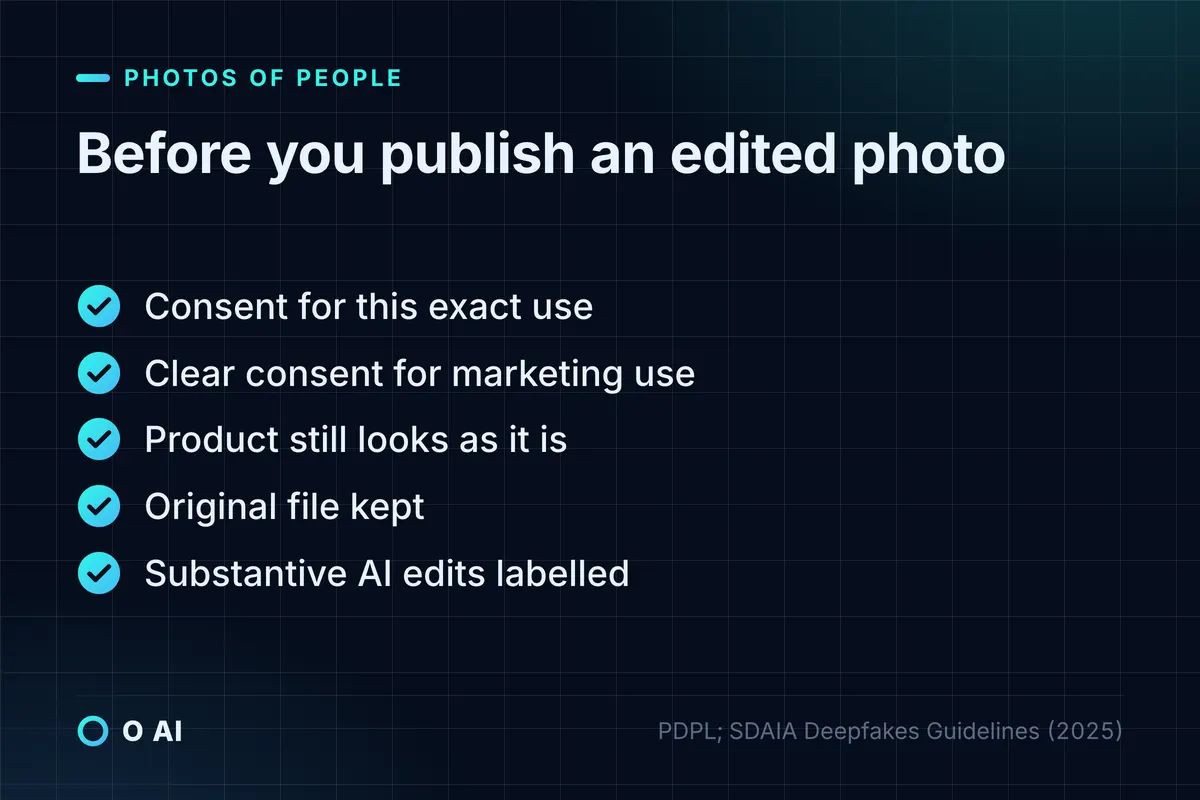
SDAIA's Deepfakes Guidelines turn this into working practice for anyone creating synthetic images of people: secure consent before using a person's data, keep consent records, use the data only for the agreed purpose, and honour withdrawal [14]. They also tell retailers not to present products in a way that misrepresents their appearance or quality [14], which applies directly to retouched product photos. The guidelines include a sample consent form you can adapt [14].
This section is general information, not legal advice; for a specific case, check the official text or ask a licensed advisor.
Labelling AI-edited photos
Some tools already record the edit for you. Google Photos adds Content Credentials when generative AI, such as Magic Eraser, creates new pixels, and shows "Edited with AI tools" under More, then About, then "How this was made" in the mobile app [15]. Adobe attaches Content Credentials to Firefly outputs automatically [10].
Metadata is easy to lose, though: a screenshot or a re-export can strip it. SDAIA's guidelines recommend visible disclosure for synthetic content, through labels or on-screen text, or in the credits or description where the context makes it clear [14]. A practical line for a business:
- No label needed: crop, brightness, colour correction, background blur.
- Label it: a removed or added person, a merged scene, a changed product, an aged or "restored" face, or anything a viewer could mistake for a record of what happened.
A 7-step workflow for product and team photos
- Check the rights. Is it your photo, a licensed stock photo, or someone else's? If someone else's, get permission first.
- Check the people. Anyone recognisable needs consent for the specific use, in writing for marketing.
- Choose where it is processed. For photos of customers or staff, prefer an on-device tool such as Windows Photos, or a business account whose terms you have read.
- Keep the original in a folder the editors cannot overwrite.
- Edit for the job, not more: remove the background, fix the light, stop.
- Review at 100% zoom for invented text, warped hands, changed product details and odd edges.
- Label substantive edits and keep a note of the tool and date.
If personal photos will be uploaded to tools hosted abroad, our guide to data residency in Saudi Arabia explains the transfer conditions.
Your next step
Pick one recurring photo job this week, such as product cut-outs or team headshots, and run the same five photos through two of the AI photo editing tools above, one free and one paid. Count the minutes and the fixes each result needs, and check that every person in the photos has agreed to the use. To turn that test into a two-week trial with a clear measure, see our guide on how AI can help your business. If you later need editing built into your own store or systems, you can read about O AI, a software and AI company in Al Khobar, on our home page.
Frequently asked questions
Can I edit photos with AI for free?
Yes. On 14 October 2026, Adobe Firefly offered a free background remover and upscaler with a free Adobe account, Google Photos and the Windows Photos app included AI erase tools, and the free Gemini and ChatGPT accounts could edit uploaded images within daily limits. Paid plans add volume, batch processing and precise tools: Canva Pro cost SAR 450 a year in Saudi Arabia and Photoshop SAR 99.11 a month including VAT on an annual plan.
Does AI upscaling really improve photo quality?
It makes a photo larger and sharper, but part of the detail is predicted, not recovered. That works well for a social post, a product listing or an old family print. It is not appropriate for ID photos, documents, insurance claims or anything used as evidence, because an invented detail becomes a false record. Keep the original file and, where a reader might rely on the image, say that it was enhanced.
Is it legal to edit someone else's photo with AI in Saudi Arabia?
It depends on the use. Saudi Arabia's Personal Data Protection Law treats a person's images as personal data and generally requires their consent, although purely personal or family use that is not published falls outside it. Publishing an edited photo that invades someone's privacy or defames them can fall under the Anti-Cyber Crime Law, and reusing another person's photo can infringe copyright. For a specific case, ask a licensed advisor.
How do I merge two photos with AI?
Upload both photos to a tool that accepts several images, such as the Gemini app, or open one in ChatGPT Images or Photoshop and describe what to add. Say where the light comes from, how large each element should be and where shadows fall. Then compare the result with the originals at full size, because merges often change faces, hands and small details. Users under 18 cannot edit images in the Gemini app.
Should I tell people a photo was edited with AI?
For small corrections such as cropping, brightness or a blurred background, no label is needed. For edits that change what the photo shows, such as removing or adding a person, merging scenes or altering a product, a short label like "edited with AI" protects your credibility. SDAIA's Deepfakes Guidelines recommend visible disclosure for synthetic content, and tools such as Google Photos and Adobe Firefly add Content Credentials automatically.
Which AI photo editing tool is best?
No single tool leads every job. Free tools from Adobe, Google and Microsoft handle background removal and object erasing well; Canva suits teams producing many social and product images; Photoshop suits precise retouching and composites; Gemini and ChatGPT are quickest for merges and style changes described in words. Compare two tools on the same five photos from your own work, and check the price model and where your photos are processed.
How this article was made: Researched from the sources listed below, opened on 14 October 2026. Drafted with AI assistance, then checked against those sources. General information, not professional advice. Images are AI-generated illustrations.
Sources
- Free image background remover in Adobe Firefly (opens in a new tab)Adobe · adobe.com
- Canva pricing: Free, Pro, Business and Enterprise plans (prices shown in Saudi Arabia) (opens in a new tab)Canva · canva.com
- Edit photos and videos in Windows (opens in a new tab)Microsoft Support · support.microsoft.com
- Edit your photos (opens in a new tab)Google Photos Help · support.google.com
- AI image upscaler in Adobe Firefly (opens in a new tab)Adobe · adobe.com
- Super resolution in Photos (opens in a new tab)Microsoft Support · support.microsoft.com
- Generate and edit images with Gemini Apps (opens in a new tab)Google Gemini Apps Help · support.google.com
- Images in ChatGPT (opens in a new tab)OpenAI Help Center · help.openai.com
- Photoshop plans and pricing (prices shown in Saudi Arabia) (opens in a new tab)Adobe · adobe.com
- Adobe Firefly plans (prices shown in Saudi Arabia) (opens in a new tab)Adobe · adobe.com
- Personal Data Protection Law, with amendments (in Arabic) (opens in a new tab)Bureau of Experts at the Council of Ministers · laws.boe.gov.sa
- Anti-Cyber Crime Law (in Arabic) (opens in a new tab)Bureau of Experts at the Council of Ministers · laws.boe.gov.sa
- Saudi Arabia issues SR9,000 fine in first AI copyright violation case (September 2025) (opens in a new tab)Gulf News · gulfnews.com
- Deepfakes Guidelines: Mitigating Risks While Fostering Innovation (2025) (opens in a new tab)Saudi Data and AI Authority (SDAIA) · sdaia.gov.sa
- How Google Photos helps you identify how photos and videos were made (opens in a new tab)Google Photos Help · support.google.com
About the author
Newsletter
New guides and news by email
New guides and news about O AI, Rushd and Dalni, at most twice a month. No spam.