 AI
AI

How to create a Google Ads campaign for the first time: budget, keywords and tracking
A step-by-step guide to a first Google Ads Search campaign for businesses in Saudi Arabia: what to prepare, which settings to choose, how to size a daily budget, keywords and match types, ad writing, conversion tracking, a 30-day review routine and the rules that can stop your ads.


Key takeaways
- Google requires at least one conversion goal to create a Search campaign, so set up tracking before you spend.
- A campaign can spend up to twice its daily budget on one day but no more than 30.4 times it in a month: SAR 100 a day caps at SAR 3,040.
- Responsive search ads take up to 15 headlines of 30 characters and 4 descriptions of 90; Google advises most advertisers not to pin text.
- Start with phrase and exact match keywords in Arabic and English, add negative keywords from day one, and read the search terms report weekly.
- Saudi Arabia's E-Commerce Law requires an online ad to name the product, the provider and its contact details, and bans misleading claims.
On this page
- Before you create a Google Ads campaign: four things to prepare
- Step by step: setting up your first Search campaign
- How much budget for a first Google Ads campaign?
- Choosing keywords: match types, negatives and Arabic variants
- Writing ads that earn the click
- Tracking: know which clicks became customers
- The first 30 days: a weekly review routine
- Policies and Saudi rules that can stop your ads
- Common first-campaign mistakes
- Your next step
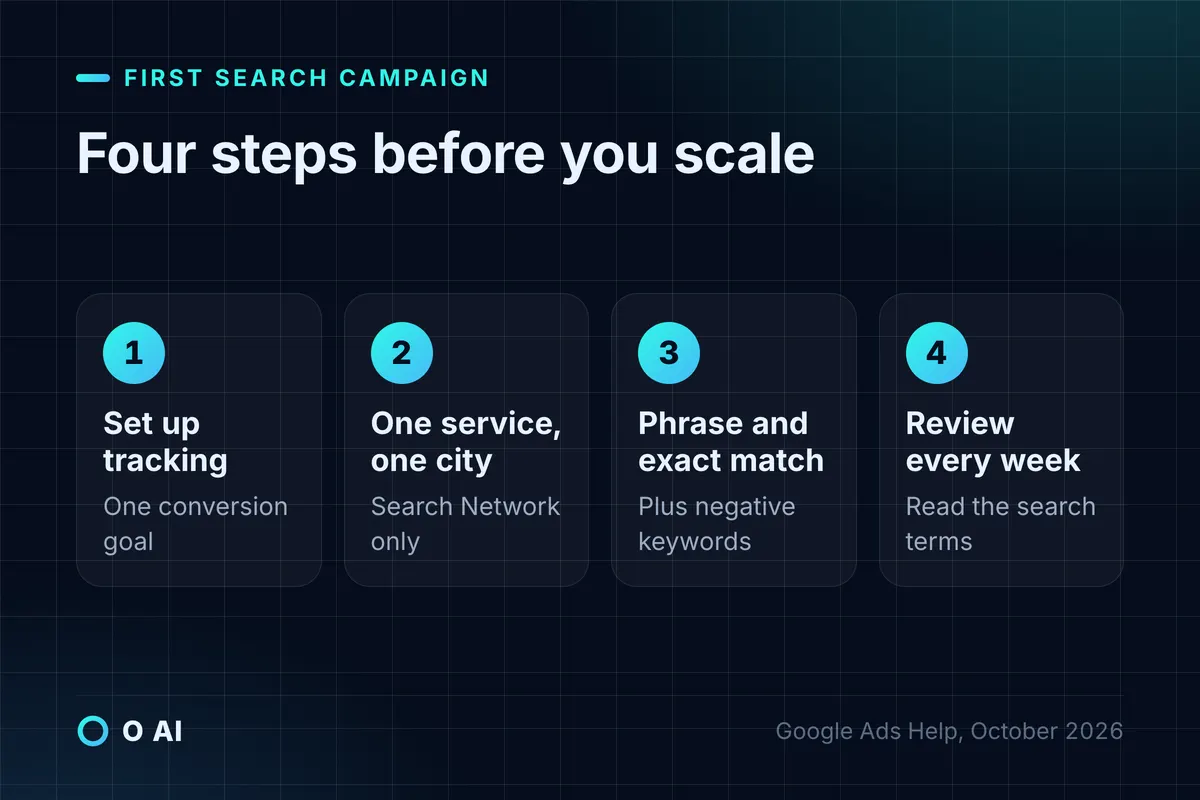
To create a Google Ads campaign that pays for itself, set up conversion tracking before you spend anything. Start with one Search campaign for one service in one city, a daily budget you can afford to learn with, a short list of phrase and exact match keywords, and at least three ads in each ad group.
This guide walks a small business in Saudi Arabia through its first campaign in Google Ads' Search Network: what to prepare, which settings to choose, how to size the budget, how to pick keywords and write ads, and what to check every week. Every rule and limit below was read on Google's own help pages or on Saudi official sources on 14 October 2026. Google changes its interface often, so menu names may differ slightly in your account.
Before you create a Google Ads campaign: four things to prepare
Your customers are already searching on their phones: Google tops the list of most-used search engines in CST's Saudi Internet 2025 report, and 99.6% of internet users go online by mobile phone [1]. Prepare these four things before you open the campaign wizard.
- One clear action you want people to take. A call, a WhatsApp message, a booking or a purchase. Google Ads can count website actions, calls from ads, calls to the number on your site, app installs and offline sales you import [2].
- A landing page for that action. One page per service, fast on a phone, with the price or "from" price if you can show it, your business name, contact details and a single button. Sending every ad to the home page wastes clicks.
- Your conversion goal set up first. Google requires at least one conversion goal to create a Search campaign [3], and without tracking you cannot tell which keyword produced a customer. The Google tag on your site records the action after an ad click [2].
- A decision on area and language. Which city or district you serve, and whether customers search in Arabic, English or both. Most local services in Saudi Arabia need both.
Step by step: setting up your first Search campaign
Google's own sequence is: choose an objective (Sales, Leads or Website traffic), choose Search as the campaign type, set the conversion goal, choose bidding, then networks, locations and languages, then keywords and ads, and finally the budget, review and publish [3]. The table gives a sensible first choice for each setting.
| Setting | First-campaign choice | Why |
|---|---|---|
| Objective | Leads or Sales | It ties bidding to the action you track |
| Campaign type | Search | People are already looking for your service |
| Bidding | Conversions (Maximize conversions) once tracking works; Clicks only if you have no conversion tracking yet | Google advises matching the bid strategy to the objective [3] |
| Networks | Untick the Display Network | The box extends a Search campaign to other sites [3]; keep the first test on search results |
| Locations | Your service area, with "Presence" if you only serve people physically there | Google recommends broad "Presence or interest" targeting in general but suggests "Presence" when you only want people in specific locations [4] |
| Languages | Arabic and English | Many customers search in both |
| Ad groups | One per service, each with its own keywords and landing page | Keeps ads relevant to the search |
| Ads | At least 3 per ad group | Google recommends this when creating a Search campaign [3] |
| Budget | A daily budget you can sustain for at least a month | See the next section |
Run the campaign at hours when someone can answer the phone or WhatsApp. CST's report puts the daily peak of internet use between 9 pm and 11 pm, with Friday as the busiest day [1], so either staff those hours or expect the leads to wait until morning. If leads arrive on WhatsApp, our guide to a WhatsApp chatbot for business explains what an assistant can answer after hours and when it must hand over to a person.
How much budget for a first Google Ads campaign?
Google Ads works with an average daily budget. On a given day a campaign may spend up to twice that amount to catch busy periods, but over a month it will not spend more than 30.4 times the daily budget [5]. Plan your cash around the monthly ceiling, not the daily figure.
To estimate cost per click before you start, Keyword Planner shows search volume estimates and what it costs to target each keyword, and its forecast estimates clicks and conversions for a given spend; you need to finish account setup, including billing details, to use it [6].
Illustrative example: an AC maintenance company in Al Khobar
Illustrative example. The figures below are assumptions for a worked calculation, not market rates. Check your own estimates in Keyword Planner.
| Item | Calculation | Result |
|---|---|---|
| Daily budget | Chosen by the owner | SAR 100 |
| Highest possible spend on one day | 2 × SAR 100 | SAR 200 |
| Most the campaign can spend in a month | 30.4 × SAR 100 | SAR 3,040 |
| Clicks if the average cost per click is SAR 5 | SAR 3,040 ÷ SAR 5 | About 600 |
| Leads if 8% of clicks call or message | 8% × 600 | 48 |
| Cost per lead | SAR 3,040 ÷ 48 | About SAR 63 |
| Jobs if 1 lead in 3 books | 48 ÷ 3 | 16 |
| Ad cost per job | SAR 3,040 ÷ 16 | SAR 190 |
If the company earns more than SAR 190 in profit on an average job, the campaign pays for itself at these assumptions. If your real cost per click or conversion rate turns out worse after a month, you know exactly which number to fix: the keywords, the ads or the landing page.

Choosing keywords: match types, negatives and Arabic variants
Keywords decide which searches can show your ad. Google offers three match types [7]:
| Match type | How you write it | What it matches | Use it for |
|---|---|---|---|
| Broad | ac repair | Searches related to the keyword, even without its words | Later, with Smart Bidding; Google calls Smart Bidding critical with broad match [7] |
| Phrase | "ac repair" | Searches that include the meaning of the keyword | Your main first-campaign keywords |
| Exact | [ac repair khobar] | Searches with the same meaning or intent | Your best-performing, high-intent terms |
Start with 10 to 20 phrase and exact match keywords per service, written the way customers type: the city name, dialect words, and both Arabic and English. For an AC company that means terms such as «صيانة مكيفات الخبر», «تصليح مكيف سبليت» and "ac repair khobar", not just the formal name of the service.
Add negative keywords from day one to block searches you do not want, such as jobs, courses, "used" or "for sale" when you only repair. Negative keywords do not match close variants, so add the singular and plural or the common spellings yourself, and remember that an ad can still show for searches longer than 16 words [8].

Writing ads that earn the click
Search ads in Google Ads are responsive search ads. You can provide up to 15 headlines and 4 descriptions, with at least 3 headlines and 2 descriptions; headlines allow up to 30 characters, descriptions up to 90, and each of the two display-path fields up to 15 [9]. Google then tests combinations. It advises against pinning text to fixed positions for most advertisers, because pinning can lower Ad Strength [9].
Good ad writing for a local service follows a simple pattern: say what you do and where, give one concrete reason to choose you, and tell people what to do next.
Illustrative example. Headlines for the AC company (each under 30 characters):
- «صيانة مكيفات في الخبر»
- «فنيون للسبليت والمركزي»
- «احجز موعدك عبر واتساب»
- "AC Repair in Al Khobar"
- "Book a Technician Today"
A description (under 90 characters): «تشخيص وإصلاح مكيفات السبليت والمركزي في الخبر والظهران. اتصل أو احجز عبر واتساب.»
Only promise what is true and current. A same-day visit, a price or a warranty in an ad is a commitment to the customer, as the next sections explain. AI assistants can draft dozens of headline variants quickly, but a person should check every claim; our guide on how AI can help your business shows how to test one such task before relying on it.
Tracking: know which clicks became customers
Conversion tracking is what turns Google Ads from spending into a measurable channel. Track the actions that matter most for a service business: form submissions and bookings on the website, clicks on the WhatsApp or call button, and calls from the ads themselves [2]. If you use Google Analytics, only events marked as key events can be imported into Google Ads as conversions [2].
Once you have results, Quality Score helps diagnose weak keywords. It is a 1 to 10 rating per keyword, built from expected click-through rate, ad relevance and landing-page experience. Google describes it as a diagnostic tool and says it is not an input in the ad auction [10], so use it to find problems, not as a goal.
The tag on your site collects data about visitors, so your landing page should link to a privacy policy. Saudi Arabia's Personal Data Protection Law requires a privacy policy available to people when their data is collected (Article 12), and it allows personal data to be processed for marketing only if it was collected from the person directly and they consented (Article 26) [11]. That matters if you plan to upload customer lists for targeting. If your tracking and CRM tools store data abroad, our guide to data residency in Saudi Arabia explains the transfer conditions. This is general information; for your case, check SDAIA's guidance or ask a licensed advisor.
The first 30 days: a weekly review routine
New campaigns need a few weeks of data, so change little and review on a fixed day each week.
| Week | Check | Typical action |
|---|---|---|
| 1 | Ads approved, conversions recording, phone and WhatsApp answered | Fix tracking before anything else |
| 2 | The search terms report: what people actually typed before seeing your ad [12] | Add irrelevant terms as negative keywords; add good ones as keywords |
| 3 | Cost per lead by keyword and ad group | Pause keywords that spend without leads; move budget to the ones that work |
| 4 | Total leads, cost per lead and the jobs that resulted | Decide whether to keep the budget, raise it or fix the landing page first |
Note that the search terms report does not show every search: Google leaves out some low-volume terms for privacy [12]. Read what it shows anyway; it is the fastest way to stop paying for the wrong searches.
Policies and Saudi rules that can stop your ads
Google reviews ads against four groups of policies: prohibited content, prohibited practices such as misrepresentation, restricted content such as healthcare, financial products and alcohol, and editorial and technical standards. Landing pages must be functional, useful and easy to navigate, so a page under construction or a mismatched display URL can get an ad disapproved [13].
Google is also rolling out advertiser verification to all advertisers. A selected account must complete it by the deadline it is given; the organisation name must match the documents submitted, and in some cases Google pauses the account until verification is done [14]. Verified advertisers' names and locations appear in the ad disclosure and in the Ads Transparency Center [14].
Saudi law applies too. The E-Commerce Law treats an electronic ad as part of the contract with the customer, requires it to state the product or service, the provider's name and contact details, and bans false or misleading claims and trademarks the advertiser has no right to use (Articles 10 and 11) [15]. In practice, keep your business name and contact details visible in the ad's assets or on the landing page, and make sure every price, discount and "same day" promise is one you honour. The Ministry of Commerce can require a non-compliant ad to be removed within one day of notice [15].
Common first-campaign mistakes
- Spending before conversion tracking works, then guessing which keywords brought customers.
- Leaving the Display Network ticked in a Search campaign, so part of the budget goes to other websites [3].
- Using broad match with manual bids on day one, against Google's advice to pair broad match with Smart Bidding [7].
- Targeting people "interested in" your city when you can only serve people who are there [4].
- One ad group for every service, all pointing to the home page.
- Never reading the search terms report, so irrelevant searches keep spending [12].
- Changing bids, keywords and ads every day, so nothing gets enough data to judge.
Your next step
This week, set up one conversion goal and confirm it records a test call or form. Then create a Google Ads campaign for your single most profitable service in one city, with 10 to 20 phrase and exact keywords, three ads and a daily budget you can hold for a month. Put a weekly 30-minute review in your calendar for the first four weeks, and judge the campaign on cost per lead and real jobs, not clicks.
Frequently asked questions
How much should I spend on my first Google Ads campaign?
Choose a daily budget you can sustain for at least a month, because the first weeks are for learning. Google may spend up to twice the daily budget on a busy day but no more than 30.4 times it in a month, so a SAR 100 daily budget means at most SAR 3,040 a month. Use Keyword Planner's cost estimates and your own profit per sale to check whether the expected cost per customer makes sense.
Should I bid for clicks or for conversions at the start?
Google advises matching the bid strategy to your objective: conversions for sales or leads, clicks for website traffic. If your conversion tracking works, a conversion-based strategy lets Google learn which searches turn into customers. If you cannot track conversions yet, a clicks-based strategy is a stopgap, but fix tracking first, because without it you cannot tell which keywords are worth paying for.
Can I show my Google ads in only one city?
Yes. In the campaign's location settings you choose the cities, regions or areas where ads can appear, and you can exclude places. Google recommends its broader "Presence or interest" option in general, but suggests "Presence" when you only want to reach people in specific locations, which suits most local services such as maintenance, clinics and restaurants that serve only their own area.
Should my Google ads be in Arabic or English?
For most businesses in Saudi Arabia, both. Many customers search in Arabic, often in dialect, while others type in English or mix the two. Target both languages in the campaign settings, write keywords the way people actually type them in each language, and create separate ads so that Arabic searches see Arabic text and English searches see English text, each linking to a landing page in the same language.
Do I need a website to advertise on Google?
For a Search campaign you need a destination for the click, and Google's destination requirements say landing pages must be functional, useful and easy to navigate. A single fast page per service, with your business name, contact details and one clear action, is enough to start. Pages under construction or display URLs that do not match the landing page can lead to disapproved ads.
What is a good Quality Score in Google Ads?
Quality Score is a 1 to 10 rating for each keyword, based on expected click-through rate, ad relevance and landing-page experience. Google treats it as a diagnostic, not an input in the auction, so do not chase a number for its own sake. A low score points you to the weak part: a keyword that does not match the ad, an ad that does not match the search, or a slow or irrelevant landing page.
Why is my new ad not showing?
Common reasons include an ad still under review or disapproved under Google's policies, a pending advertiser verification, a budget that runs out early in the day, keywords that are too narrow, location or language settings that exclude your customers, or a negative keyword that blocks your own search. Check the status columns for the campaign, ad group, ads and keywords first; they usually name the problem.
How this article was made: Researched from the sources listed below, opened on 14 October 2026. Drafted with AI assistance, then checked against those sources. General information, not professional advice. Images are AI-generated illustrations.
Sources
- Saudi Internet 2025 (opens in a new tab)Communications, Space and Technology Commission (CST) · cst.gov.sa
- About conversion measurement (opens in a new tab)Google Ads Help · support.google.com
- Create a Search campaign (opens in a new tab)Google Ads Help · support.google.com
- Target ads to geographic locations (opens in a new tab)Google Ads Help · support.google.com
- About overdelivery and your average daily budget (opens in a new tab)Google Ads Help · support.google.com
- Use Keyword Planner (opens in a new tab)Google Ads Help · support.google.com
- About keyword matching options (opens in a new tab)Google Ads Help · support.google.com
- About negative keywords (opens in a new tab)Google Ads Help · support.google.com
- About responsive search ads (opens in a new tab)Google Ads Help · support.google.com
- About Quality Score for Search campaigns (opens in a new tab)Google Ads Help · support.google.com
- Personal Data Protection Law, with amendments (in Arabic) (opens in a new tab)Bureau of Experts at the Council of Ministers · laws.boe.gov.sa
- About the search terms report (opens in a new tab)Google Ads Help · support.google.com
- Google Ads policies (opens in a new tab)Advertising Policies Help · support.google.com
- Advertiser verification (opens in a new tab)Advertising Policies Help · support.google.com
- E-Commerce Law (in Arabic) (opens in a new tab)Bureau of Experts at the Council of Ministers · laws.boe.gov.sa
About the author
Newsletter
New guides and news by email
New guides and news about O AI, Rushd and Dalni, at most twice a month. No spam.