 AI


E-invoicing software: Phase 2 requirements and integration with Fatoora
What Phase 2 e-invoicing software must do in Saudi Arabia: XML, stamps, hash chains, clearance and 24-hour reporting through Fatoora. With ZATCA's waves and deadlines checked on 14 October 2026, onboarding steps, prohibited functions and a ten-question buyer's checklist.


Key takeaways
- Phase 2 requires e-invoicing software that issues XML invoices, stamps and hash-chains them, and connects to ZATCA's Fatoora platform by API.
- Standard tax invoices must be cleared by ZATCA before reaching the buyer; simplified invoices are stamped by your solution and reported within 24 hours.
- As of 14 October 2026 the latest wave is Wave 25: VAT-subject revenue above SAR 187,500 in 2022–2025, with integration by 1 February 2027.
- Each unit that issues invoices is onboarded on the Fatoora portal with a one-time password; until your notified date, Phase 1 rules apply.
- ZATCA's Solution Providers Directory is indicative only: any solution that meets the requirements is compliant, listed or not.
On this page
- What Phase 2 of e-invoicing requires
- Phase 2 waves and timelines, checked 14 October 2026
- What e-invoicing software must do in Phase 2
- How integration with Fatoora works, step by step
- Clearance and reporting in daily use
- Choosing Phase 2 e-invoicing software: a buyer's checklist
- Is there free e-invoicing software for Phase 2?
- Mistakes that break compliance after go-live
- Your next step
E-invoicing software for Phase 2 must produce invoices in XML, stamp and chain every document, and connect to ZATCA's Fatoora platform by API: standard invoices are cleared before they reach the buyer, simplified ones reported within 24 hours. ZATCA rolls Phase 2 out in waves; Wave 25 reaches businesses above SAR 187,500.
This guide covers the software side: what a Phase 2 solution must do, how waves and deadlines work, how onboarding with Fatoora runs, and how to choose a system. Every rule and date below was checked on zatca.gov.sa on 14 October 2026. It is general information, not tax or legal advice; for your own case, follow ZATCA's notification to you or ask a licensed advisor.
What Phase 2 of e-invoicing requires
Saudi e-invoicing has two phases. Phase 1, the Generation Phase, has applied since 4 December 2021: taxpayers must generate and store tax invoices and notes in an electronic solution that meets Phase 1 requirements. Phase 2, the Integration Phase, began on 1 January 2023 and is rolled out in waves by taxpayer group [1].
Phase 2 adds three things, in ZATCA's words: integrating your e-invoicing solution with its Fatoora platform, issuing e-invoices in a specific format, and including additional fields in the invoice [5]. In practice, two flows replace "print and hand over":
- Clearance for standard tax invoices (usually business to business). Your system sends each invoice to Fatoora before sharing it; ZATCA validates it, adds its cryptographic stamp and QR code, and returns the cleared invoice for you to send to the buyer [3].
- Reporting for simplified tax invoices (usually business to consumer). Your system stamps the invoice itself, gives it to the customer, and uploads it to Fatoora within 24 hours of issue [2][3].
ZATCA's detailed guideline compares the two phases requirement by requirement [3]:
| Requirement | Phase 1 (since 4 December 2021) | Phase 2 (by wave, from 1 January 2023) |
|---|---|---|
| Invoice format | No format mandated | XML, or PDF/A-3 with embedded XML |
| QR code | On simplified invoices | On all invoices; ZATCA generates it for standard invoices at clearance |
| Cryptographic stamp | Not mandated | Applied by ZATCA (standard) or by your solution (simplified) |
| Device registration | Not mandated | Each solution unit onboarded on Fatoora |
| UUID and invoice hash | Not mandated | In every invoice |
| Connectivity | Able to connect to the internet | Real-time API for clearance; upload for reporting |
| Sharing with ZATCA | None | Clearance (standard) and reporting within 24 hours (simplified) |
Phase 2 waves and timelines, checked 14 October 2026
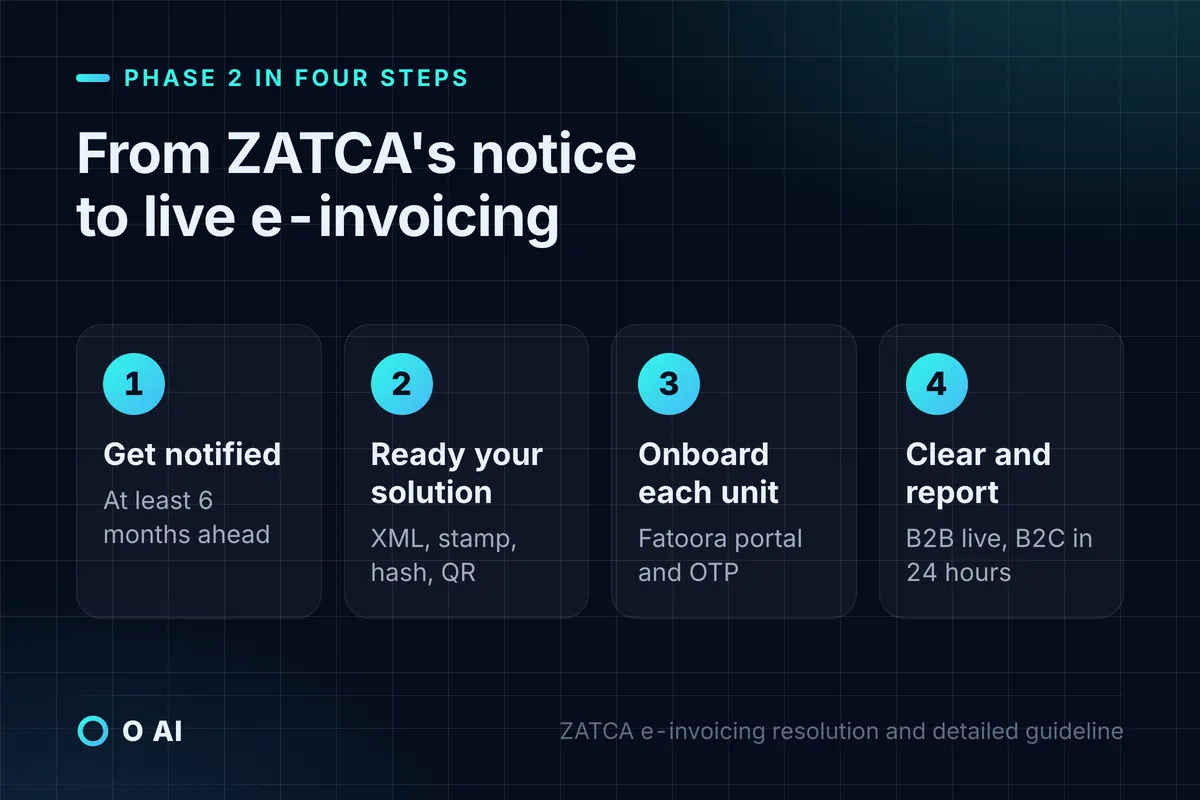
ZATCA selects each wave by VAT-subject revenue in reference years, and notifies taxpayers at least six months before their integration date [1][2]. ZATCA's roll-out page presents its wave table as an image, so the rows below come from ZATCA's individual announcements.
| Wave | Selected if VAT-subject revenue exceeded | Reference years | Integration date or deadline |
|---|---|---|---|
| 1 | SAR 3 billion | 2021 | From 1 January 2023 [5] |
| 21 | SAR 1.25 million | 2022, 2023 or 2024 | Notified to integrate by 30 November 2025 [6] |
| 22 | SAR 1 million | 2022, 2023 or 2024 | Notified to integrate by 31 December 2025 [7] |
| 23 | SAR 750,000 | 2022, 2023 or 2024 | Integration before 31 March 2026 [8] |
| 24 | SAR 375,000 | 2022, 2023 or 2024 | Notified to integrate by 30 June 2026 [9] |
| 25 | SAR 187,500 | 2022, 2023, 2024 or 2025 | Notified to integrate by 1 February 2027 [10] |
Three points help you read the table:
- Any one year is enough. If your revenue crossed the threshold in any listed reference year, you are in that wave, even if it fell later [6][10].
- Wave 25 is the latest announced. ZATCA published it on 24 July 2026, and no later wave appeared in its news list when we checked on 14 October 2026 [10].
- Until your date, Phase 1 applies. A taxpayer keeps following Phase 1 requirements until its wave's integration date [3]. Your actual date is the one in ZATCA's notification to you, not a press release.
What e-invoicing software must do in Phase 2
ZATCA's e-invoicing resolution (the controls and technical specifications) and its detailed guideline set out what a compliant solution must do [2][3]. Use this as the requirements list for any system you buy or build.
Format and content
- Generate invoices and credit and debit notes as XML following ZATCA's XML Implementation Standard, which is based on UBL 2.1 [2][4].
- Produce a human-readable version: PDF/A-3 with the XML embedded for standard invoices, and a printout or agreed electronic copy for simplified ones [2][3].
- Carry every mandatory field in Annex 2 of the resolution, and pass the business rules attached to conditional fields [2].
Security and integrity
- Give each invoice a UUID and increment a tamper-resistant counter for every invoice and note [2].
- Link each invoice to the previous one by placing the previous invoice's hash in it, so the chain cannot be reordered [3].
- For simplified invoices, hold a cryptographic stamp identifier (CSID) issued through ZATCA's portal, and generate a stamping key that cannot be exported, protected by disk encryption when stored in software [2].
- Print a QR code: for simplified invoices in Phase 2 it carries nine fields, from the seller's name and VAT number to the hash, the signature and the public key [2][3].
Connectivity
- Connect over an encrypted, authenticated channel such as TLS [2].
- Submit standard invoices in real time and receive ZATCA's response; upload simplified invoices in batches [2].
- Keep working offline: queue invoices and report them once the connection returns [2].
Prohibited functions
ZATCA treats a solution with any of these enabled as non-compliant [2][3]:
| Prohibited function | What it means in practice |
|---|---|
| Uncontrolled access | Anonymous log-in, default passwords, no user-session log |
| Tampering | Editing or deleting issued invoices or notes, editing logs, inaccurate timestamps, non-sequential logs, counter resets |
| Multiple sequences | One unit running more than one invoice sequence at a time |
| Exporting the stamping key | Any option to copy the private key out of the solution |
| Time changes | Letting users change the system time or an invoice timestamp |
To "cancel" an invoice, the solution must issue a credit note and a new invoice; deleting is not an option [3].
How integration with Fatoora works, step by step
Fatoora is not where you write invoices. It is ZATCA's portal for onboarding your e-invoicing units and receiving invoice data; the invoices themselves still come from your own solution [3]. Onboarding links each unit, such as a cash register or an accounting system, to your VAT account. ZATCA's guides describe the steps [3][11]:
- ZATCA notifies you of your wave and integration date.
- Log in to the Fatoora portal (fatoora.zatca.gov.sa) with your ERAD credentials, the same account you use for ZATCA's e-services.
- Choose "onboard a device" for each unit that issues invoices.
- Generate a one-time password (OTP) for that unit.
- Enter the OTP in your e-invoicing solution to complete the onboarding of that unit.
- Check in the portal that the unit shows as onboarded, then start issuing Phase 2 invoices.
The same portal lets you renew or revoke a unit's stamp identifier and see every onboarded solution and device [3]. A new branch or a replacement till is a new unit, so build onboarding into your branch-opening checklist.
Before go-live, developers can test against ZATCA's sandbox through the e-invoicing developer portal [12]. ZATCA describes its toolkit as a sandbox, an SDK and a web-based validator for checking that a solution produces compliant invoices [3].
Clearance and reporting in daily use
Fatoora answers every submission. ZATCA's guideline sets out what to do with each outcome [3]:
| What happens | What to do |
|---|---|
| Accepted | Nothing; share the cleared invoice |
| Accepted with warnings (for example, a missing building number) | Fix the cause for the next invoice; warnings may become rejections later |
| Rejected (missing mandatory fields, wrong VAT values) | Correct the invoice and resubmit |
| No response, ZATCA servers busy or down | Keep resubmitting at intervals until it goes through |
| No internet or a broken device at your end | Report the failure to ZATCA, keep records, and submit once fixed |
ZATCA runs a failure-notification service for incidents that stop you generating or integrating e-invoices. You report the incident, report again when it is fixed, then promptly issue and integrate the invoices for sales made during the outage [13][2]. For simplified invoices, the 24-hour reporting window is the line to watch: if you cannot report within it, ZATCA's guideline expects you to notify it through that form [3].
Choosing Phase 2 e-invoicing software: a buyer's checklist
ZATCA publishes a Solution Providers Directory of companies that have passed its qualification process for Phase 1 or Phase 2. ZATCA calls it an indicative, non-binding list, says it is not an approval of any solution, and states that you are compliant with any solution that meets the requirements, even if its provider is not listed [14]. Treat the directory as a starting point, then test.
Ask every candidate, in writing:
- Phase 2 status. Has the solution completed ZATCA's qualification for Phase 2, and can you see it onboarded in a sandbox?
- Both flows. Does it clear standard invoices in real time and report simplified invoices within 24 hours, including credit and debit notes?
- Units and branches. How are tills, branches and users onboarded, and how is each unit's single sequence kept?
- Offline behaviour. What happens to sales when the internet drops, and how are queued invoices reported?
- Warnings and rejections. Who sees Fatoora's responses, and who fixes recurring warnings?
- Arabic output. Is every visible field in Arabic, with English only as a translation?
- Special cases you need. Advance-payment invoices and their later adjustment, exports, zero-rated and exempt lines, summary invoices [3].
- Archive and exit. Can you export all XML and PDF/A-3 files under ZATCA's naming rule (VAT number, issue date, time and invoice number) if you leave [2]?
- Hosting. Where are invoices stored, and can ZATCA reach them for audit? ZATCA's guideline allows cloud hosting provided the data is accessible to it through a direct link [3].
- Stamp identifier care. How are CSIDs renewed, and who in your company is alerted before one expires?
Our guide to choosing a software company in Saudi Arabia gives a way to score vendors' written answers before you compare prices.
Is there free e-invoicing software for Phase 2?
None of the ZATCA pages we checked on 14 October 2026 offers ready-made invoicing software for businesses. What ZATCA does publish are the specifications, the developer portal and sandbox, the Solution Providers Directory and the VAT app that reads QR codes [3][12][14]. ZATCA also confirms that a cloud system is not required: any invoicing system is acceptable if it meets the requirements [15].
If a provider offers a free plan, check it against the same list as a paid one. Free tiers often limit the number of invoices, users or devices, and the limits matter once each till needs its own onboarding. Confirm in writing that the free plan covers both clearance and reporting, credit notes, and a full XML export of your archive, since you must keep invoices for years after the plan or the provider changes.
Mistakes that break compliance after go-live
- Sharing a standard invoice before clearance. In Phase 2, clearance is a precondition for the invoice to be valid and shared [3].
- Deleting or editing an issued invoice instead of issuing a credit note [3].
- Missing the 24-hour reporting window for simplified invoices without notifying ZATCA [3].
- Issuing from a unit that was never onboarded, such as a new branch till [2].
- Changing the device's date or time, or resetting an invoice counter [2].
- Ignoring repeated warnings. ZATCA says continuous warnings will be investigated [3].
The resolution states that the penalties in the VAT Law apply to violations of the e-invoicing rules, according to the violation classifications set by ZATCA's board [2].
Your next step
Find ZATCA's notification for your wave, or check your revenue against the thresholds above. Then list every unit that issues invoices today (tills, branch systems, the accounting package), ask your provider the ten checklist questions, and book a sandbox test before your integration date. If your e-invoicing software has to talk to an ERP or other systems you run, our guide to custom software development in Saudi Arabia explains when to connect and when to build. O AI is a software and AI company in Al Khobar; more on our home page. Our ERP and business systems page describes the business systems we build.
Frequently asked questions
When must my business integrate with Fatoora for Phase 2?
On the date in ZATCA's notification to you. ZATCA selects waves by VAT-subject revenue in reference years and notifies each wave at least six months before its integration date. As of 14 October 2026 the latest announced wave, Wave 25, covers taxpayers whose VAT-subject revenue exceeded SAR 187,500 in 2022, 2023, 2024 or 2025, with integration by no later than 1 February 2027. Until your date, Phase 1 rules continue to apply.
What is the difference between clearance and reporting?
Clearance applies to standard tax invoices: your system sends each invoice to Fatoora before the buyer receives it, and ZATCA validates it, stamps it and adds the QR code. Reporting applies to simplified tax invoices: your own system stamps the invoice, hands it to the customer and uploads it to Fatoora within 24 hours of issue. Credit and debit notes follow the same route as the invoice type they correct.
Does my e-invoicing software have to be on ZATCA's list of solution providers?
No. ZATCA's Solution Providers Directory is an indicative, non-binding list of providers that passed its qualification process, and ZATCA says it is not an approval of any solution. A taxpayer using any solution that meets the e-invoicing requirements is considered compliant even if the provider is not listed. The list is still a useful place to start a shortlist.
Do I need cloud software for Phase 2?
No. ZATCA states that any invoicing system can be used provided it meets its requirements, whether it is installed on a computer, runs on a tablet or point-of-sale device, or is cloud-based. What Phase 2 does require is internet connectivity for clearance and reporting, an onboarded unit for each device that issues invoices, and records ZATCA can access for audit.
What happens if the internet or ZATCA's system is down?
Keep trading and keep records. For simplified invoices, your solution should queue them and report them once the connection returns, within the 24-hour window where possible. If ZATCA's servers are unresponsive, keep resubmitting at intervals. If an incident on your side stops you generating or integrating invoices, notify ZATCA through its failure-notification service, notify it again when fixed, and submit the invoices made during the outage.
Can I keep using my Phase 1 system after my wave starts?
Only if it has been upgraded to meet Phase 2 requirements and onboarded on Fatoora. A Phase 1 solution may generate electronic invoices without XML, stamps, UUIDs or hashes, which is not enough in Phase 2. Ask your provider whether your current version is Phase 2 capable and qualified, and plan the upgrade and the onboarding of every unit before your integration date.
Is there a free e-invoicing program from ZATCA?
None of the ZATCA pages we checked offers ready-made invoicing software for businesses. ZATCA publishes the technical specifications, a developer portal with a sandbox, the Solution Providers Directory and a VAT app that scans invoice QR codes. If a vendor offers a free plan, check that it covers clearance, reporting, credit notes and a full archive export before you rely on it.
How this article was made: Researched from the sources listed below, opened on 14 October 2026. Drafted with AI assistance, then checked against those sources. General information, not professional advice. Images are AI-generated illustrations.
Sources
- E-invoicing roll-out phases (opens in a new tab)Zakat, Tax and Customs Authority (ZATCA) · zatca.gov.sa
- Controls, Requirements, Technical Specifications and Procedural Rules for Implementing the E-Invoicing Regulation (May 2023, unofficial English translation) (opens in a new tab)ZATCA · zatca.gov.sa
- Detailed Guidelines for E-Invoicing, Version 2, May 2023 (opens in a new tab)ZATCA · zatca.gov.sa
- Electronic Invoice XML Implementation Standard, version 1.2 (opens in a new tab)ZATCA · zatca.gov.sa
- ZATCA initiates procedures for implementing Phase Two (Integration Phase) of the e-invoicing project, 24 June 2022 (opens in a new tab)ZATCA · zatca.gov.sa
- E-invoicing: Wave 21 regulations, 28 February 2025 (opens in a new tab)ZATCA · zatca.gov.sa
- Criteria for selecting the targeted taxpayers in Wave 22, 21 March 2025 (opens in a new tab)ZATCA · zatca.gov.sa
- Criteria for selecting the targeted establishments in Wave 23, 27 June 2025 (in Arabic) (opens in a new tab)ZATCA · zatca.gov.sa
- Criteria set for taxpayers in Wave 24 of e-invoicing, 26 September 2025 (opens in a new tab)ZATCA · zatca.gov.sa
- Criteria for selecting the targeted taxpayers in Wave 25, 24 July 2026 (opens in a new tab)ZATCA · zatca.gov.sa
- Simplified Guide: E-invoicing Requirements, Version 1, June 2022 (opens in a new tab)ZATCA · zatca.gov.sa
- E-invoicing: Systems Developers (opens in a new tab)ZATCA · zatca.gov.sa
- E-invoicing failure notifications (opens in a new tab)ZATCA · zatca.gov.sa
- Solution Providers Directory (opens in a new tab)ZATCA · zatca.gov.sa
- Frequently Asked Questions: E-invoicing (Fatoora), August 2021 (opens in a new tab)ZATCA · zatca.gov.sa
About the author
Newsletter
New guides and news by email
New guides and news about O AI, Rushd and Dalni, at most twice a month. No spam.