 AI


How to issue a tax invoice in Saudi Arabia: simplified or standard, with a template
Standard or simplified? The fields ZATCA lists for each type of tax invoice in Saudi Arabia, side by side, with deadlines, language and retention rules, what Phase 2 changes, how to check a QR code in ZATCA's VAT app, and two illustrative templates.


Key takeaways
- Only VAT-registered businesses may issue tax invoices; a non-registered person who issues one or collects VAT faces a fine of up to SAR 100,000.
- Issue a standard tax invoice to businesses and government and a simplified one to consumers; business sales under SAR 1,000 may also take a simplified invoice.
- A simplified invoice needs the date, the supplier's name, address and VAT number, a description, the price, and the VAT or a statement that it includes VAT.
- Issue standard invoices by the 15th of the following month, keep invoices for at least six years, and correct them only by credit or debit note.
- In Phase 2, ZATCA clears standard invoices before they reach the buyer, and simplified invoices must be reported to it within 24 hours.
On this page
- Who can issue a tax invoice in Saudi Arabia?
- Standard or simplified: which tax invoice do you issue?
- Fields required on a standard tax invoice
- Fields required on a simplified tax invoice
- Standard and simplified tax invoices side by side
- When to issue it, how to deliver it, how long to keep it
- Illustrative template: a standard tax invoice
- Illustrative template: a simplified tax invoice
- Phase 2 of e-invoicing: what changes on your invoices
- E-invoice reader: checking the QR code with ZATCA's VAT app
- A ten-point check before you send any tax invoice
- Your next step
A valid tax invoice in Saudi Arabia comes from a VAT-registered business, is generated by a compliant e-invoicing solution, is in Arabic and carries the fields ZATCA lists. Issue a standard tax invoice for sales to businesses and government; a simplified one for consumers, or for business sales under SAR 1,000.
This guide follows ZATCA's Guideline for Tax Invoicing and Records under VAT Provisions, Version 3 of May 2026 [1], the VAT Implementing Regulations [2] and the e-invoicing resolution that lists every invoice field [3]. It gives both field lists side by side, two illustrative templates and the checks to run before you send. It is general information, not tax advice.
Who can issue a tax invoice in Saudi Arabia?
Only a person registered for VAT may issue a tax invoice. Anyone not registered who issues a document intended as a tax invoice, or collects an amount as VAT, faces a fine of up to SAR 100,000 [1][7]. Registration is mandatory once taxable supplies over twelve months exceed SAR 375,000, and voluntary above SAR 187,500 [1].
How you issue it matters as much as what it says. Every taxable person resident in the Kingdom must issue tax invoices electronically under the E-Invoicing Regulation [1]. ZATCA tells businesses to stop issuing handwritten invoices or invoices made in word-processing software [1], and a paper invoice that is scanned or copied into a file is not an electronic invoice [6]. Since 4 December 2021 (Phase 1), invoices must be generated and stored in a compliant e-invoicing solution, such as an online cash register, a tablet point-of-sale app or accounting software [5].
Standard or simplified: which tax invoice do you issue?
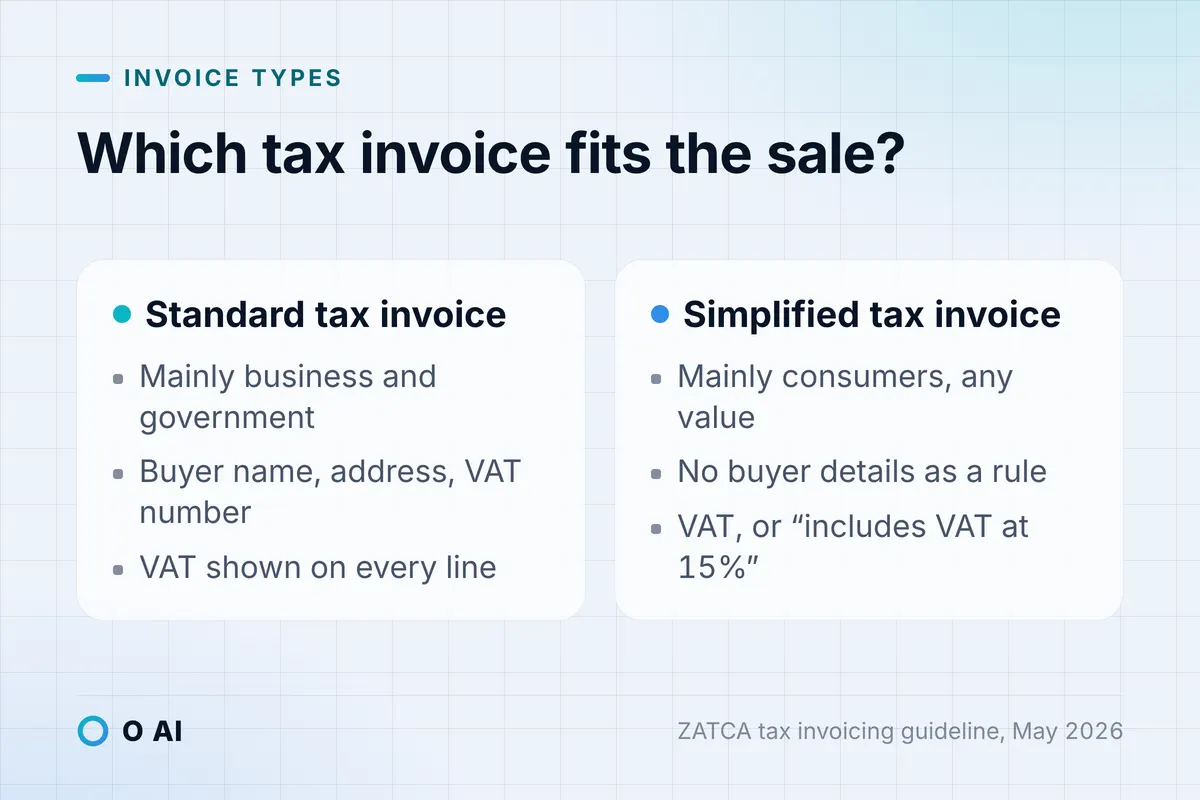
ZATCA's guideline describes two main types. A standard tax invoice is usually issued business to business or business to government, and must be issued for any such supply over SAR 1,000. A simplified tax invoice is usually issued to individuals, and carries fewer details [1].
| Your sale | Invoice to issue | Note |
|---|---|---|
| To a VAT-registered business, a non-registered company, a sole establishment or a government entity | Standard tax invoice | Includes the buyer's details [1][2] |
| To an individual consumer | Simplified tax invoice | Any value [1] |
| To a business, under SAR 1,000 | Simplified tax invoice allowed | Optional; the SAR 1,000 limit applies only to business buyers [4] |
| Export of goods | Standard tax invoice | Whatever the value or the customer [1] |
| A payment received in advance from a business | Standard tax invoice | For the amount received [1] |
| An exempt supply, such as exempt financial services | No tax invoice required | [1] |
| A sale by a person not registered for VAT | No tax invoice may be issued | Penalty applies [1] |
A simplified invoice is still a tax invoice. Every taxable supply needs one or the other, whatever the custom in your trade [1].
Fields required on a standard tax invoice
ZATCA's guideline lists the minimum content of a standard tax invoice under Article 53(5) of the Implementing Regulations [1]. In the order the guideline gives them:
- Document title: "Tax Invoice".
- Dates: the issue date (YYYY-MM-DD) and time (HH:mm:ss), and the date of supply if it differs from the issue date.
- Sequential number that uniquely identifies the invoice.
- Supplier details: the legal name as on the VAT registration certificate, an address in the Kingdom per the National Address, and the VAT registration number (or the VAT group number).
- Customer details: name and address, and the customer's VAT registration number (or VAT group number). If the customer is not VAT-registered, one additional identifier, used in this order of preference: Tax Identification Number, Commercial Registration, Ministry of Municipal and Rural Affairs licence, Ministry of Human Resources and Social Development licence, the 700 number, General Authority for Investment licence, national ID, GCC ID, residency (iqama) number, passport number.
- Supply details for each line: description, unit price, quantity, discount, total excluding VAT, VAT rate, VAT amount, total including VAT.
- Totals: any invoice-level discount, the taxable amount by rate or exemption, the VAT amount in Saudi riyals, and the total including VAT.
- "Issued on behalf of" statement if the customer or a third party issues the invoice for the supplier.
- Special tax treatment statement where VAT is not at the standard rate, for a deemed supply, an export or a summary invoice.
- QR code provided under the e-invoicing framework [1].
The QR code arrives with Phase 2: for standard tax invoices, ZATCA's platform generates it when it clears the invoice, and your system prints it [4]. The e-invoicing resolution also requires one of the seller's own identifiers (such as the Commercial Registration) on standard invoices [3].
Fields required on a simplified tax invoice
Article 53(8) sets a shorter minimum [2], and the guideline repeats it [1]:
- The date of issue.
- The supplier's name, address and VAT registration number.
- A description of the goods or services.
- The consideration payable.
- Either the VAT payable in Saudi riyals or a clear statement that the price includes VAT at 15%.
E-invoicing adds three items: the title "Simplified Tax Invoice", the invoice number and a QR code generated by your e-invoicing solution, which has been mandatory since Phase 1 [1][3]. The buyer's name is not normally needed; the resolution requires it for the financial-services cases in Article 53(7), and the buyer's national ID for private education and private healthcare supplied to Saudi citizens [3].
ZATCA's own example: a market sells food for SAR 90 plus SAR 13.50 VAT. Its simplified invoice may show the SAR 13.50 of VAT, or show SAR 103.50 with a clear statement that it includes VAT at the basic rate [1].
Standard and simplified tax invoices side by side
Annex 2 of ZATCA's e-invoicing resolution lists every field and whether it must be visible on the printed or PDF invoice [3]. This is a condensed view of the visible requirements; fields marked "in the data only" must be in the electronic file but need not be printed.
| Field | Standard tax invoice | Simplified tax invoice |
|---|---|---|
| Title | "Tax Invoice", visible | "Simplified Tax Invoice", visible |
| Invoice reference number (sequential) | Visible | Visible |
| QR code | Visible | Visible |
| Issue date | Visible | Visible |
| Issue time | In the data only | In the data only |
| Supply date, if different | Visible | Visible |
| Seller name, address and VAT number | Visible | Visible |
| Seller additional ID (for example CR) | Visible | In the data only |
| Buyer name and address | Visible | Name only in specified cases; address optional |
| Buyer VAT number, or another ID if not registered | Visible where applicable | National ID only for private education and healthcare to citizens |
| Line description, unit price, quantity | Visible | Visible |
| Line VAT rate and VAT amount | Visible | Optional |
| Line subtotal including VAT | Visible | Visible, marked "inclusive of VAT" |
| Taxable amount, VAT total in SAR, gross total | Visible | Visible when used; the gross total carries "Amount includes VAT" |
| UUID, previous-invoice hash, counter, cryptographic stamp | In the data only | In the data only |
When to issue it, how to deliver it, how long to keep it
Timing. Issue a standard tax invoice no later than the fifteenth day of the month after the month of supply [2]. Issue a simplified invoice on the date of supply or of payment, whichever comes first; licensed banks, financial institutions and insurers supplying financial services may issue theirs by the fifteenth day of the following month [1][2]. Several supplies to the same customer within one calendar month can go on one summary tax invoice [1].
Once only. A tax invoice is issued once and its issue date cannot be amended [1]. To correct the price or details, issue a credit note (to reduce) or a debit note (to increase) that refers to the original invoice's number [1][2]. An e-invoicing solution must not let anyone edit or delete an issued invoice; cancelling means a credit note and a new invoice [4].
Delivery. In Phase 2, a standard tax invoice is shared with the buyer as XML or as PDF/A-3 with the XML embedded. A simplified invoice is handed over printed or, if both parties agree, electronically [3][4].
Language and currency. Every field must be in Arabic, with any other language as a translation. Western or Arabic-Indic numerals, currency codes and Latin spelling of proper names are acceptable. Prices may be in any currency, but the VAT amount must be in Saudi riyals [1].
Retention. Keep invoices for at least six years from the end of the tax period, fifteen years for real estate, and longer for capital assets. Records are kept electronically, and for a business resident in the Kingdom, ZATCA's guideline says the server holding them must be located in the Kingdom [1].
Illustrative template: a standard tax invoice
Illustrative example. A hypothetical office-supplies company in Al Khobar invoices a VAT-registered clinic. All names and numbers are placeholders.
| Field | Entry |
|---|---|
| Title | فاتورة ضريبية / Tax Invoice |
| Invoice number | INV-2026-000184 |
| Issue date and time | 2026-10-12, 10:42:15 |
| Date of supply | 2026-10-11 |
| Supplier | [Legal name as on VAT certificate], [National Address, Al Khobar], VAT no. [15 digits], CR [number] |
| Customer | [Clinic legal name], [National Address, Dammam], VAT no. [15 digits] |
| Description | Unit price (SAR) | Qty | Net (SAR) | VAT rate | VAT (SAR) | Total (SAR) |
|---|---|---|---|---|---|---|
| A4 printing paper, box | 95.00 | 20 | 1,900.00 | 15% | 285.00 | 2,185.00 |
| Toner cartridge | 320.00 | 4 | 1,280.00 | 15% | 192.00 | 1,472.00 |
| Delivery | 150.00 | 1 | 150.00 | 15% | 22.50 | 172.50 |
| Totals | 3,330.00 | 499.50 | 3,829.50 |
Below the lines: taxable amount at 15%, SAR 3,330.00; total VAT, SAR 499.50; total due, SAR 3,829.50; and the QR code. Payment terms or bank details can be added freely, since ZATCA puts no limit on extra commercial information [1].
Illustrative template: a simplified tax invoice
Illustrative example. A café sells to a walk-in customer, with menu prices that include VAT.
| Field | Entry |
|---|---|
| Title | فاتورة ضريبية مبسطة / Simplified Tax Invoice |
| Invoice number, date and time | 000921, 2026-10-12, 08:15:03 |
| Supplier | [Café legal name], [National Address], VAT no. [15 digits] |
| 2 × Arabic coffee, 14.00 each | SAR 28.00 |
| 1 × Date pastry | SAR 12.00 |
| Total including VAT at 15% | SAR 40.00 |
| Of which VAT | SAR 5.22 |
| QR code | Printed below the total |
The VAT line is optional on a simplified invoice if the total states clearly that it includes VAT, but showing it helps customers who need to claim input tax. SAR 40 × 15/115 = SAR 5.22.
Phase 2 of e-invoicing: what changes on your invoices
Phase 2, the Integration Phase, has been rolled out in waves since 1 January 2023, and ZATCA notifies each wave at least six months ahead [9]. Once your wave starts, invoices move through ZATCA's Fatoora platform:
- Standard tax invoices are cleared. Your system sends the XML to Fatoora before the buyer sees it; ZATCA validates it, adds its cryptographic stamp and QR code, and returns it for you to share [4].
- Simplified invoices are reported. Your system stamps them with its own cryptographic stamp identifier, hands them to the customer, and reports them to ZATCA within 24 hours [3][4].
As of 14 October 2026, the latest wave announced is Wave 25: taxpayers whose VAT-subject revenue exceeded SAR 187,500 in 2022, 2023, 2024 or 2025 will be notified to integrate by no later than 1 February 2027 [8]. Until your notified date, Phase 1 rules continue to apply [4].
E-invoice reader: checking the QR code with ZATCA's VAT app
A simplified e-invoice's QR code holds five basic fields: the seller's name, the seller's VAT number, the invoice timestamp, the invoice total with VAT and the VAT total. In Phase 2 the code adds the XML hash, the cryptographic signature and the public key, and on simplified invoices the signature of ZATCA's certificate [3].
Anyone holding the invoice can use ZATCA's VAT app as an e-invoice reader: scan the code, and the app checks that its content is compliant and shows the stored values with the verification result [4][5]. When you receive a supplier's invoice, scan it and compare what the app shows with the printed seller name, VAT number, total and VAT. A mismatch is a reason to ask for a corrected invoice before you claim the input tax, since deduction needs a valid tax invoice [1].

If you capture supplier invoices from scans or photos rather than XML, check the extracted VAT numbers and totals with care; our guide to Arabic OCR for scanned PDFs sets out a review step for exactly this.
A ten-point check before you send any tax invoice
Use it as-is when you set up a new invoicing system or review last month's invoices.
- The business is VAT-registered, and the invoice shows the right VAT number (the group number for a VAT group).
- The type fits the sale: standard for business and government buyers over SAR 1,000, simplified for consumers.
- The title reads "Tax Invoice" or "Simplified Tax Invoice".
- The number follows one unbroken sequence, with no resets or duplicates [4].
- Issue date and time are system-generated; the supply date appears if it differs.
- A business buyer's name, address and VAT number (or other ID) are complete.
- Each line shows its description, quantity, unit price, discount, VAT rate and VAT amount, and the VAT is in riyals.
- The Arabic text is complete; any English is a translation [1].
- The QR code scans correctly in ZATCA's VAT app.
- Corrections go through a credit or debit note, never through editing or deleting the original [4].

Your next step
This week, take five invoices you issued last month, two standard and three simplified, and check each against the side-by-side table above. Scan their QR codes with ZATCA's VAT app. Note any missing field, then ask your e-invoicing provider to fix the template before your next batch of tax invoices in Saudi Arabia goes out. If your invoicing needs to connect to other systems you run, our guide to custom software development in Saudi Arabia explains when to buy and when to build; O AI is a software and AI company in Al Khobar, and you can read more on our home page. Our ERP and business systems page describes the business systems we build. For a specific case, check ZATCA's guidance or ask a licensed tax advisor.
Frequently asked questions
What is the difference between a tax invoice and a simplified tax invoice?
A standard tax invoice is used mainly for sales to businesses and government and carries the buyer's name, address and VAT number or other ID, with VAT shown line by line. A simplified tax invoice is used mainly for consumers and needs fewer details: the date, the supplier's name, address and VAT number, a description, the price, and either the VAT or a statement that the price includes VAT. Both are tax invoices and both must be generated electronically.
Can I issue invoices by hand or in Excel in Saudi Arabia?
No. Since 4 December 2021, invoices must be generated and stored in a compliant e-invoicing solution. ZATCA's guidance tells businesses to stop issuing handwritten invoices and invoices made in word-processing software, and a scanned paper invoice does not count as an e-invoice. Compliant solutions include online cash registers, point-of-sale apps on tablets, accounting software and cloud systems that meet ZATCA's requirements.
Does a simplified tax invoice need the customer's name?
Usually not. The minimum content of a simplified invoice covers the supplier, the goods or services, the price and the VAT. ZATCA's e-invoicing resolution requires the buyer's name only in specified cases, such as financial services under Article 53(7), and requires the buyer's national ID on invoices for private education or private healthcare supplied to Saudi citizens. Adding the name in other cases is allowed but not mandatory.
Must a tax invoice be in Arabic?
Yes. The Implementing Regulations require invoices to be issued in Arabic, and ZATCA's guidance says every field must be completed in Arabic, with any other language treated as a translation. Western or Arabic-Indic numerals, currency codes such as USD and Latin spelling of proper names like brands are acceptable. A bilingual Arabic and English layout is common and allowed.
How do I correct a tax invoice I have already issued?
Do not edit or delete it. Issue a credit note if the value goes down, for example after a return or a later discount, or a debit note if it goes up, such as when items were undercharged. The note must meet the same content requirements as the invoice, state its type and refer to the original invoice's number. Under e-invoicing rules, cancelling an invoice means a credit note followed by a new invoice.
How long must I keep tax invoices in Saudi Arabia?
At least six years from the end of the related tax period in general. Records for real estate must be kept for at least fifteen years, and records for capital assets for their adjustment period plus five more years. Records are kept electronically and, according to ZATCA's guideline, a business resident in the Kingdom must keep the server that holds them in the Kingdom.
How can I check that an e-invoice I received is genuine?
Scan its QR code with ZATCA's VAT app, which reads the code, checks its content and shows the seller's name, VAT number, timestamp, total and VAT with a verification result. Compare those values with the printed invoice. If they differ, or the code will not scan, ask the supplier for a corrected invoice before you claim the VAT as input tax.
How this article was made: Researched from the sources listed below, opened on 14 October 2026. Drafted with AI assistance, then checked against those sources. General information, not professional advice. Images are AI-generated illustrations.
Sources
- Guideline for Tax Invoicing and Records under VAT Provisions, Version 3, May 2026 (opens in a new tab)Zakat, Tax and Customs Authority (ZATCA) · zatca.gov.sa
- Implementing Regulations of the Value Added Tax Law, eighth edition (unofficial English translation) (opens in a new tab)ZATCA · zatca.gov.sa
- Controls, Requirements, Technical Specifications and Procedural Rules for Implementing the E-Invoicing Regulation (May 2023, unofficial English translation) (opens in a new tab)ZATCA · zatca.gov.sa
- Detailed Guidelines for E-Invoicing, Version 2, May 2023 (opens in a new tab)ZATCA · zatca.gov.sa
- Simplified Guide: E-invoicing Requirements, Version 1, June 2022 (opens in a new tab)ZATCA · zatca.gov.sa
- What is E-invoicing? (opens in a new tab)ZATCA · zatca.gov.sa
- VAT penalties (opens in a new tab)ZATCA · zatca.gov.sa
- ZATCA determines the criteria for selecting the targeted taxpayers in Wave 25 for the Integration Phase of e-invoicing (opens in a new tab)ZATCA · zatca.gov.sa
- E-invoicing roll-out phases (opens in a new tab)ZATCA · zatca.gov.sa
About the author
Newsletter
New guides and news by email
New guides and news about O AI, Rushd and Dalni, at most twice a month. No spam.