 AI


n8n vs Make vs Zapier vs Power Automate: which one fits?
A practical comparison of n8n, Make, Zapier and Power Automate for companies in Saudi Arabia: how each counts usage (executions, tasks, credits, licences), plans as of October 2026, where each hosts your data under the PDPL, a worked example with 1,000 monthly runs, and five steps to choose.


Key takeaways
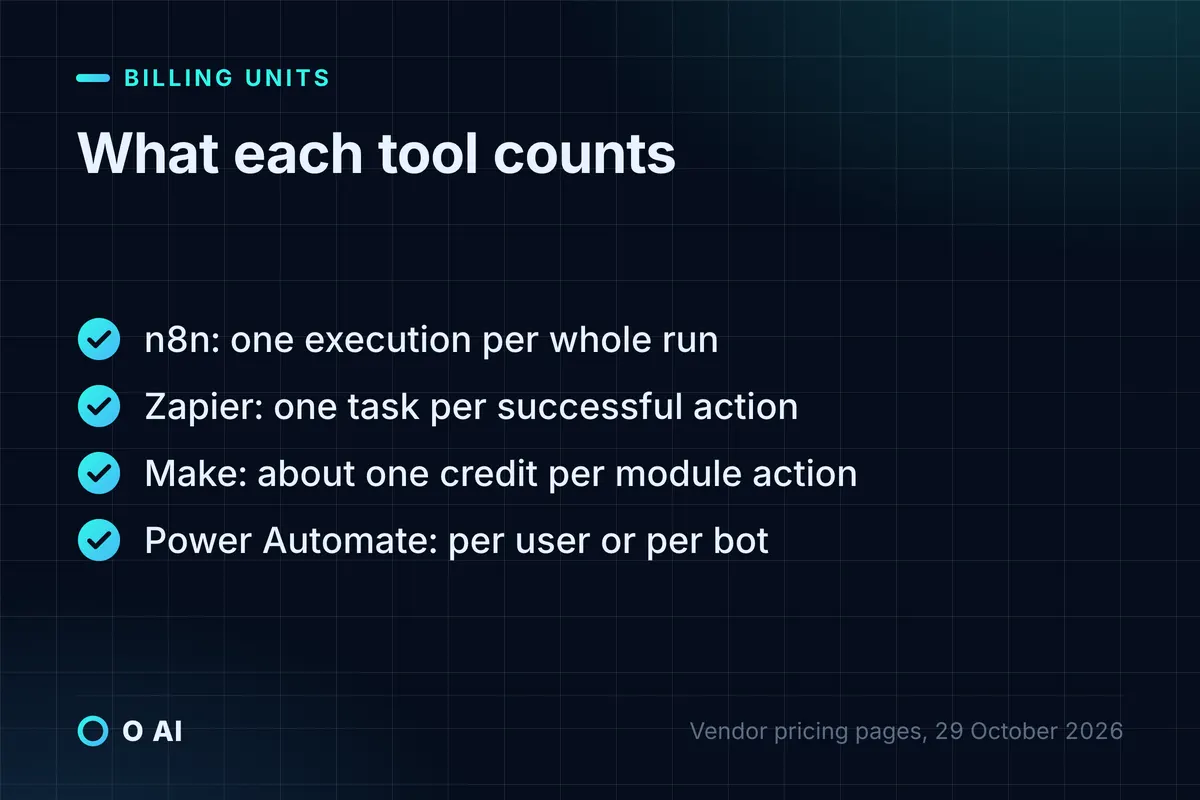
- n8n bills per workflow execution, a whole run however many steps it has; its self-hosted Community edition is free but needs technical skills.
- Zapier bills per task, roughly one per successful action step; triggers and built-in data tools such as Formatter and Paths use no tasks.
- Make bills in credits; most module actions use 1 credit, while Router and error handler modules use none.
- As of October 2026 Power Automate Premium is listed at $15 per user per month paid yearly, with attended desktop RPA.
- Zapier hosts data in the United States and Make in the US or EU; self-hosted n8n can run on a server inside the Kingdom.
On this page
- What workflow automation tools do
- n8n: self-hosted or cloud, billed per execution
- Zapier: a broad app catalogue, billed per task
- Make: visual scenarios, billed per credit
- Power Automate: Microsoft's option, billed per user or bot
- n8n, Make, Zapier and Power Automate side by side
- Illustrative example: the same workflow on each platform
- Data, privacy and the Saudi PDPL
- How to choose an automation tool in five steps
- Common mistakes when choosing an automation tool
- Your next step
This guide is by O AI, a Saudi software and AI company that builds systems, apps and AI for companies. See what we build
n8n, Make, Zapier and Power Automate all connect apps and run workflows without much code, but they bill and host differently. n8n can be self-hosted and counts whole workflow runs; Zapier counts tasks; Make counts credits per module; Power Automate is licensed per user or per bot. Your volume, data rules and team skills decide.
What workflow automation tools do
A workflow automation tool watches for an event, a trigger, and then runs a chain of steps across your apps. A new web form entry can create a CRM lead, post a message to the sales channel and add a row to a sheet, with no one copying data by hand.
All four tools in this comparison follow that pattern. They differ in four ways that matter to a Saudi company:
- How usage is counted, which decides the bill at volume.
- Where the platform and your data run, which matters under the Personal Data Protection Law.
- Who can build and maintain flows, business users or developers.
- What they connect to out of the box, and how well they handle AI steps.
If you are still deciding whether you need rule-based automation, robotic process automation (RPA) or AI agents, start with our comparison of AI agents, RPA and workflow automation.
n8n: self-hosted or cloud, billed per execution
n8n offers a managed cloud and a self-hosted option. Its documentation says the self-hosted Community edition is free with almost the complete feature set, but that installation and configuration require technical expertise and you must provide and manage the infrastructure [2].
As of 29 October 2026, n8n's pricing page lists these plans, billed annually [1]:
- Starter: €20 per month, 2,500 workflow executions, 5 concurrent executions.
- Pro: €50 per month, 10,000 executions.
- Business: €667 per month, 40,000 executions, self-hosted.
- Enterprise: priced by sales.
The key difference is the unit. n8n says an execution is a single run of your entire workflow, however many steps it has or however much data it processes [1].
Two more points before you choose n8n:
- Licence. n8n's source code is under the Sustainable Use License, which allows use and modification only for your own internal business purposes or for non-commercial or personal use. Enterprise features in ".ee" files need a separate n8n Enterprise License [3]. Using n8n inside your company fits; reselling it as a hosted service does not.
- AI. n8n documents building AI workflows that connect several large language model providers and use agents, tools, memory and vector databases, and connecting an agent to MCP servers [4].
Zapier: a broad app catalogue, billed per task
Zapier is a hosted service only. It claims connections to more than 9,000 apps [5].
As of 29 October 2026, its pricing page lists these plans, in US dollars [5]:
- Free: 100 tasks a month.
- Professional: from $19.99 a month billed annually ($29.99 monthly) for 750 tasks.
- Team: from $69 a month billed annually ($103.50 monthly) for 2,000 tasks.
- Enterprise: custom pricing through sales.
A task is counted each time Zapier successfully completes a unit of work, usually one action step; failed actions are not counted. Triggers and built-in data tools such as Formatter and Paths do not use tasks [5]. Higher task tiers cost more, and annual billing is cheaper than monthly [5].
On data, Zapier states that it hosts data on AWS servers in the United States, and that it does not offer an EU-only storage option [6].
Make: visual scenarios, billed per credit
Make builds "scenarios" on a visual canvas. Its pricing page bills in credits: most actions consume 1 credit, and every module action counts, including reads, searches, creates, updates, deletes and data transformations. Error handler and Router modules consume no credits [7].
The Free plan includes 1,000 credits a month; paid plans are Core, Pro and Teams, plus Enterprise, with annual payment cheaper than monthly [7]. Make's marketing copy mentions more than 3,000 native apps [7].
On data location, Make supports two data centres, the United States and the European Union. You choose the region when you create an organisation, and you cannot change it afterwards [8].
Power Automate: Microsoft's option, billed per user or bot
Power Automate is Microsoft's automation platform. It runs cloud flows and desktop flows, which are its robotic process automation (RPA) feature for automating clicks in desktop applications.
As of 29 October 2026, Microsoft's pricing page lists, paid yearly [9]:
- Premium: $15 per user per month, including attended desktop flows (RPA).
- Process: $150 per bot per month, for unattended desktop flows and cloud flows.
- Hosted Process: $215 per bot per month, adding a Microsoft-hosted virtual machine.
Microsoft notes these are marketing prices and the final price appears at checkout [9]. If your company already runs on Microsoft 365, check what your existing licences include before you buy.
Each Power Platform environment is created in a chosen region, and the apps and data you create in it stay in that geographic location [10].
n8n, Make, Zapier and Power Automate side by side
| n8n | Zapier | Make | Power Automate | |
|---|---|---|---|---|
| Billing unit | Workflow execution (whole run) [1] | Task (successful action) [5] | Credit (per module action) [7] | User or bot per month [9] |
| Free option | Self-hosted Community edition [2] | 100 tasks a month [5] | 1,000 credits a month [7] | 30-day trial [9] |
| Hosting | Cloud or self-hosted [2] | Hosted, data in the US [6] | Hosted, US or EU region [8] | Microsoft cloud, region per environment [10] |
| Typical fit | Teams with a developer, high volumes, data control | Non-technical teams, many SaaS apps | Visual builders, complex branching | Microsoft 365 companies, desktop RPA |
| Main caution | You run and secure the server | Cost rises with steps and volume | Every module uses credits | Licensing is per user or bot |
The "typical fit" row is our editorial judgement from the facts above, not a vendor claim. None of these tools is right for every company; this table compares fit by task, cost model and control.
Illustrative example: the same workflow on each platform
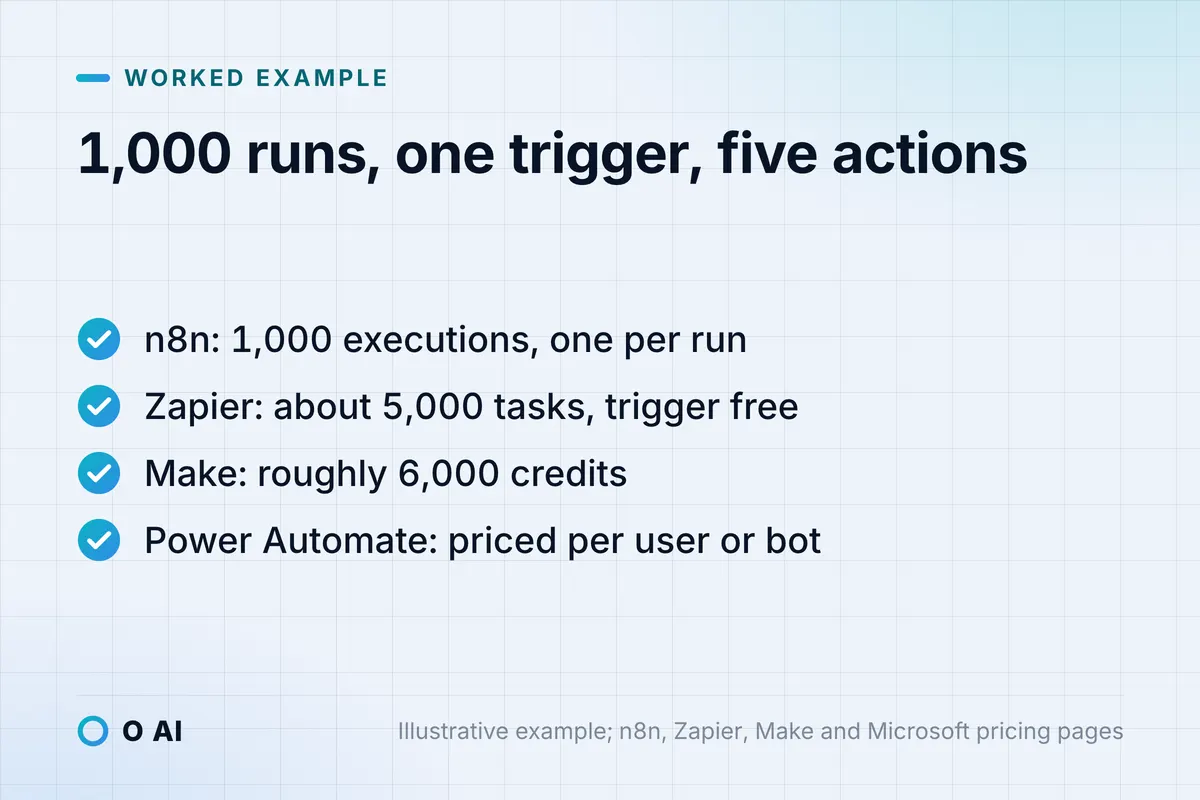
Illustrative example: a company receives 1,000 web enquiries a month. Each one starts a workflow with one trigger and five action steps: look up the customer, create a CRM lead, send a WhatsApp template, post to a team channel and add a sheet row.
- n8n: 1,000 executions, because each run counts once regardless of steps [1]. That fits within the Pro plan's 10,000 executions, or costs only your server if you self-host [1][2].
- Zapier: about 5,000 tasks, one per successful action step; the trigger is free [5]. That needs a higher Professional or Team tier than the entry 750 tasks.
- Make: roughly 6,000 credits if each of the six modules runs once per enquiry, since most actions consume 1 credit [7].
- Power Automate: no per-run count; the cost depends on how many users or bots you license [9].
The arithmetic shows why step-heavy workflows at volume can push teams from Zapier towards n8n, while small, simple flows cost little anywhere. Verify current prices on each vendor's page before you commit.
Data, privacy and the Saudi PDPL
Automations move personal data between systems: names, phone numbers, ID numbers, invoices. Article 29 of the Personal Data Protection Law, as amended, restricts transferring personal data outside the Kingdom to set purposes and conditions [11].
That makes hosting part of the decision:
- Zapier stores data in the United States [6], and Make in the US or the EU [8], so routing personal data through them is a transfer outside the Kingdom.
- Power Automate keeps data in the region of the environment you choose [10]; check which regions your tenant can use.
- Self-hosted n8n runs on a server you choose, including one inside the Kingdom [2], but then you are responsible for patching, backups and access control.
Our guide to data residency in Saudi Arabia explains the transfer rules in more detail. This section is general information, not legal advice; for your own case, read the official text or consult a licensed lawyer.
How to choose an automation tool in five steps
- List three workflows you want to automate first, with their monthly volume and number of steps.
- Mark the data each one moves: personal, financial or neither.
- Count the cost in each tool's unit: executions, tasks, credits or licences, using the example above.
- Check the connectors for your key systems, such as your accounting software, CRM and messaging channel.
- Decide who maintains it. A tool no one on staff understands becomes a risk when a flow breaks at month end.
Customer messaging is a common first workflow; our guide to a WhatsApp chatbot for business covers the costs and data points specific to that channel.
Common mistakes when choosing an automation tool
- Comparing plan prices instead of units. A cheap plan with a unit you burn quickly can cost more than a dearer one, so count in executions, tasks or credits [1][5][7].
- Forgetting where the data goes. Make's region cannot be changed after you create the organisation [8], and Zapier hosts data in the United States with no EU-only option [6].
- Self-hosting without an owner. Self-hosted n8n needs someone to install it and manage its infrastructure [2]; name who handles updates and backups before you start.
- Reselling a tool whose licence forbids it. n8n's licence limits use to your own internal business purposes or non-commercial or personal use [3].
- Undocumented workflows. Record each workflow's purpose, owner and the systems it touches, so it can be fixed when it breaks.
Your next step
Pick one workflow with a clear volume, build it on the free tier of two tools, and compare the bill, the build time and where the data went. If the winner needs a self-hosted n8n server inside the Kingdom or connections to in-house systems, our AI development and automation page describes how O AI scopes that work.
Frequently asked questions
Is n8n free?
The self-hosted Community edition of n8n is free to use, but you need technical skills to install, secure and maintain the server, and you pay for that infrastructure. n8n Cloud plans are paid and billed by workflow executions. The licence allows internal business use; offering n8n itself as a service to others is not allowed.
What is the difference between n8n and Zapier?
Zapier is a hosted service with a very large app catalogue and bills per task, roughly one per successful action step. n8n can be self-hosted or used in the cloud and bills per workflow execution, however many steps the run has. Zapier is quicker for non-technical teams; n8n gives more control and is often cheaper at high volume.
Is Make cheaper than Zapier?
It depends on the workflow. Make bills in credits, with most module actions using one credit, and includes routers and error handlers at no credit cost. Zapier does not charge for triggers and built-in data tools such as Formatter and Paths. Count your real steps and monthly runs in each unit before comparing plan prices.
Do I need Power Automate if I use Microsoft 365?
Not necessarily, but it is worth checking first. If your company already works in Outlook, Teams, SharePoint and Excel, Power Automate connects to them natively and adds desktop RPA on paid plans. Check what your existing Microsoft licences include before buying a separate tool.
Can these tools work with Arabic data?
Yes, they pass text between apps, so Arabic names and messages move like any other text. Test right-to-left display, Arabic sorting and date formats in the receiving apps, and check that message templates for channels such as WhatsApp handle Arabic correctly.
Where is my data stored with each tool?
Zapier hosts data in the United States. Make lets you choose a United States or European Union data centre when you create an organisation. Power Automate stores data in the region of each environment. Self-hosted n8n runs on whatever server you choose, including one inside Saudi Arabia.
How this article was made: Researched from the official sources listed below, opened on 29 October 2026. Drafted with AI assistance, then checked against those sources. General information, not legal or professional advice. Illustrations were made for this article.
Sources
- Pricing (opens in a new tab)n8n · n8n.io
- Choose how to use n8n (opens in a new tab)n8n · docs.n8n.io
- Sustainable Use License (LICENSE.md) (opens in a new tab)n8n · github.com
- Advanced AI (opens in a new tab)n8n · docs.n8n.io
- Plans and pricing (opens in a new tab)Zapier · zapier.com
- Data privacy (opens in a new tab)Zapier · zapier.com
- Pricing (opens in a new tab)Make · make.com
- Organizations (Make Help Center) (opens in a new tab)Make · help.make.com
- Power Automate pricing (opens in a new tab)Microsoft · microsoft.com
- Choose the region when setting up an environment (opens in a new tab)Microsoft Learn · learn.microsoft.com
- Personal Data Protection Law (Royal Decree M/19 of 9/2/1443 AH) (opens in a new tab)Bureau of Experts at the Council of Ministers · laws.boe.gov.sa
About the author
Newsletter
New guides and news by email
New guides and news about O AI, Rushd and Dalni, at most twice a month. No spam.