 AI
AI

Mudad: how to upload the wage protection file and run payroll
A practical guide to Mudad, the platform where Saudi private establishments upload their monthly wage protection file: who is covered, the 30-day upload window since March 2025, step-by-step upload, why files are rejected, the 70% compliance certificate and the optional Mudad payroll system.


Key takeaways
- Since 1 December 2020 every private establishment in Saudi Arabia, down to those with 1 to 4 workers, is covered by the Wage Protection Program.
- Wage protection files are uploaded only through Mudad, free of charge, within 30 days of the due date, the first day of each Gregorian month.
- HRSD cut the upload window from 60 to 30 days from 1 March 2025.
- Mudad issues the compliance certificate at a 70% compliance rate over 12 months, or 50% for a new establishment.
- Salaries paid in cash cannot be uploaded: the file must come from the bank that transferred them.
On this page
- What is Mudad?
- Who must upload wage protection files on the Mudad platform
- How to upload the wage protection file on Mudad, step by step
- The 30-day window: Mudad's monthly calendar
- Why Mudad rejects a file or flags a violation
- Compliance rate, justifications and the compliance certificate
- What happens if you stop uploading
- Mudad payroll (مدد رواتب): the payroll management system
- Common mistakes on Mudad
- Your next step
Mudad is the platform where every private-sector establishment in Saudi Arabia uploads its monthly wage protection file. As of October 2026, the file is the bank's signed record of salaries actually transferred, and it must be uploaded within 30 days of the due date, the first day of each Gregorian month. Uploading is free; late or missing files cost services.
What is Mudad?
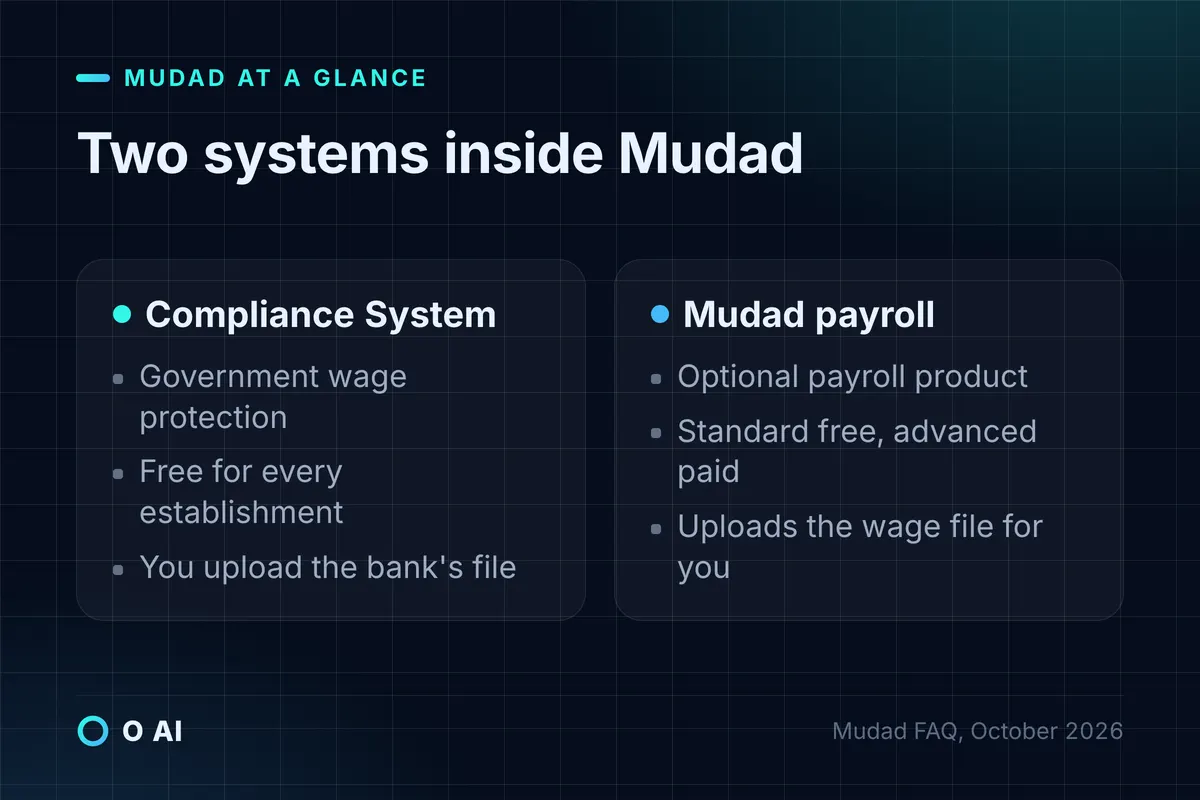
Mudad is a digital platform with two systems. The Compliance System is the government wage protection service of the Ministry of Human Resources and Social Development (HRSD), and Mudad's own FAQ calls it "a governmental system for wage protection". The Payroll Management System is an optional tool that calculates salaries and sends them to the bank [2].
The Wage Protection Program itself is older than the platform. HRSD launched it in 2013 to record wage payments to every private-sector worker, Saudi and expatriate, and to measure whether each employer pays on time and at the agreed amount [3]. HRSD now states that users enter it only through Mudad, no longer through the ministry's e-services site [1].
In practice, Mudad is where an establishment:
- uploads the monthly (or weekly) wage file and any settlement file from its bank;
- sees its compliance rate and the violations found in each file;
- answers violations with justifications that employees accept or reject;
- issues the wage protection compliance certificate [2].
Who must upload wage protection files on the Mudad platform
Every private establishment is covered. HRSD rolled the obligation out in 17 phases by workforce size, starting with establishments of 3,000 or more workers on 1 September 2013. The final phase, establishments with 1 to 4 workers, became mandatory on 1 December 2020 [3].
The legal basis sits in the Labor Law (Royal Decree No. M/51 of 23/8/1426H, read in its consolidated text on laws.boe.gov.sa, including the amendments of Royal Decree No. M/44 of 8/2/1446H in force from 20/8/1446H). Article 90, as amended by Royal Decree No. M/46 of 5/6/1436H, requires establishments to pay wages into workers' accounts through banks approved in the Kingdom, no later than the legal pay dates, and lets the minister exempt some establishments [5].
Before the first upload, HRSD lists three requirements [1]:
- The establishment is registered with HRSD.
- It is registered with the General Organization for Social Insurance (GOSI), with the main branch documented and the owner or authorised representative registered.
- The establishment and its registered employees have bank accounts.
Only the owner, or a person the owner authorises for wage protection, can upload files. Mudad lets the owner assign an employee to a branch with a job role from the "Job Roles Management" page [2].
How to upload the wage protection file on Mudad, step by step
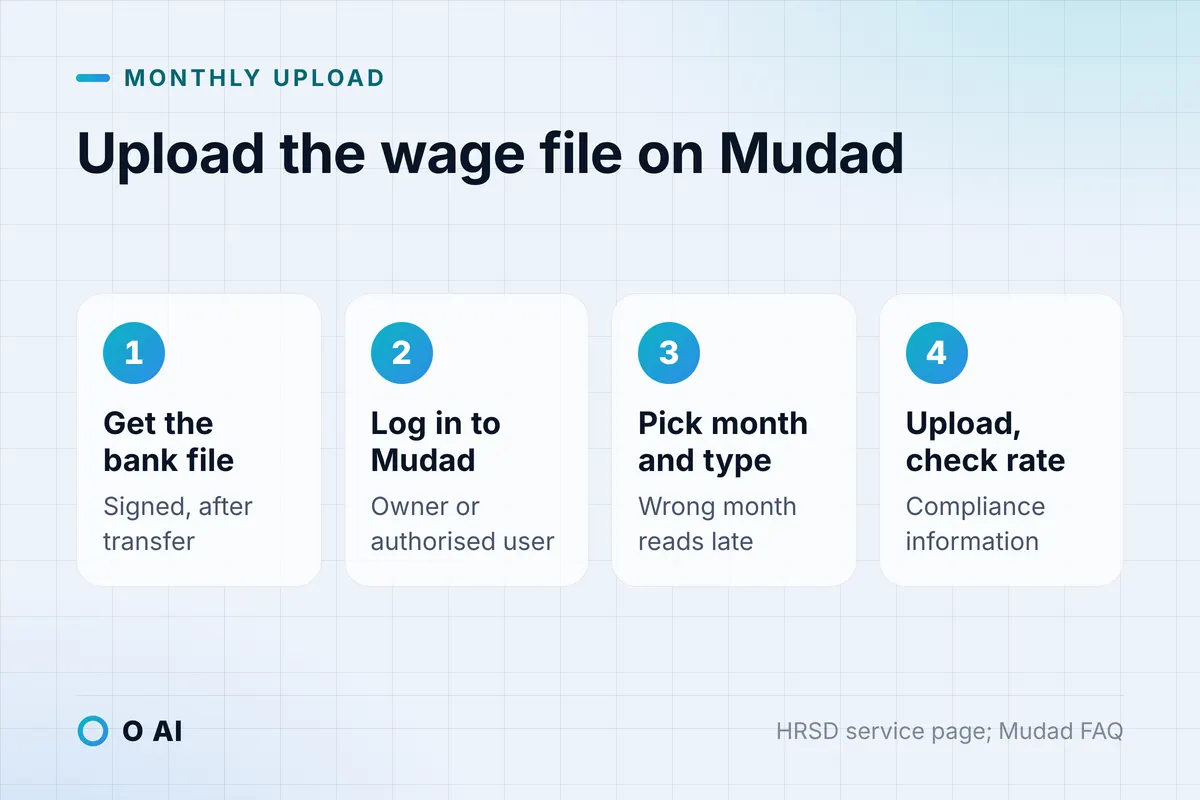
The file does not come from your accounting software. You ask your bank for a signed wages file after it transfers the salaries, then upload that file to Mudad [2]. HRSD describes the steps on its service page [1]:
- Log in to the Mudad platform.
- Select the establishment from the list linked to your ID or Iqama number.
- Open "Upload files" from the sidebar and choose "Upload new file".
- Choose the wage month and the wage type.
- Select the file.
- Accept the declaration and click "Upload". The file is processed immediately.
- Open "Compliance information" to see the updated compliance rate.
The service costs nothing and is instant [1]. Choose the wage month with care, because a file uploaded against the wrong month is read as a late payment for the month you actually paid.
An establishment with several branches uploads through the main entity. Employee data from all branches appears through the link with GOSI, and up to five wage protection files can go in a single transaction [2].
The 30-day window: Mudad's monthly calendar
From 1 March 2025, HRSD cut the upload window from 60 days to 30 days. The ministry said 91% of establishments already uploaded within 30 days of the due date [4]. Mudad's FAQ states the rule plainly: a wage protection file is accepted only within 30 days of the due date, which is the first day of each Gregorian month [2].
The table below sets out the monthly calendar as Mudad and the Ministry publish it. Check your Mudad notifications as well, since the platform also alerts you during the month.
| When | What happens | Source |
|---|---|---|
| 1st of the month | Wages fall due; Mudad emails a reminder if the file is not uploaded | Mudad FAQ [2] |
| 3 days after the employee is notified | Employee accepts or rejects the justification; silence means it is processed automatically | Mudad FAQ [2] |
| Day 30 | Last day the file for that month is accepted | Mudad FAQ [2], HRSD [4] |
Illustrative example: salaries for April are due on 1 April. A company that pays on 27 March and receives the bank file the same day can upload it any time until the end of the 30-day window. If it waits until 10 May, Mudad will not accept the April file, and the month counts against its compliance rate.
Why Mudad rejects a file or flags a violation
HRSD's program page separates a rejected file from a violation [3]. A rejected file never counted, so you correct it and upload again. A violation is recorded against the month and lowers the compliance rate until it is justified.
The whole file is rejected if [3]:
- it was opened after the bank issued it;
- the establishment's unified number is missing or does not match;
- the salaries were paid in a currency other than the Saudi riyal.
An employee's record is rejected if the total does not equal basic salary plus housing allowance plus other entitlements minus deductions, if any amount or the total is negative or zero, or if the national ID or Iqama number is missing [3]. Mudad then shows an Excel error report on the "Upload files" page [2].
Violations include paying the same worker more than once in a month, paying late, deducting more than 50% of the basic salary of a GOSI-registered worker, paying more than 20% above the salary registered with GOSI, and a basic salary that does not match GOSI's record [3].
The 50% line is the same ceiling the Labor Law sets: Article 93 bars deductions above half of the wage due, save where the labour dispute body allows otherwise [5].
Compliance rate, justifications and the compliance certificate
The compliance rate is the number of employees whose wages were paid through the program, divided by all employees registered with GOSI at the establishment [3]. Some workers are left out of the calculation: a new expatriate worker during the first 90 days in the Kingdom, workers authorised outside the Kingdom, and workers with pending court cases. A Saudi worker counts only after a full month at the establishment [3].
Mudad shows the current month's rate on the home page and the previous six months on the "Compliance information" page [2]. Each violation lowers the rate unless the establishment justifies it. Depending on the violation, Mudad sends the justification to the employee, who receives a text message on the number registered in Absher, logs in and accepts or rejects it [2]. If the employee does not respond within 3 days, the justification is processed automatically [2].
The compliance certificate is what many government services ask for. Mudad issues it from the "Certificates" icon when the establishment has a compliance rate of 70% or more over the past 12 months, or 50% or more for a new establishment during the months it has been in the labour market [2]. Qiwa also shows the wage protection certificate under Establishment management, then Certificates, where you can issue, download or print it [6]. HRSD lists that Qiwa service as free and instant [7].
What happens if you stop uploading
HRSD's program page sets out an escalation [3]:
- One month late, a late payment or a payment different from the agreed amount triggers a scheduled inspection; a proven violation can be referred to the courts.
- Two months late: all HRSD services are suspended except issuing and renewing work permits.
- Three months late: all services are suspended, and workers may move to another employer without the current employer's consent, even before their work permit expires.
The same page states a fine of 10,000 riyals per month for late payment of wages [3]. Mudad's FAQ names services that are stopped, including requests for a start-up or activity-expansion quota, visa issuance, conditional temporary disbursement for government contracts, transfer of workers between contracts and the Saudization certificate [2].
Separately, under Article 94 of the Labor Law a worker, a representative or the labour office director can ask the labour dispute body to order unpaid wages or unlawful deductions repaid. It may fine the employer up to twice the amount deducted or delayed [5].

Mudad payroll (مدد رواتب): the payroll management system
Mudad's Payroll Management System is optional. It pulls establishment and employee data from GOSI, calculates salaries with allowances and deductions, sends them to the bank, detects wage protection violations before you pay and uploads the wage file to the Compliance System automatically [2]. Mudad says a subscriber does not need a separate payroll agreement with a bank [2].
The facts Mudad publishes in its FAQ, as of October 2026 [2]:
- Who it is for: small and medium establishments with 1 to 1,000 employees.
- Banks: Mudad lists Riyad Bank, Arab National Bank, Alinma Bank, Al Rajhi Bank, Saudi National Bank, Bank Albilad and STC Bank as partners.
- Requirements: the establishment is registered with HRSD and GOSI, the owner or the person the owner authorised in GOSI registers, and the establishment holds a corporate account at a supported bank.
- Price: opening an account is free and the standard package lets you try the services. The advanced package costs between 460 riyals a year for 0 to 9 employees and 920 riyals a year for 100 to 1,000 employees. Check the current price on Mudad before subscribing.
- No bank account: an employee must still be paid into an account; the employer can issue payroll cards, or e-wallets through the Payroll Management System.
If you already run payroll in an HR or ERP system, you do not need Mudad payroll. Keep paying through your bank's wage protection service and upload the bank's file to the Compliance System each month.
Common mistakes on Mudad
- Paying cash. Cash salaries cannot be uploaded, because the program reads the bank's transfer file [2].
- Opening or editing the bank file. A file opened after the bank issued it is rejected in full [3].
- A wage that does not match GOSI. A basic salary that differs from the GOSI record, or a payment more than 20% above it, is a violation [3]. Update GOSI first.
- Missing the 30-day window. Since 1 March 2025 there is no second month to catch up [4].
- Ignoring justifications. An unjustified violation keeps the compliance rate down, and the certificate needs 70% [2].
This guide is general information, not legal advice. For a specific dispute, read the Labor Law on laws.boe.gov.sa and speak to a licensed lawyer.
Your next step
Put the 1st of each month in your calendar, ask your bank for the signed wage file on the day salaries leave, and upload it to Mudad within the window. Before the next payroll run, check that every basic salary matches GOSI. Our guide to payroll calculation in Saudi Arabia shows how the GOSI deduction and net pay are worked out. If payroll still lives in spreadsheets, see what an HR and payroll system connected to GOSI and your bank involves, and compare features in our HR system guide.
Frequently asked questions
Is uploading the wage protection file on Mudad free?
Yes. HRSD lists the upload service as free and instant, and Mudad's FAQ confirms that registering in the Compliance System to upload wage protection files costs nothing. Fees apply only if you choose the optional advanced package of Mudad's Payroll Management System, which is a separate product from the government wage protection service.
How long do I have to upload the file on Mudad?
Thirty days from the due date, which Mudad defines as the first day of each Gregorian month. HRSD reduced the window from 60 days to 30 days from 1 March 2025. A file for a month whose window has closed is not accepted, and that month counts against your compliance rate.
Can I upload a wage protection file if I pay salaries in cash?
No. The Wage Protection Program reads the wage file that your bank creates after it transfers salaries, so a cash payment cannot be proven on Mudad. The Labor Law requires establishments to pay wages into workers' accounts through approved banks. A worker without a bank account can be paid on a payroll card or a Mudad e-wallet.
What compliance rate do I need for the wage protection certificate?
Mudad issues the compliance certificate when the establishment has a compliance rate of 70% or more over the previous 12 months. A newly established entity needs 50% or more over the months it has been in the labour market. You can also view, issue, download and print the certificate from the Certificates service in your Qiwa business account.
What happens if an employee does not answer a justification?
Mudad sends the justification to the employee by text message to the number registered in Absher. If the employee neither accepts nor rejects it within 3 days of being notified, the system processes it automatically. Some cases, such as a new employee or a terminated contract, are checked against the social insurance system instead of being sent to the employee.
Is Mudad payroll the same as the wage protection system?
No. Mudad has two systems. The Compliance System is HRSD's wage protection service that every private establishment uses to upload files. Mudad payroll (the Payroll Management System) is an optional product that calculates and pays salaries through partner banks and uploads the wage file for you automatically.
How this article was made: Researched from the official sources listed below, opened on 29 October 2026. Drafted with AI assistance, then checked against those sources. General information, not legal or professional advice. Illustrations were made for this article.
Sources
- Upload wage protection file (service page) (opens in a new tab)Ministry of Human Resources and Social Development · hrsd.gov.sa
- Frequently asked questions: Wage Protection, Payroll Management and Contract Authentication (opens in a new tab)Mudad · mudad.com.sa
- Wage Protection Program (opens in a new tab)Ministry of Human Resources and Social Development · hrsd.gov.sa
- Wage protection upload window reduced to 30 days from 1 March 2025 (3 February 2025) (opens in a new tab)Ministry of Human Resources and Social Development · hrsd.gov.sa
- Labor Law (Royal Decree No. M/51 of 23/8/1426H), consolidated text (opens in a new tab)Bureau of Experts at the Council of Ministers · laws.boe.gov.sa
- How to manage the wage protection system certificate (opens in a new tab)Qiwa Knowledge Center · knowledge-center.qiwa.sa
- Issue wage protection certificate (service page) (opens in a new tab)Ministry of Human Resources and Social Development · hrsd.gov.sa
About the author
Newsletter
New guides and news by email
New guides and news about O AI, Rushd and Dalni, at most twice a month. No spam.